Vigor2862 Series User’s Guide
107
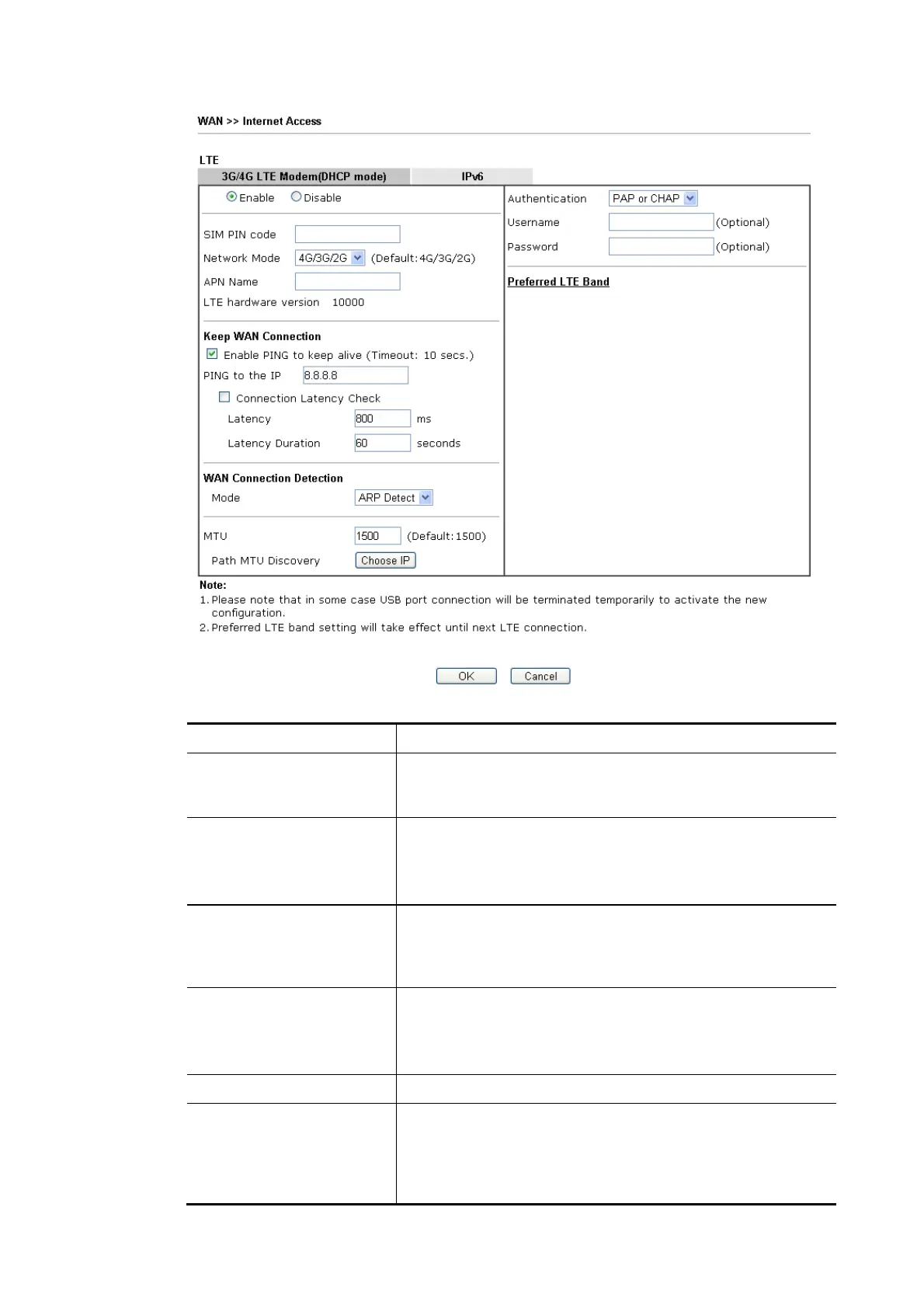
Available settings are explained as follows:
Item Description
Enable Click Enable for activating this function. If you click Disable,
this function will be closed and all the settings that you
adjusted in this page will be invalid.
SIM PIN code Type PIN code of the SIM card that will be used to access
Internet.
The maximum length of the PIN code you can set is 19
characters.
Network Mode Force Vigor router to connect Internet with the mode
specified here. If you choose 4G/3G/2G as network mode,
the router will choose a suitable one according to the actual
wireless signal automatically.
APN Name APN means Access Point Name which is provided and
required by some ISPs. Type the name and click Apply.
The maximum length of the name you can set is 47
characters.
LTE hardware version The hardware version of the embedded LTE module.
Keep WAN Connection Normally, this function is designed for Dynamic IP
environments because some ISPs will drop connections if
there is no traffic within certain periods of time. Check
Enable PING to keep alive box to activate this function.
Enable PING to Keep alive – If you enable the PING function,


 To Next Page
 Loading...











