Vigor2862 Series User’s Guide
235
A
A
-
-
2
2
H
H
o
o
w
w
t
t
o
o
u
u
s
s
e
e
D
D
r
r
a
a
y
y
D
D
D
D
N
N
S
S
?
?
Vigor router supports various DDNS service providers, user can set up user-defined profile to
update the DDNS even the service provider is not on the list. Now, DrayTek starts to support
our own DDNS service - DrayDDNS. We will provide a domain name for each Vigor Router, this
single domain name can record IP addresses of all WAN.
A
A
c
c
t
t
i
i
v
v
a
a
t
t
e
e
D
D
r
r
a
a
y
y
D
D
D
D
N
N
S
S
L
L
i
i
c
c
e
e
n
n
s
s
e
e
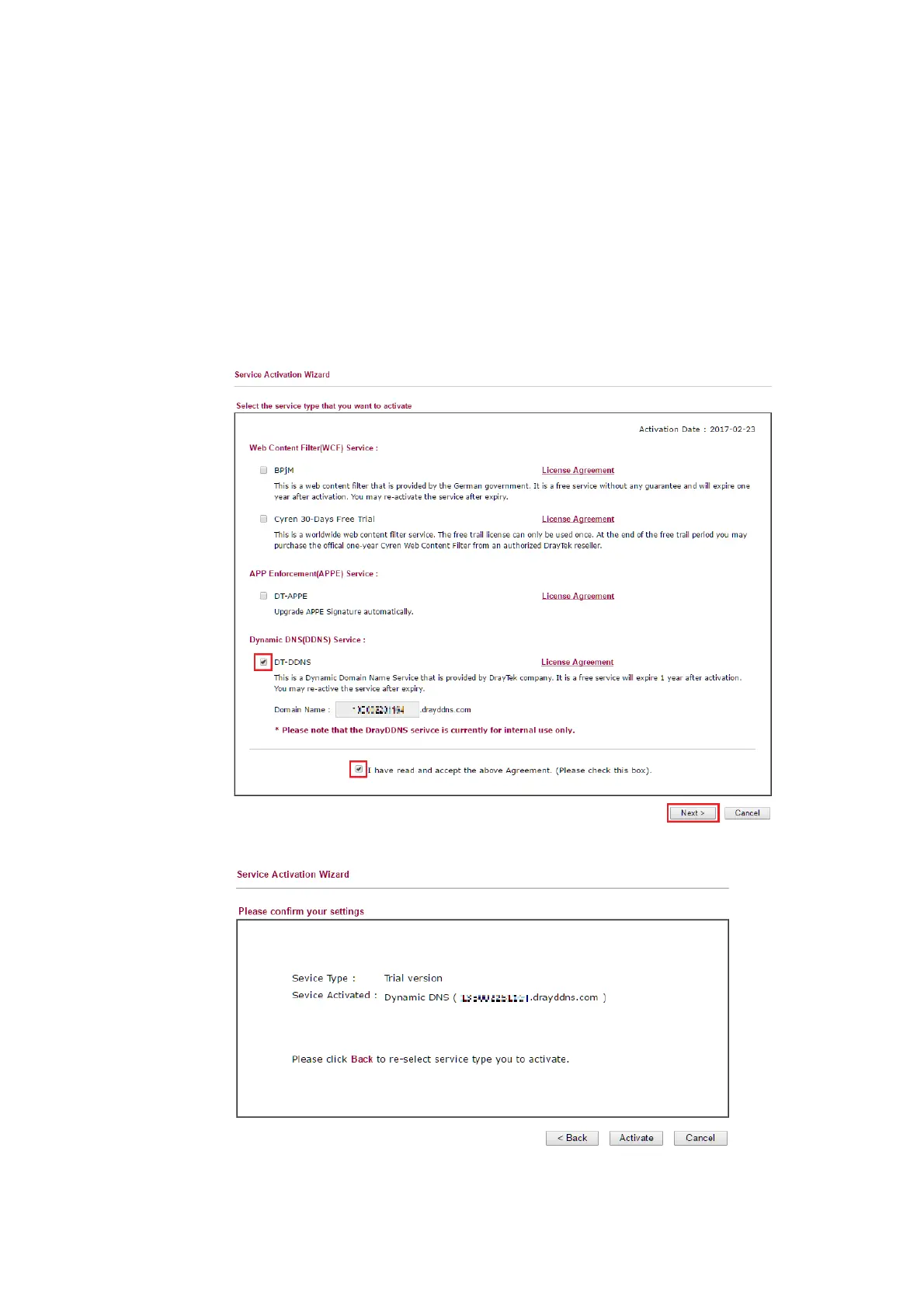
1. Go to Wizards >> Service Activation Wizard, wait for the router to connect to MyVigor
server, then tick DT-DDNS and I have read and accept the above Agreement, click
Next.
2. Confirm the information, then click Activate.
3. MyVigor server will reply with the service activation information.


 To Next Page
 Loading...











