VigorAP 902 User’s Guide
214
3
3
.
.
1
1
5
5
M
M
o
o
b
b
i
i
l
l
e
e
D
D
e
e
v
v
i
i
c
c
e
e
M
M
a
a
n
n
a
a
g
g
e
e
m
m
e
e
n
n
t
t
Such feature can control / manage the mobile devices accessing the wireless network of
VigorAP. VigorAP offers wireless LAN service for mobile device(s), PC users, MAC users
or other users according to the policy selected.
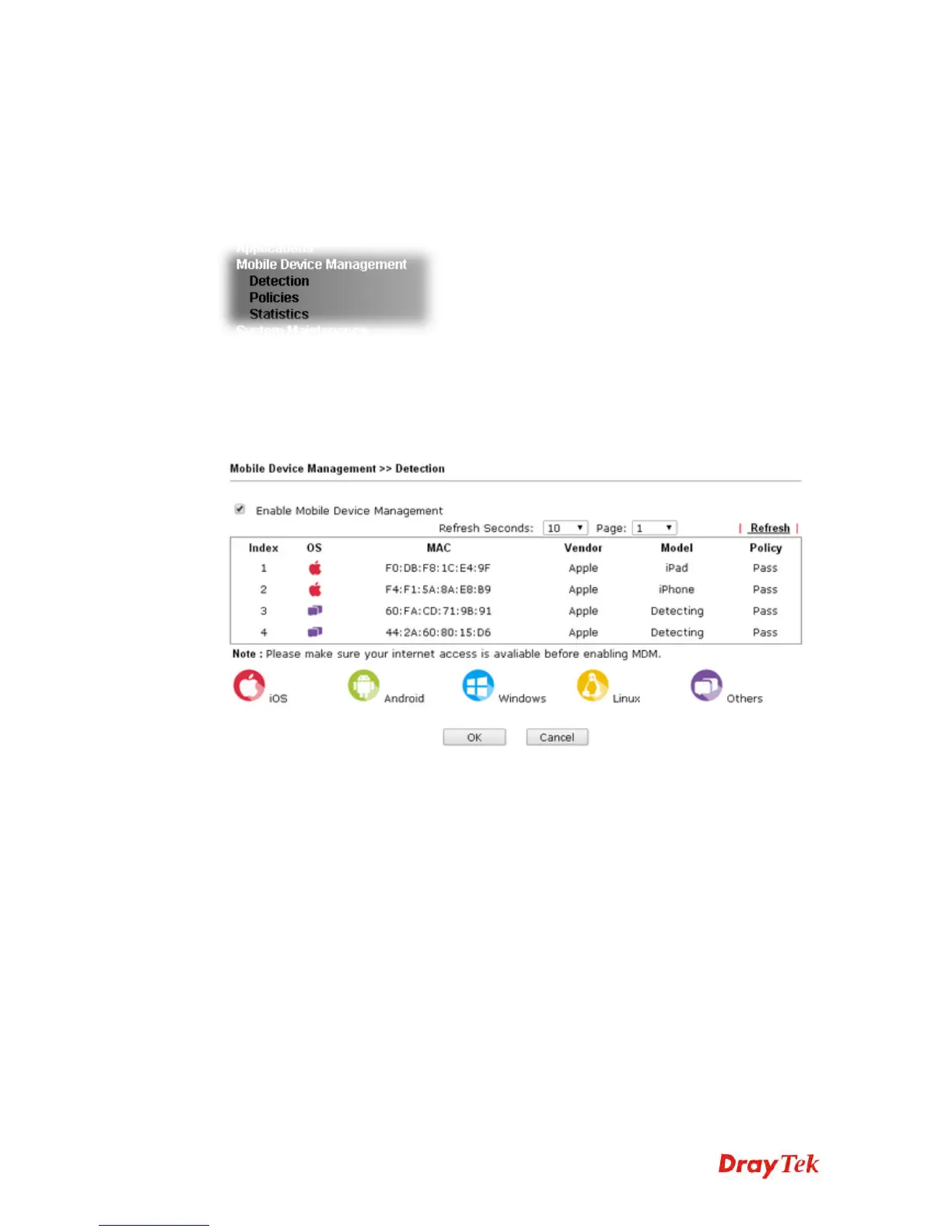
Below shows the menu items for Mobile Device Management.
3
3
.
.
1
1
5
5
.
.
1
1
D
D
e
e
t
t
e
e
c
c
t
t
i
i
o
o
n
n
Such page displays mobile device(s) detected by VigorAP Detected device(s) with Policy –
Pass can access into the wireless LAN offered by VigorAP. Detected device(s) with Policy –
Block are not allowed to access into Internet via VigorAP’s WLAN.
Once you check/uncheck the box of Enable Mobile Device Management and click OK,
VigorAP will reboot automatically to activate MDM.
At present, OS (for mobile device) categories supported by VigorAP include:
Windows
Linux
iOS
Andorid
WindowsPhone
BlackBerry
Symbian.











 To Next Page