VigorSwitch G2240 User’s Guide
34
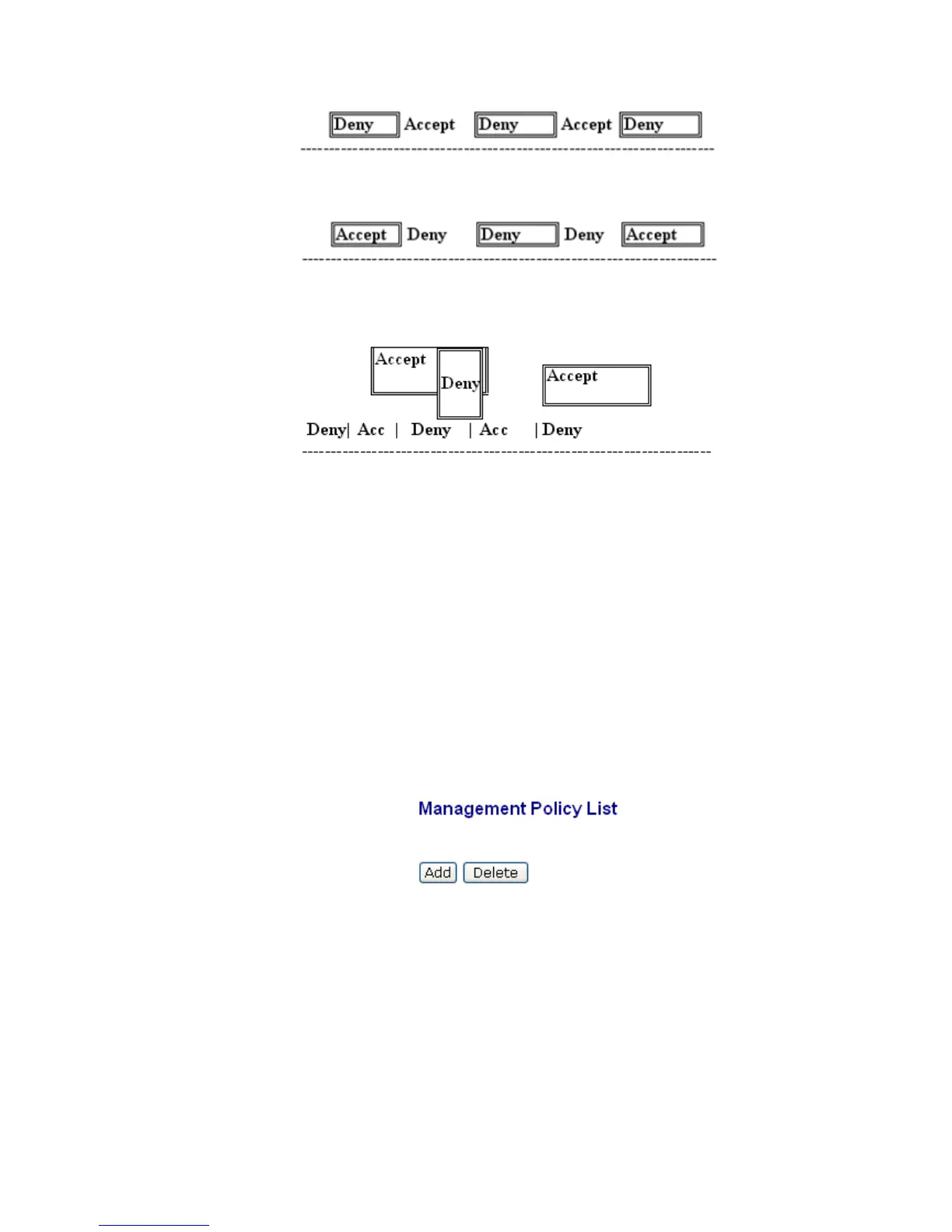
Rule 4): When both “accept and deny” lists exist, then it will deny all connections,
excluding the connection inside of the accepting range.
Rule 5): When both “accept and deny” lists exist, then it will deny all connections,
excluding the connection inside of the accepting range and NOT inside of the denying
range at the same time.
Function name:
Management Policy List
Function description:
The switch offers Management Policy List function. With this function, the manager can
easily control the mode that the user connects to the switch. According to the mode, users
can be classified into two types: Those who are able to connect to the switch (Accept) and
those who are unable to connect to the switch (Deny). Some restrictions also can be placed
on the mode that the user connect to the switch, for example, we can decide that which
VLAN VID is able to be accepted or denied by the switch, the IP range of the user could be
accepted or denied by the switch, the port that the user is allowed or not allowed to connect
with the switch, or the way of controlling and connecting to the switch via Http, Telnet or
SNMP.
Parameter description:
Add: A new entry of Management Policy List can be created after
the parameters as mentioned above had been setup and then
press <Add> button. Of course, the existed entry also can be
modified by pressing this button.
Delete: Remove the existed entry of Management Policy List from
the management security table.
Click Add to get the following page:





 To Next Page