VigorSwitch G2240 User’s Guide
35
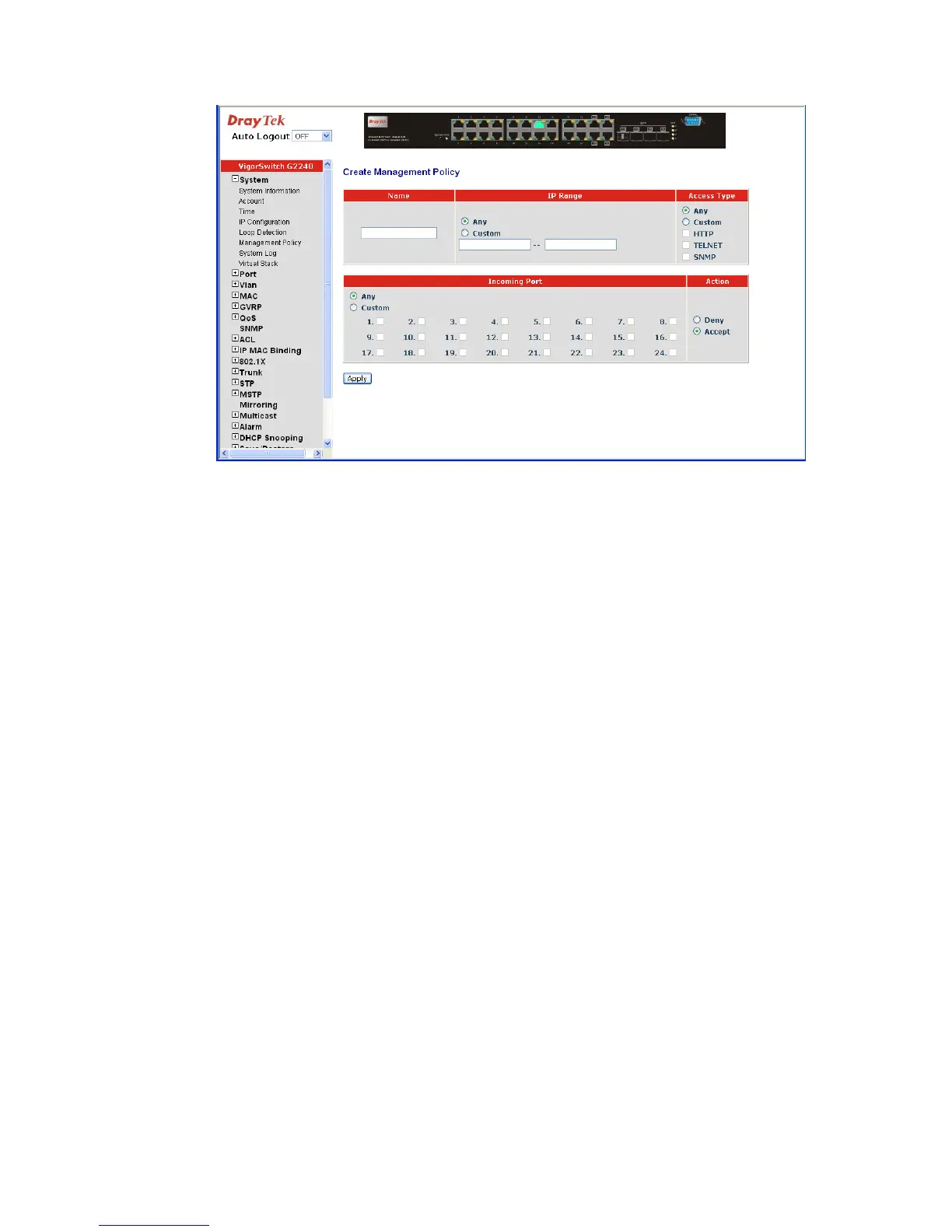
Name: A name is composed of any letter (A-Z, a-z) and digit (0-9)
with maximal 8 characters.
IP Range: The switch supports two kinds of options for managed valid
IP Range, including “Any” and “Custom”. Default is “Any”.
In case that “Custom” had been chosen, you can assign
effective IP range. The valid range is
0.0.0.0~255.255.255.255.
Access Type: The switch supports two kinds of options for managed valid
Access Type, including “Any” and “Custom”. Default is
“Any”. “Http”, “Telnet” and “SNMP” are three ways for the
access and managing the switch in case that” Custom” had
been chosen.
Incoming Port: The switch supports two kinds of options for managed valid
Port Range, including “Any” and “Custom”. Default is
“Any”. You can select the ports that you would like them to
be worked and restricted in the management policy list if
“Custom” had been chosen.
Action: The switch supports two kinds of options for managed valid
Action Type, including “Deny” and “Accept”. Default is
“Deny”. When you choose “Deny” action, you will be
restricted and refused to manage the switch due to the
“Access Type” you choose. However, while you select
“Accept” action, you will have the authority to manage the
switch.





 To Next Page