VigorSwitch P2280 User’s Guide
3
I
I
I
I
-
-
5
5
-
-
5
5
P
P
r
r
o
o
t
t
o
o
c
c
o
o
l
l
V
V
L
L
A
A
N
N
VigorSwitch offers protocol VLANs which allows Network Administrator to filter out untagged
traffic of certain protocol and then assign them a specific VLAN ID.
I
I
I
I
-
-
5
5
-
-
5
5
-
-
1
1
P
P
r
r
o
o
t
t
o
o
c
c
o
o
l
l
G
G
r
r
o
o
u
u
p
p
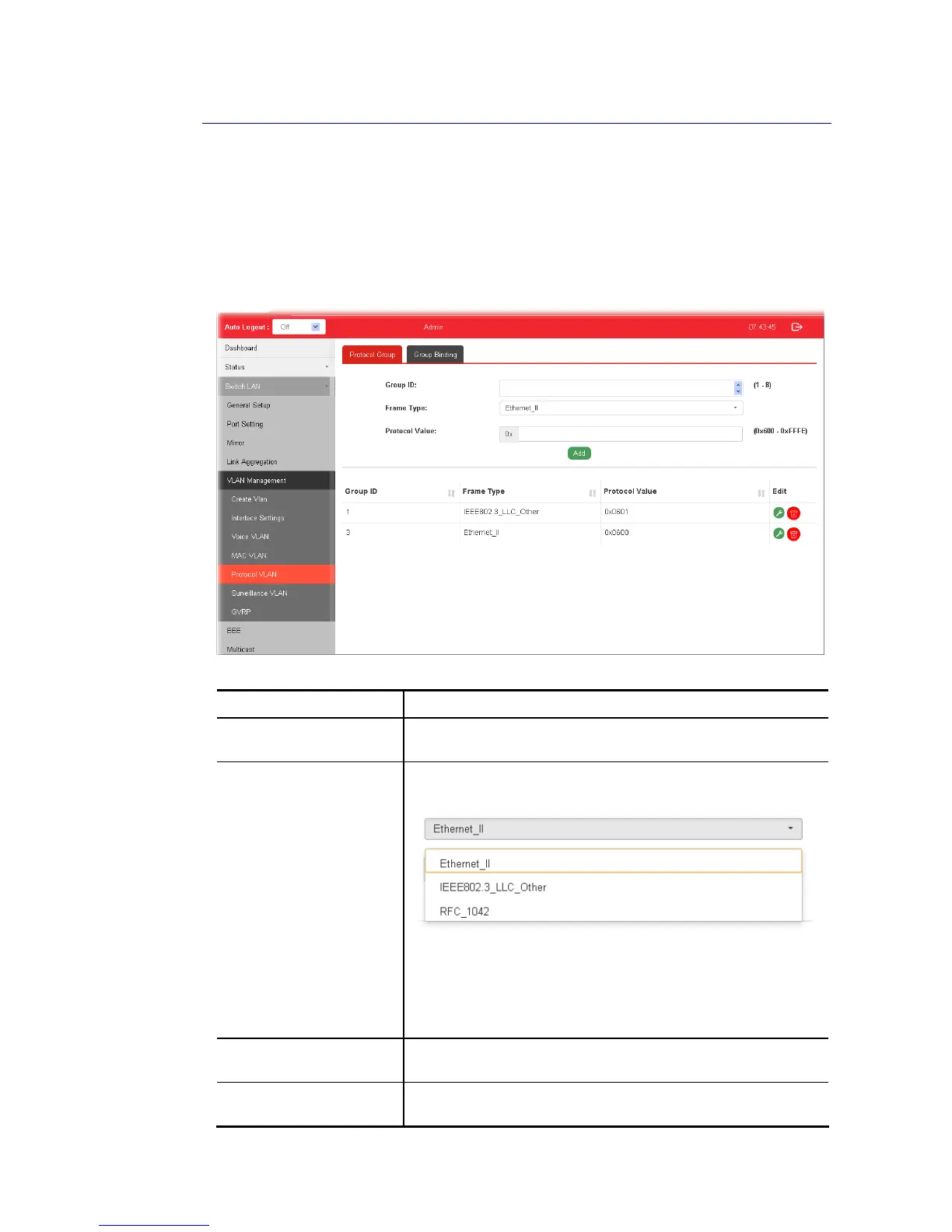
Up to eight protocol groups can be defined, each of them can have a unique filtering criteria
such as frame type and protocol value.
Available settings are explained as follows:
Item Description
Group ID It is a number for identification while bounding with
VLAN/Port.
Frame Type Use the drop-down list to specify the frame type which you
would like to filter.
Ethernet_II - Packet will be mapped based on Ethernet version
2.
IEEE802.3_LLC_Other –Packet will be mapped based on 802.3
packet with LLC other header.
RFC_1042 - Packet will be mapped based on RFC 1042.
Protocol Value Input a value (ranging from 0x600 ~0xFFFE). Packets match
with such value will be classified into this group.
Add Click it to create a new protocol group profile based on the
settings configured above.















 To Next Page