85
VAPOR-LOGIC
®
VERSION 6 INSTALLATION AND OPERATION MANUAL
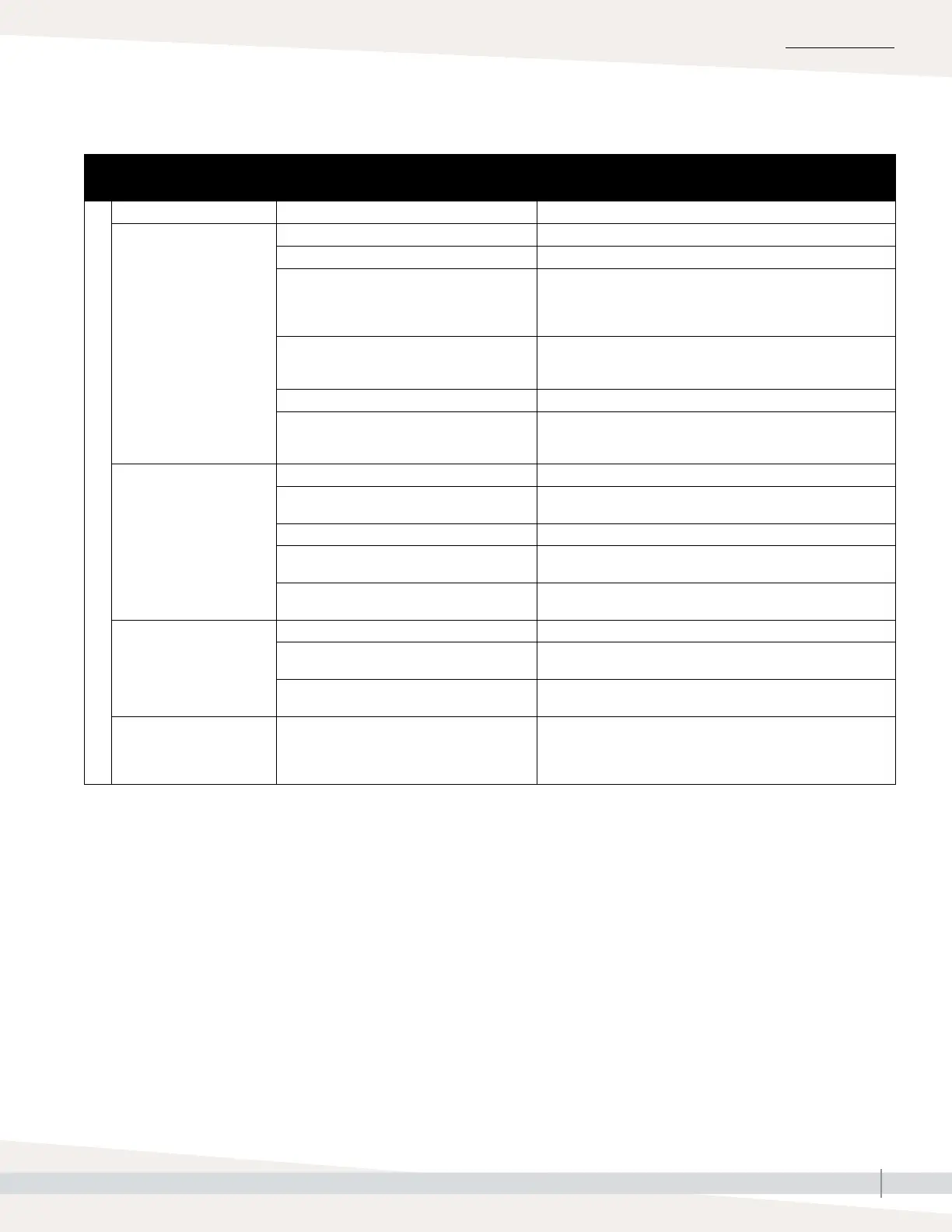
Troubleshooting guide
Table 85-1:
Troubleshooting guide (continued)
Draining issues
Issue Possible causes Actions
Alerts:
Tank not draining
• Tank drain outlet • If the humidifier tank drain outlet is plugged, clean.
• Water detection probes • Clean probe or replace probe rod assembly.
• Drain valve wiring • Check drain valve wiring.
• Check to be sure drain valve is wired to Terminal P17 (drain)
on control board.
• Reset Vapor-logic.
• Fill valve • Check for voltage present at the valve. If present, clean or
replace valve.
• Replace fill valve if water is leaking through.
• System programmed for manual drain • Run a test cycle to see if the system activates drain output.
• Drain line backing up with water
• Drain line plugged
• Insufficient drain line pitch.
• Insufficient drain line size. See tank manual for drain piping
size and pitch requirements.
Unit does not perform
automatic drain sequence
• Automatic drain is disabled • Go to Settings menu to verify that auto drain/flush is enabled.
• Drain fault, plugged drain valve, or plugged
drain pipe
• Clean drain valve piping.
• Malfunctioning automatic drain sequence • Go to Settings menu and check auto drain/flush settings.
• No power to the automatic drain valve • Check if 24 VAC is present at terminal block P17 (drain) and
at drain valve.
• Defective automatic drain valve • If voltage is present at the valve and it still does not open,
replace valve.
Unit does not perform
end-of-season drain
• Input signal always has a demand • Reduce demand signal.
• Vapor-logic
setup • Verify in Settings menu Vapor-logic is set for end-of-season
drain.
• Drain valve • Valve not wired, or incorrectly wired, to control board.
• Check 24 VAC across valve coil during test cycle.
Alert:
Drain sensor out of range
• Signal outside of 4-20mA • Check P6 voltage from CS2 to ground (2-10vdc)
• Replace transmitter if no voltage output
• Check voltage on P6 from 21vdc to ground is 21vdc. If not,
re-check terminals for all field connections.
Continued
TROUBLESHOOTING



 To Next Page