Page 64 • DRI-STEEM XT Series Electrode Steam Humidifier Installation, Operation, and Maintenance Manual
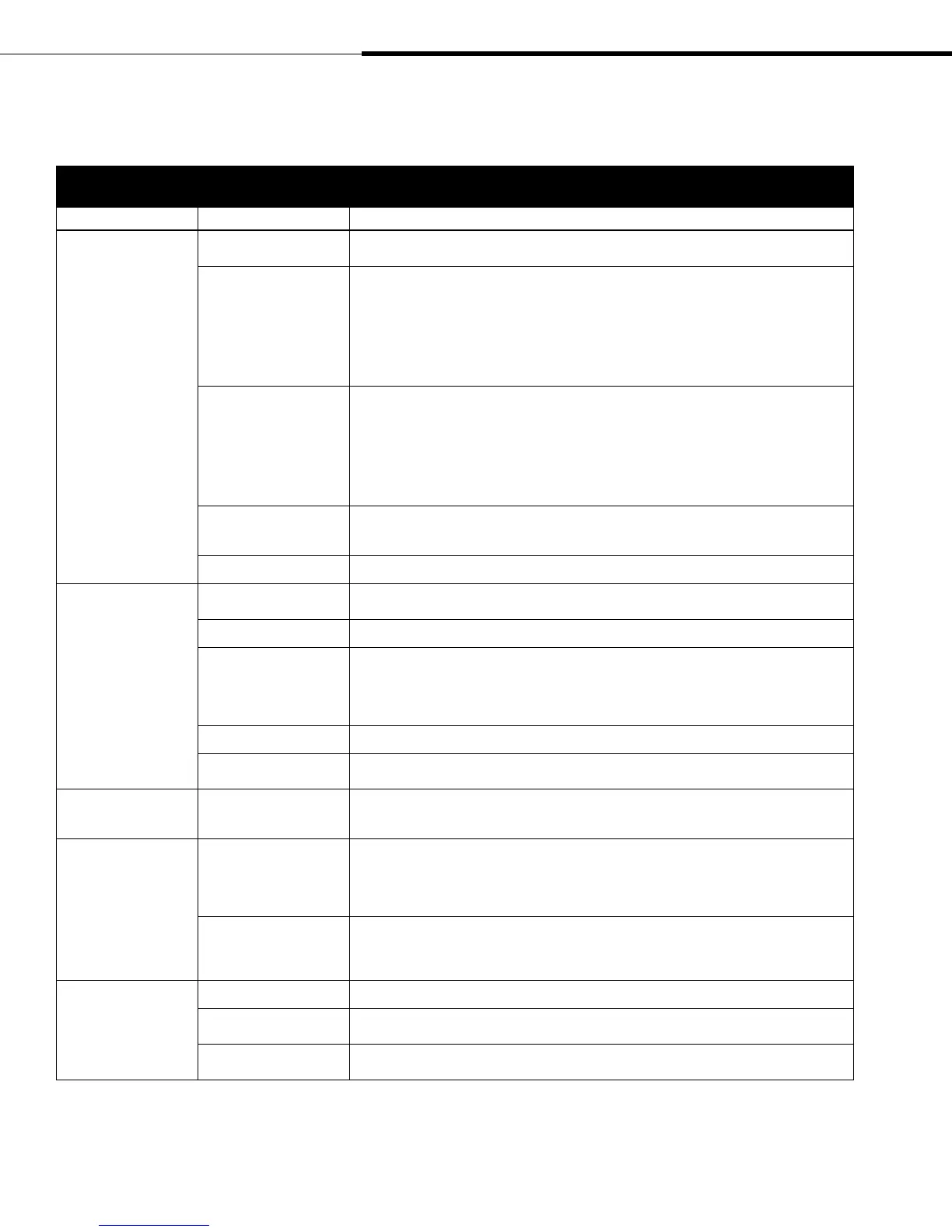
Table 64-1:
Problem/possible cause/action
Problem Possible cause Action
Humidity below desired
level
No humidity demand signal
from humidistat
• Low or no signal strength from humidistat. Check for proper wiring.
• No demand signal by others.
Unit is operating but fails
to meet required humidity
output
• If water is siphoning from the steam cylinder to the overflow drain, check if there is excessive internal
steam pressure, determine the cause of the high pressure (e.g., high duct static pressure, undersized
orifices in dispersion tube, or crushed vapor hose) and repair as required.
• If drain valve does not close fully, determine the cause and clean, repair, or replace as needed.
• If fill valve is stuck open, repair or replace.
• Recalibrate if controls are out of calibration.
• Replace leaking vapor hose.
• Unit is undersized; replace with a larger unit or add additional humidifier.
Steam cylinder not heating • Verify that humidistat is calling for humidity.
• Check for control voltage if limit controls (airflow proving switch, etc.) are not allowing unit to
operate.
• Check power fuse. If open, replace fuse with equal fuse.
• Verify contactor and transformer electrical connections.
• Check water conductivity. Water conductivity must be at least 125 μS/cm
. Add sodium bicarbonate
through steam outlet on top of the steam cylinder to increase. Start with ¼ tablet.
Consult DRI-STEEM for further advice.
Humidity control input
type not the same as the
operating mode.
• Check the internal control board connections and the CS program variable in Program mode. See
Pages 52-53 for more information.
Excessive outside air volume • Verify proper operation of fans and dampers.
Humidity above set
point
Improperly located
humidistat
• Relocate, using guidelines described on Page 13.
Reduced airflow • Check fans and dampers.
Malfunctioning controls • Check for incorrect supply voltage.
• Check for incorrect control signal.
• Check for improper wiring hookup.
• If humidity controller is out of calibration or malfunctioning, repair or recalibrate.
• Check if contactor shorted. Repair or replace as needed.
Unit oversized • Reduce output limit (OL) setting (see Table 52-1 on page 52).
High entering relative
humidity
• Dehumidify.
Hunting (humidity
swings above and below
desired set point)
Malfunctioning control
system
• If there is a faulty or inaccurate humidity controller repair or replace.
• Relocate poorly located control components. See humidity control placement information on Page 13.
Noisy operation Contactor noise • Verify contactor and transformer electrical connections.
• Verify 24 VAC on internal control board terminal strip.
• Contactor normally makes a "clunk" sound as it pulls in. A continuous chattering noise is not
normal and is symptomatic of a failing contactor or malfunctioning controls. Replace contactor or
troubleshoot the control system.
Fill valve noise • A clicking sound as the fill valve opens or closes, and a hissing sound during fill are normal. A
slamming sound as fill valve closes is "water hammer" and can be minimized by installing a shock
arrestor.
• A loud buzzing sound indicates poor alignment or valve stem. Replace valve.
No remote fault
indication
Field wiring not installed • Provide field wiring to a remote fault indicator from supply board (see Pages 14-19).
Field-supplied remote fault
indicator lamp is burned out
• Check if lamp by others is burned out; replace if needed.
Remote fault relay is not
switching
• Check relay continuity for contact closure (see Pages 14-19).
Troubleshooting (continued)
XT_IOM_Jan_2008.pdf 66 11/19/2009 10:13:40 AM


 To Next Page