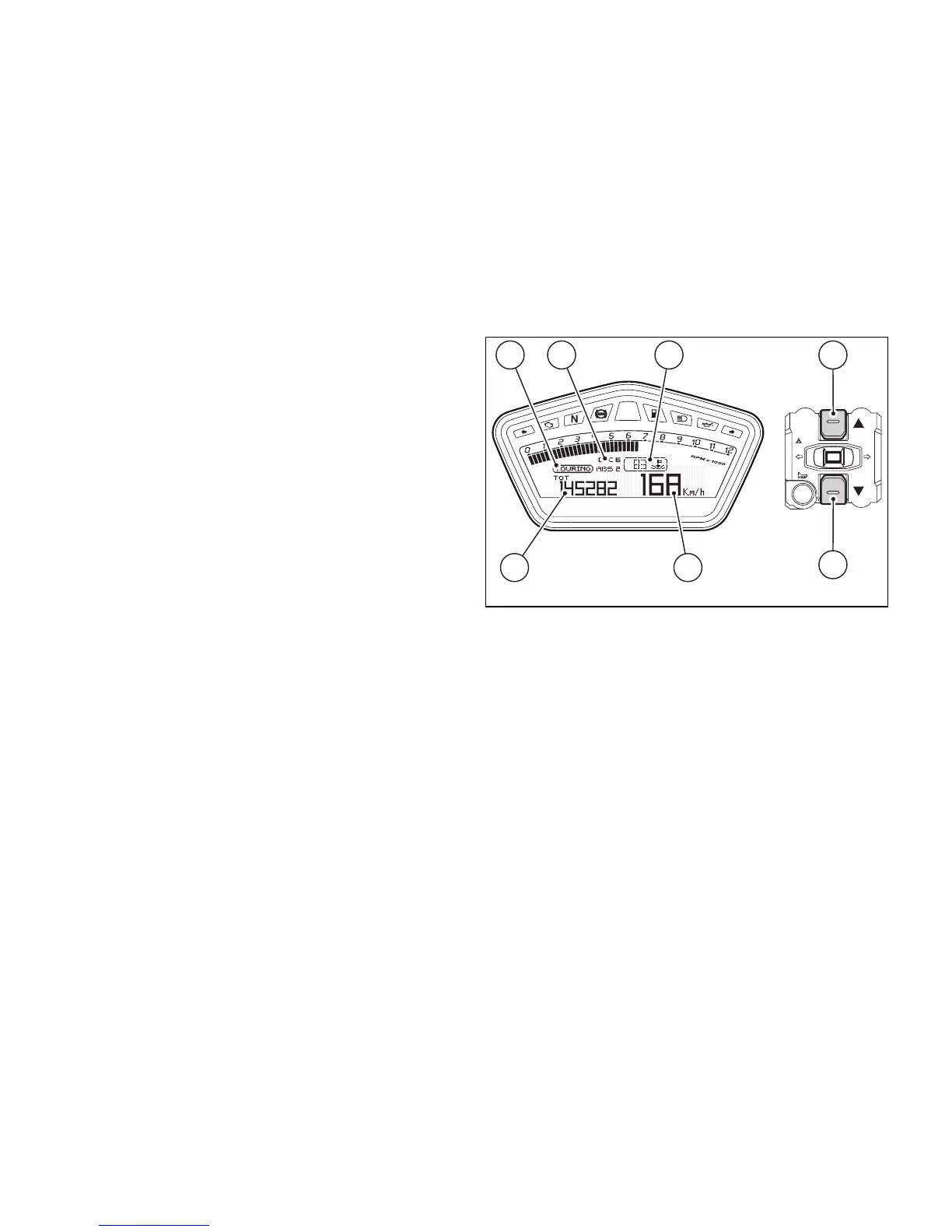
Once initial check is completed, the instrument panel
always goes to the "main" displaying page, with the
following information appearing on the display:
- MENU 1 (3): TOT - Odometer;
- MENU 2 (4): engine coolant temperature
indicator
- SET UP - Set "Riding Mode" indicator (5);
- Engine RPM indicator (RPM) (7);
- Vehicle speed indicator (8);
- "SERVICE" indicator (if active, only).
Press button (2) to scroll MENU 1 and shift to the
following functions:
- TRIP 1 - Trip meter 1;
- TRIP 2 - Trip meter 2;
- TRIP FUEL - Fuel reserve trip meter (if active,
only);
- CONS. AVG - Average Consumption;
- CONS. - Instantaneous Consumption;
- SPEED AVG - Average Speed;
- TRIP TIME - Trip Time.






 To Next Page