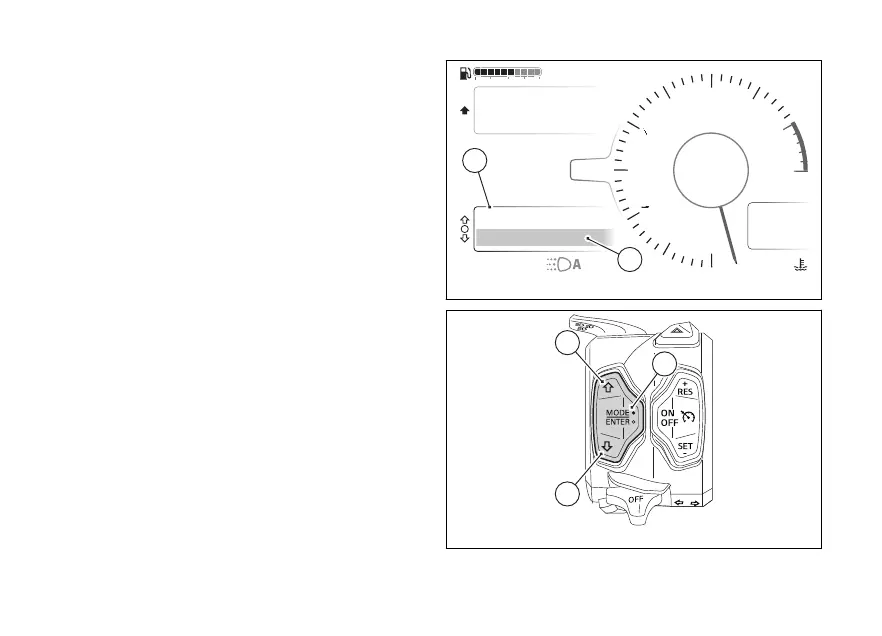
Info display
The Info display menu contains all available meters
with travel information (A, Fig 78).
To select the "Info display" menu, press and hold the
(2) for a long time.
The information is displayed on 2 lines, the selected
item is the one highlighted in the second line
(B, Fig 78). Once you have selected the Info display
menu, scroll through the list of information using the
(1) and (2).
The order of the information can be changed via the
Info display function in the menu (page 153).
The units of measurement of the trip information
can be changed using the Measurement units
function in the menu (page 188).
Air
24
°C
0
km/h
90
°C
10:34
pm
rpm X1000
4
1
2
3
5
6
7
8
10
12
NN
Gear
Total
Range
2017 km
250 km
ABS
Setting menu
Trip master
ENDURO
Fig 78
Fig 79
101











 To Next Page