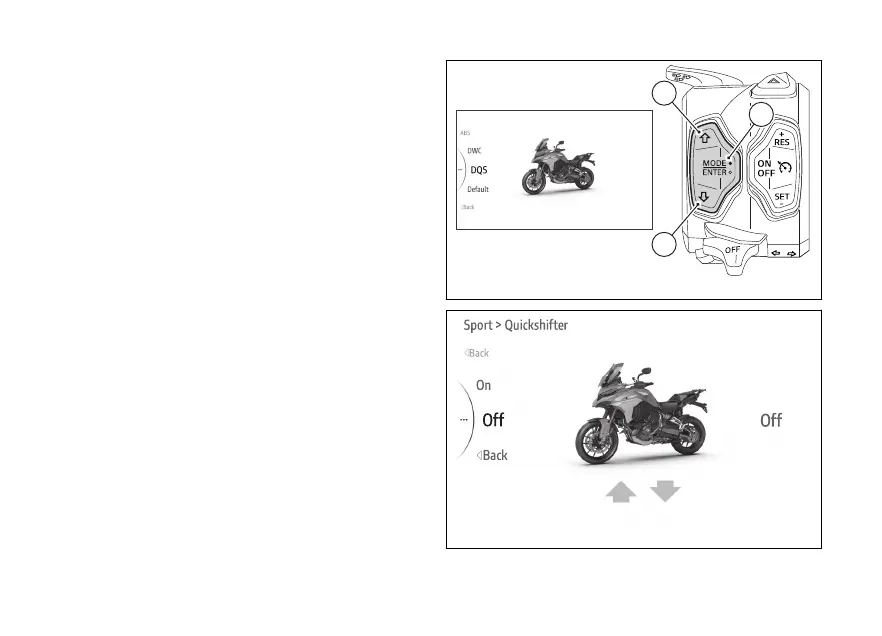
menu - Riding Mode - DQS
This function allows activating or deactivating the
DQS system.
●
Use (1) and (2) from the Interactive
Menu to select the menu item and press
ENTER (3).
●
Select the Riding Mode item and press ENTER
(3).
●
Select the Riding Mode you wish to customise
and press ENTER (3).
●
Select the DQS item and press ENTER (3).
Levels On and are displayed on the
side. While the currently set level is shown on the
right. The motorbike is shown in the middle with the
involved in the highlighted and the
reference indications.
Use (1) and (2) to scroll and select the desired
level. Press ENTER (3) to confirm and quit the
menu.
The DQS with up/down feature allows the rider to
and without using the clutch lever.
It includes a two-way microswitch - built in the lever
mechanism - that outputs a signal to the engine
control unit whenever the gearchange is operated.
Fig 122
Fig 123
149











 To Next Page