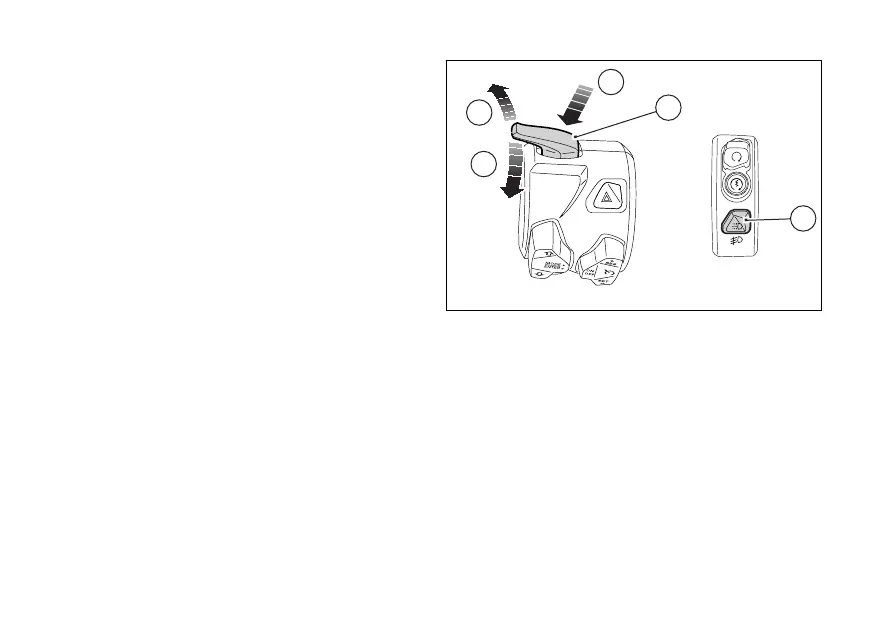
Light control
Low / High beam
By means of (A) it is possible to switch from
low beam to high beam and vice versa: position (B)
for high beam, position (C) for low beam. To flash,
press the in position (D).
If engine is not turning the key to on, it
is possible to switch on the lights or
flash.
If within 60 seconds from the manual switching on of
the low or high beam the engine is not the
lights are turned
To preserve the motorcycle the headlight is
automatically switched when the engine
and it is then switched on again when the engine has
DRL in "Auto" mode only for version with DRL
lights
If the DRL was set to "Auto" via the "DRL" function
within menu (page 157), the instrument
panel automatically manages the DRL and the low
beam according to detected ambient light:
●
if the instrument panel detects good light
conditions (day) the DRL is turned on and the
low beam is turned
●
if the instrument panel detects poor light
conditions (night) the DRL is turned and the
low beam is turned on.
When the DRL is set to Auto mode, the
corresponding warning light (13, Fig 71) will turn on.
If the DRL was set to "Auto" mode, press
(E, Fig 207) to disable that mode and set manual
light management. Press again (E, Fig 207) to
Fig 207
204











 To Next Page