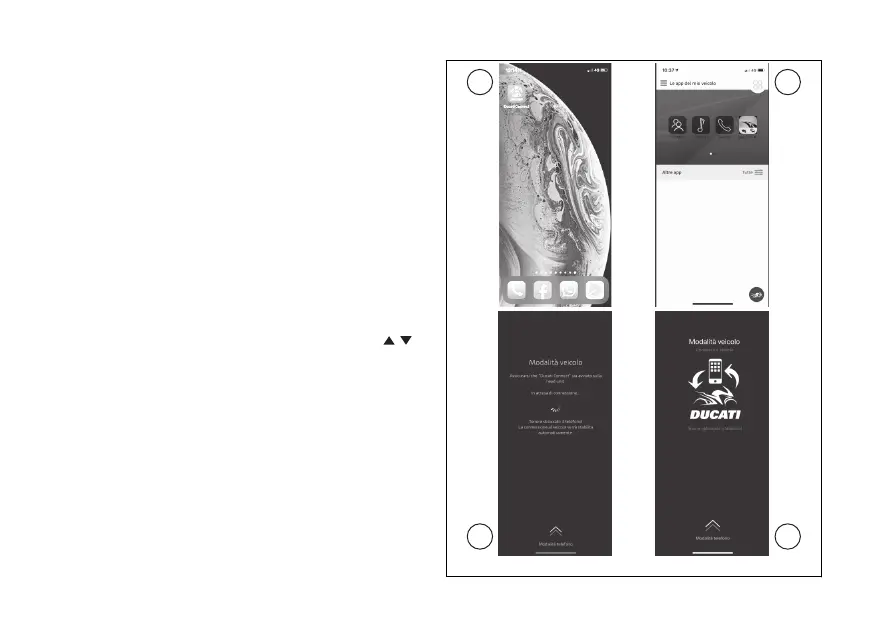
First connection - Mirroring
To the mirroring:
- the Ducati Connect app (B, Fig 114)on your
- from the app, press the motorcycle icon to
Vehicle Mode (C, Fig 114), then the instrument
panel connection wait screen is displayed
(D, Fig 114);
- once the connection has been established, to
ensure correct mirroring operation, the
must be unlocked and have the
Ducati Connect app active in the foreground
(E, Fig 114); take care not to lock the screen
unintentionally by pressing the screen lock key;
- on the instrument panel, use the joystick
to
select the Ducati Connect item from the
Interactive Menu and press ENTER (A, Fig 112).
Once the Ducati Connect function has been
connected, the instrument panel switches
to mirroring mode, displaying the travel information
at the top and of the display and showing in
the centre a window with the Ducati Connect app
(Fig 115): the items and apps displayed in
the window are managed directly from the
connected
Fig 114
142











 To Next Page