2
67
PC Controller Setting
4
Programming a JOB on a Computer
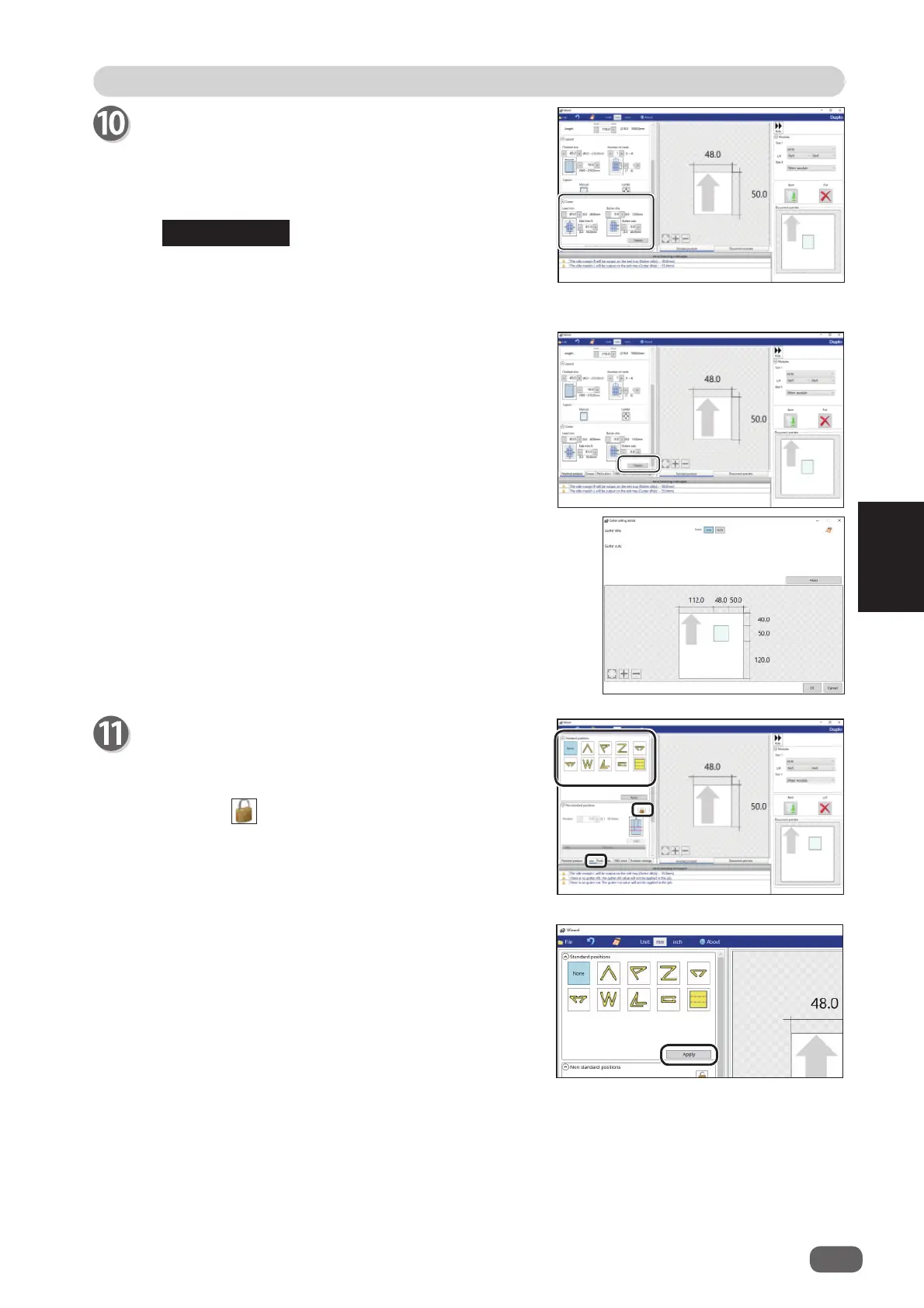
Gutter
Make settings for
Lead trim
(the lead margin cut),
Side trim R
(the right margin slit),
Gutter slits
, and
Gutter cuts
.
1. Enter values in each box.
If you have selected
Center
in step 9, you cannot
manually enter values for
Lead trim
(the lead
margin cut) or
Side trim R
(the right margin slit).
2. Clicking
Details
displays the
Gutter setting
details
screen, on which you can make settings
for the width of gutter slits and gutter cuts.
Click
OK
when the setting is completed.
The settings are saved and the previous screen
reappears.
Clicking
Cancel
returns to the previous screen
without saving the them.
Crease
Set crease positions.
Click the
Crease
tab.
You can set up to 20 creases on one document.
Clicking the icon switches entry mode between
Standard positions
and
Non standard positions
.
REFERENCE
Standard positions
: Automatically sets crease
positions. Select a fold pattern
and adjust values in the
A
,
B
,
and
C
boxes. Then click
Apply
.



 To Next Page