72
PC Controller Setting
•
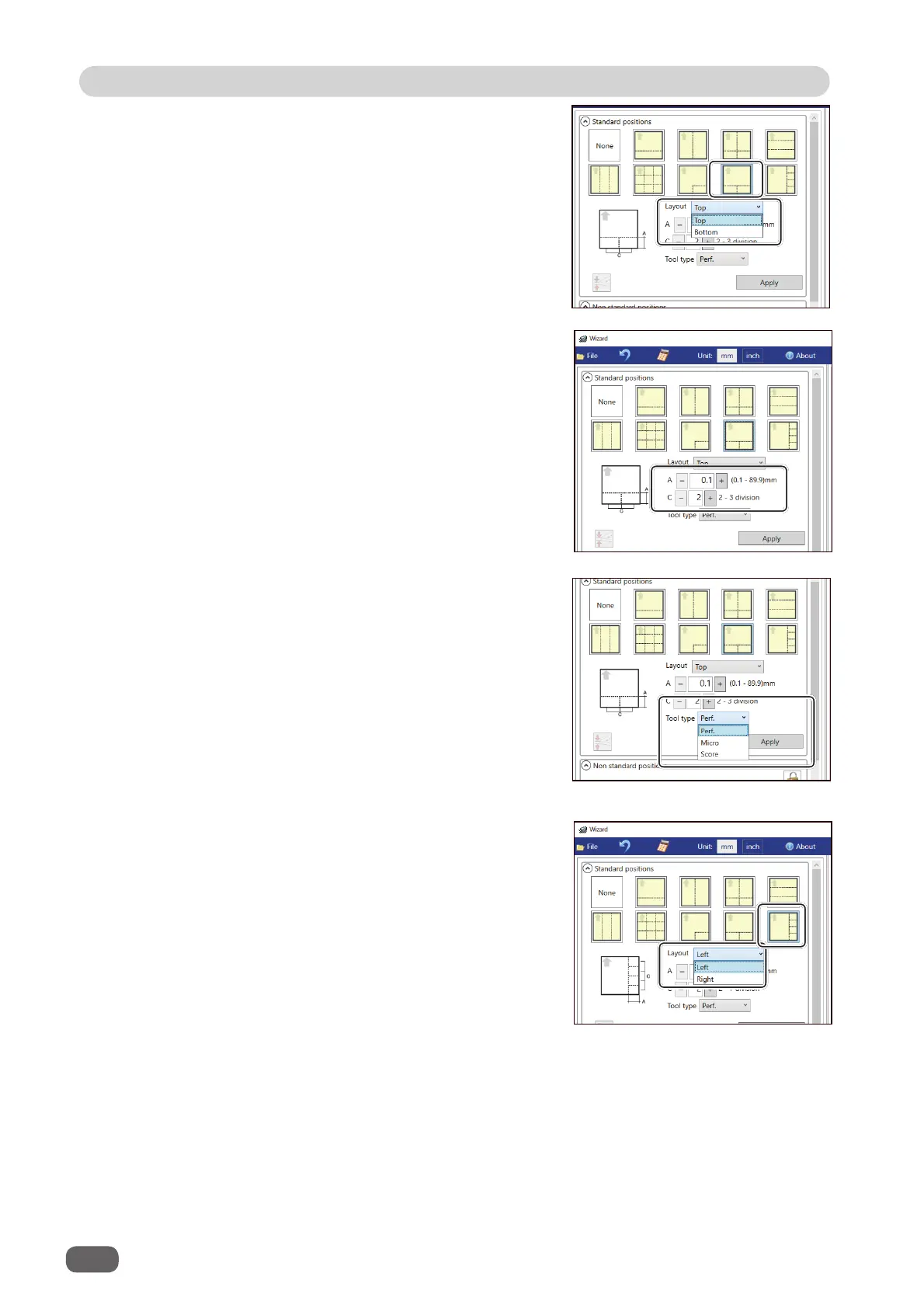
T shape
Perforates a document widthwise and then
lengthwise to divide it into two or three pieces.
This is available only when both of
RTM (Rotary
Tool Module)
and
CPM (Cross Tool Module)
are
available.
1. Click the
Layout
box and select at which
position the document is processed out of
Left
and
Right
.
1. Click the
Layout
box and select at which
position the document is processed out of
Top
and
Bottom
.
•
Tear off coupons
Perforates a document lengthwise and then
widthwise to divide it into two to seven pieces.
This is available only when both of
RTM (Rotary
Tool Module)
and
CPM (Cross Tool Module)
are
available.
3. Click the
Tool type
box and select a rotary tool
out of
Perf. (perforation tool),
Micro (micro
perforation tool)
, and
Score (score tool)
.
Click
Apply
.
2. Enter a value of the distance between the lead
edge of the document and the processing start
position of the rotary tool for
A
and a value of
into how many pieces the document is divided
for
C
.



 To Next Page