2
73
PC Controller Setting
4
Programming a JOB on a Computer
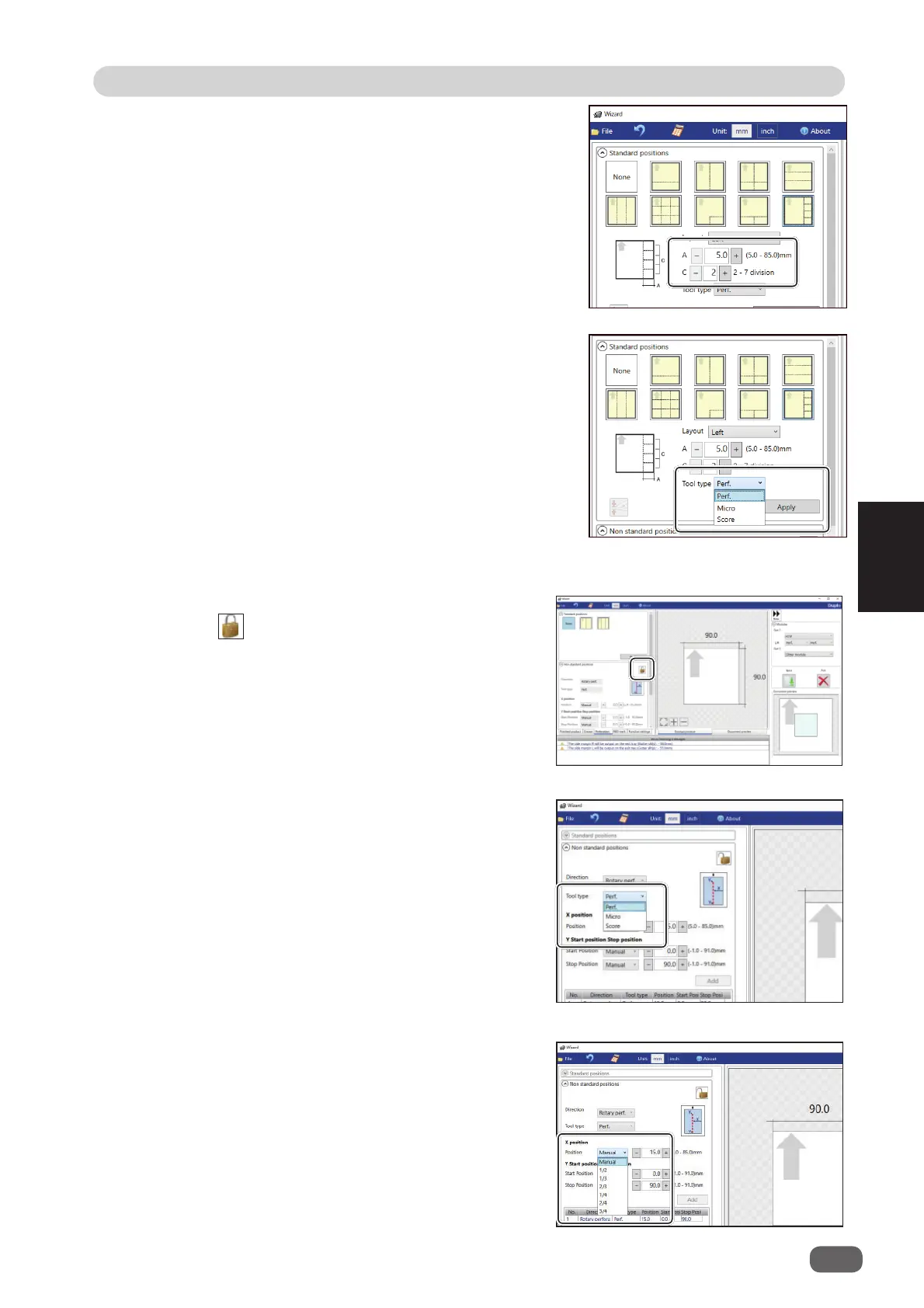
Non standard positions
:
Clicking the icon switches entry mode between
Standard positions
and
Non standard positions
.
1. Click the
Tool type
box and select a
rotary
tool
out of
Perf. (perforation tool)
,
Micro
(micro perforation tool)
, and
Score (score
tool)
.
2.
X position (crosswise)
Click the
Position
box and select a crosswise
processing position of the
rotary tool
out of
Manual
,
1/2
,
1/3
,
2/3
,
1/4
,
2/4
, and
3/4
.
2. Enter a value of the widthwise distance
between the right side edge of the document
and the processing start position of the rotary
tool for
A
and a value of into how many pieces
the document is divided for
C
.
3. Click the
Tool type
box and select a rotary tool
out of
Perf. (perforation tool)
,
Micro (micro
perforation tool)
, and
Score (score tool)
.
Click
Apply
.



 To Next Page