84
PC Controller Setting
REG mark type
Select and click
Standard
or
Bold mark width
.
(This is available only when you have entered values
for
Side mark
and
Lead mark
in steps 10 and 11.)
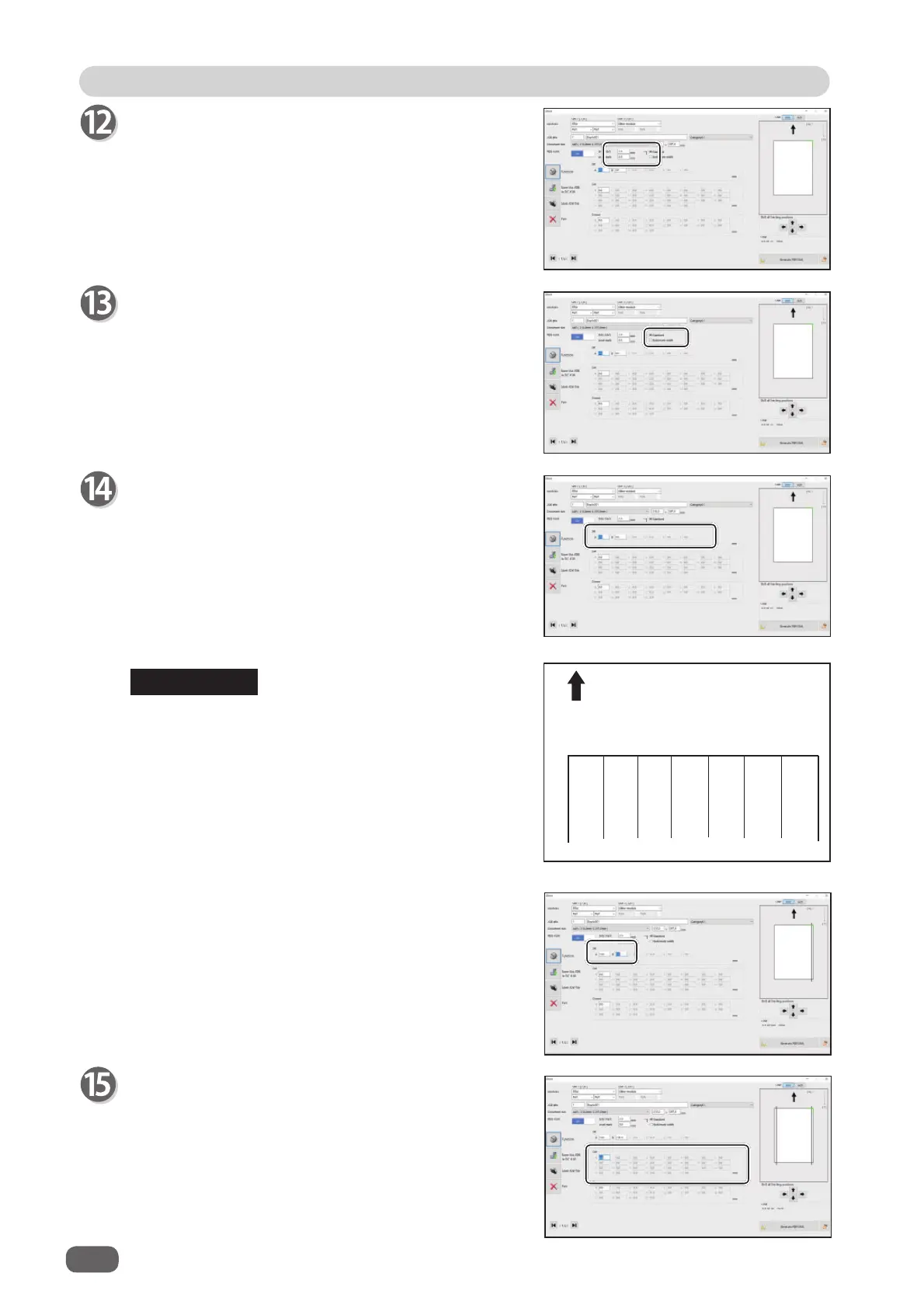
Select
On
if you use the REG mark reading function.
(This is available only when you have made settings
in steps 10 to 12.)
Slit
If you have selected the
advanced mode
, numerals
of 1 to 6 appear under
Slit
. If you have selected the
simple mode
, alphabetical letters of
A
to
F
appear
there.
Click each
Slit
box and enter the distance from the
right edge of the document to the slit position. Press
the Enter key to set the value.
Entering
0
fi nishes the settings for
Slit
.
12 56 34
ABCEDF
Document feed direction
• Slit position setting order
Simple mode
: Sets slits in alphabetical order of
SlitA
to
SlitF
.
Advanced mode
: Sets slits in numerical order as
shown in the fi gure on the right.
1
,
2
: Margin slitter module
5
,
6
: Center slitter module
3
,
4
: Center slitter module
e.g. If one
RTM (Rotary Tool Module)
and one
center slitter module
are installed,
A
,
B
,
C
,
and
D
or
1
,
2
,
5
, and
6
are displayed.
• If the
RTM (Rotary Tool Module)s
are installed
both in slot 2 and slot 3, you can enter two
positions for
Slit
.
Cut
Click each
Cut
box and enter the distance from the
right edge of the document to the cut position with the
NUMERIC keys. Press the Enter key to set the value.
You can set up to 30 cuts.
Entering
0
fi nishes the settings for
Cut
.
REFERENCE



 To Next Page