EN
56
BAKING PROCEDURE
Preparing for use – programming phases for baking bread
1. Before using the appliance for the first time, wash the parts which will come into contact with food
using hot water and detergent. Carefully rinse with clean water and wipe dry, or leave to dry.
2. Set the program to BAKE and turn the bread maker on without inserting ingredients, and then let
the bread maker cool down. Mild smoke coming out of the appliance is not a problem. Place the
bread maker on a flat and dry surface. Connect the cord to the socket.
3. Use both hands to insert the baking form into the bread maker and push it to make sure it is well
inserted in the centre of the baking area. Then insert two kneading hooks onto the baking form
shafts. Put the ingredients into the form in the order prescribed in the respective recipe. Close the
lid. Set the desired program on the control panel (SELECT / LOAF SIZE / COLOR / TIME). Finish by
pressing the START button.
4. The bread maker automatically begins mixing and kneading dough, until the proper consistency
is reached. After the final kneading cycle is completed, the bread maker is heated to the optimal
temperature for the dough to rise. The bread maker then automatically sets the temperature and
baking time.
5. If at the end of the baking program, the bread is too light, use the BAKE program for further
browning. Press the START/STOP button and then select the BAKE program and start the bread
maker. A sound will be played after the baking process is finished. You can remove the bread from
the appliance. The one hour warm-up is then started.
Preparing bread
1. Insert the baking form into the bread maker, push until it clicks into its correct position. Place the
kneading hooks onto the shafts. Turn the kneading hooks clockwise, until they click into their
correct position. We recommend placing baking margarine into the form before installing the
kneading hooks to prevent dough from sticking to the hooks. Removing the kneading hooks from
the loaf of bread will also be easier.
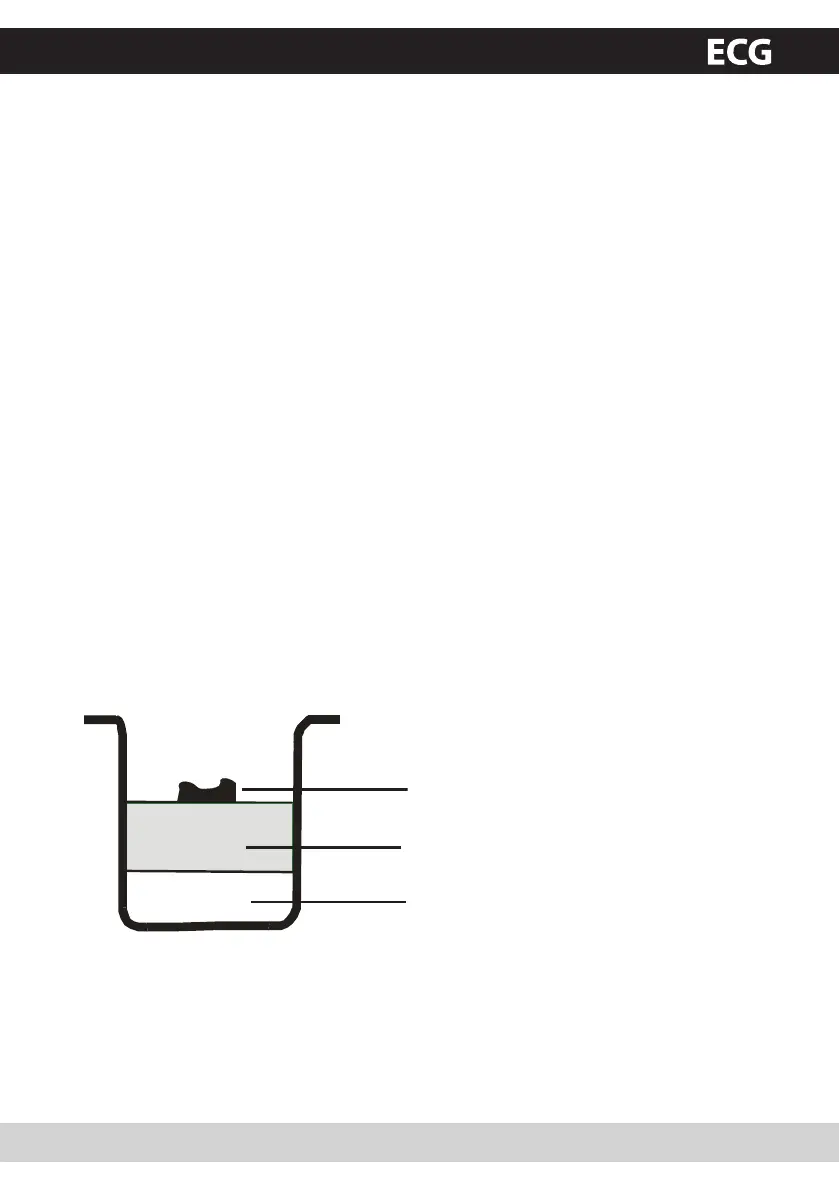
2. Insert the ingredients into the baking form. Respect the order listed in the recipe. Liquid ingredients
or water are usually added first, followed by sugar, salt and flour, yeast or baking powder always
comes last.
Yeast and soda
Dry ingredients
Water and other liquids
3. Form a small hole into the flour and insert the yeast here. Make sure it does not come into contact
with the liquids or salt.
4. Close the lid carefully and connect the cord into the socket.
5. Turn on the switch on the side of the bread maker.
6. Press the SELECT button repeatedly, until the desired program is selected.
7. Press the COLOR button to select the desired crust colour.
8. Press the LOAF SIZE button to select the weight (1kg or 1.3kg).
PCB 538 CZ+SK+DE+EN.indb 56 18.6.2010 15:30:14


 To Next Page