RTTI (Real Time Traffic Information)
129
RTTI (Real Time
Traffic Information)
2. Displaying the traffic information
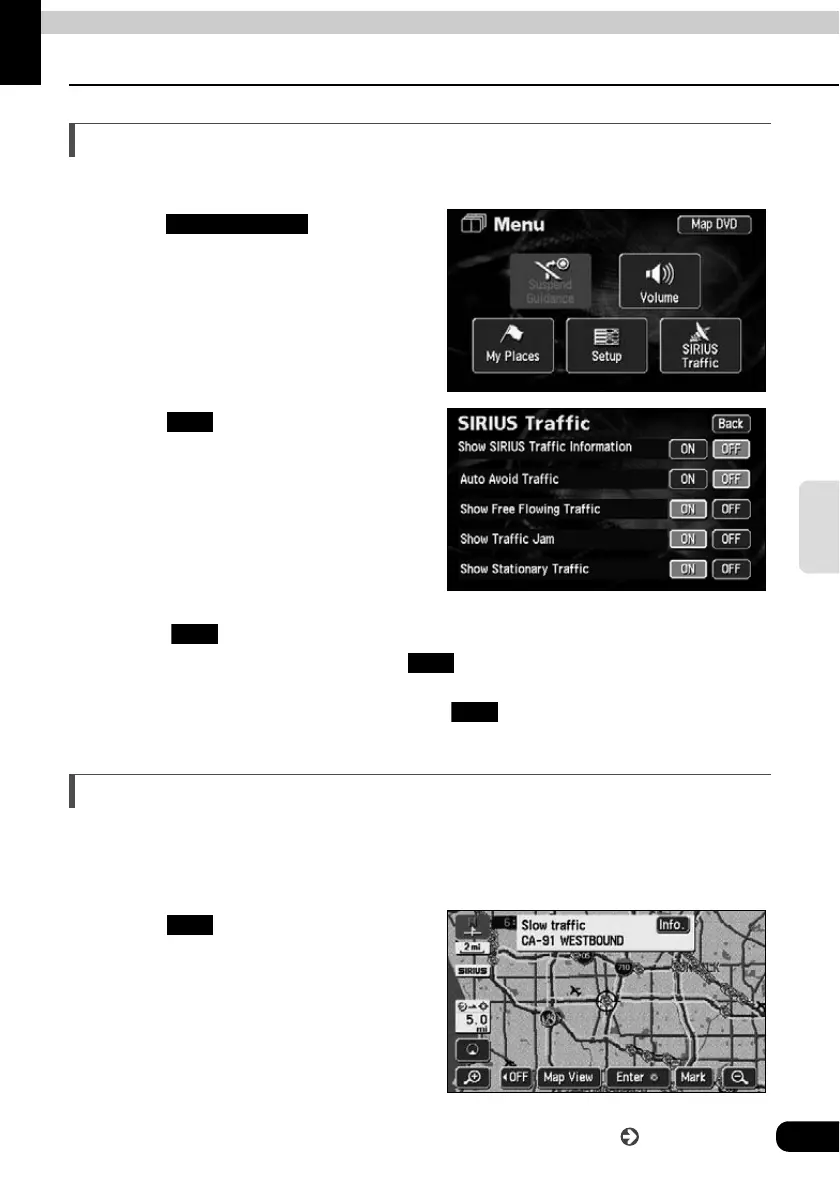
Displaying the traffic information on the map
"SIRIUS Traffic" can display the jam situation using color-coded arrows alongside the routes.
Touch in the Menu
screen.
Touch of the item to be
displayed.
• When the "Show Free Flowing Traffic" is
set to , less crowded routes can be displayed in light-blue.
• When the "Show Traffic Jam" is set to , crowded routes can be displayed in
yellow.
• When the "Show Stationary Traffic" is set to , routes with heavy traffic can be
displayed in orange.
How to display the text information screen
By touching the icon on the map, you can see the text information.
Touch the icon to be displayed.
Touch .
• The Traffic Information screen is
displayed.
SIRIUS Traffic
ON
ON
ON
ON
Info
Go to the next page



 To Next Page