92
5. Route guidance
Navigation guidance
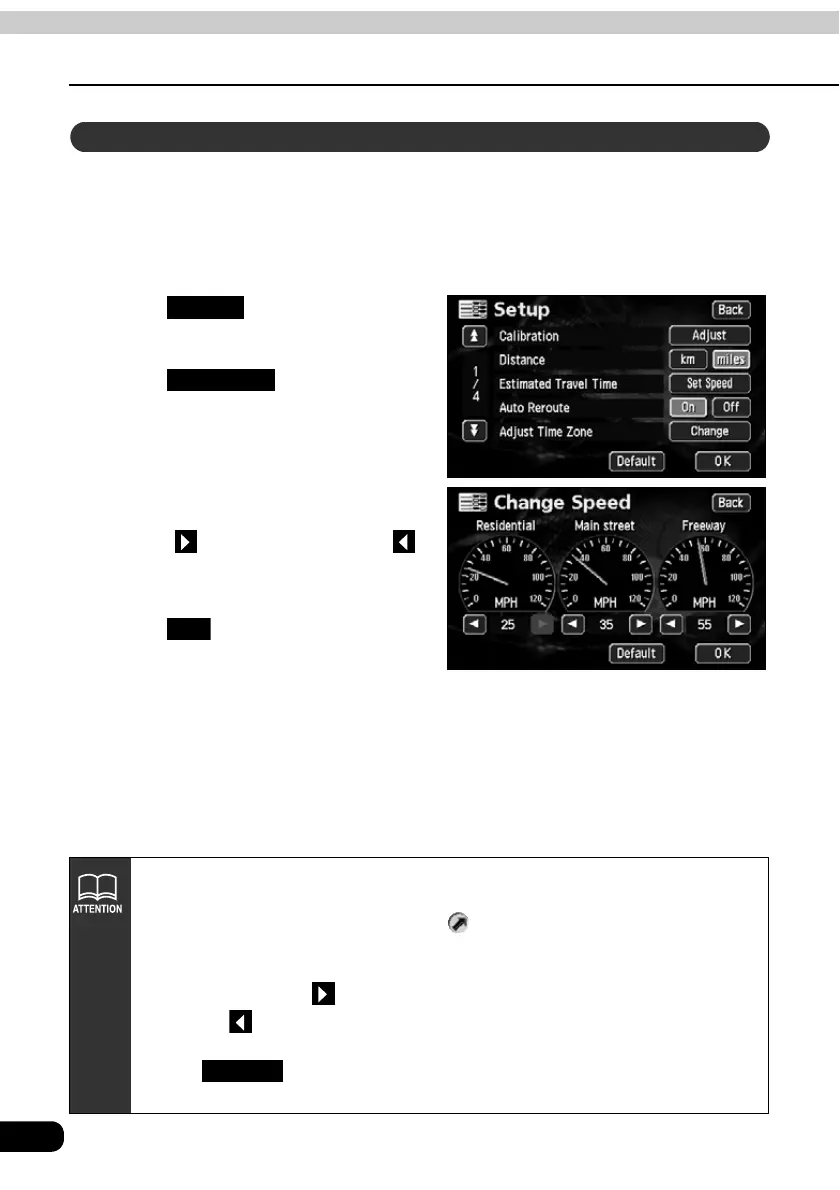
The following times are calculated based on the set average vehicle speed.
• Required time on the present location screen (Page 16)
• All route display screen required time (Page 71)
• Required times for the segments list (simultaneous 3 route display) (Page 77)
Touch in the Menu
screen.
Touch for the
Estimated Travel Time.
Set the speed for each road.
• Touch to raise the speed, touch
to lower it. (Each press raises or
lowers 5 mph.)
Touch .
Setting the average speed
Setup
Set Speed
OK
• The required time is calculated from the average vehicle speed and may have a
slight deviation depending on the driving conditions.
• When deviating from the set route, the destination direction mark will
appear.
• When reaching the maximum speed (75 mph freeway, 55 mph main streets, 25
mph residential), the switch inverts. When reaching the minimum speed (5
mph), the switch inverts. These switches cannot be operated even if
touched.
• Touch on the Change Speed screen to return to its default settings
(Freeway;55 mph / Main street; 35 mph / Residential; 25 mph).
Default



 To Next Page