79
Navigation
guidance
Adding a destination
After having set a destination, up to five more destinations can be added.
In the following situations, set an additional destination.
• When setting a transit point between the present location and set destination
• When changing the set destination into a transit point and setting a new destination
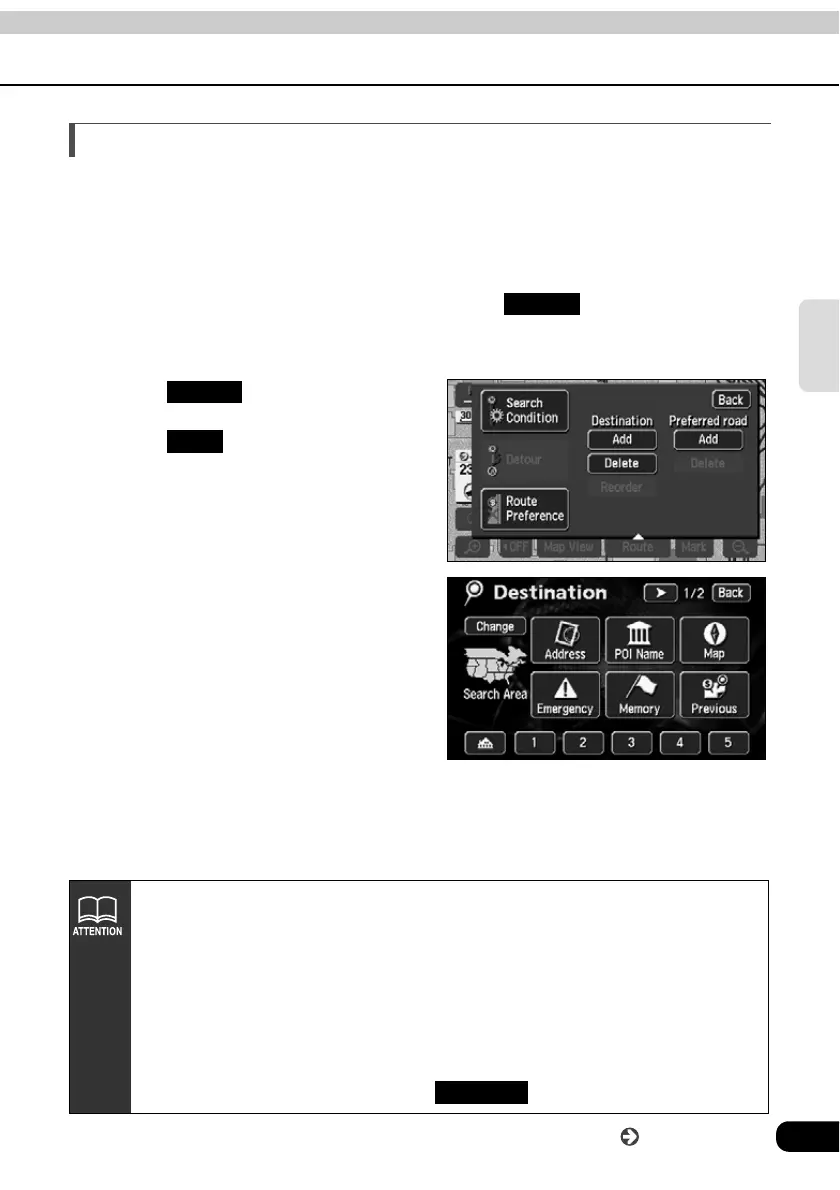
Using the same method as setting a destination, touch to add a destination.
(Refer to "One-touch setting" (Page 68), "Set from a registered point" (Page 69) and
"Set using the map retrieval method" (Page 69).)
Touch .
Touch for Destination.
Select the map retrieval method
and display the map on which a
destination is to be set.
• See pages 49 and 65, "How to
retrieve maps" and "Performing
operations on a displayed map".
Add to
Route
Add
• The destination can be set on a map with a scale of 0.5 miles or greater detail.
• Geographical points on maps representing set destinations are automatically
registered (up to 100 points) and can be used to retrieve a map when setting a
destination. When exceeding 100 points, the oldest entry is deleted every time
a new one is entered. Unnecessary points can be deleted. (
Refer to the Section
"Deleting entries from the destination archive"
on page 127.)
• When adding a destination with a transit road (see
pages 84 and 85) indicated,
that transit road indication may be canceled depending on that geographical
point.
• When 2 or more destinations are set, appears.
Reorder
Go to the next page



 To Next Page