134
Information function
1. Information screen
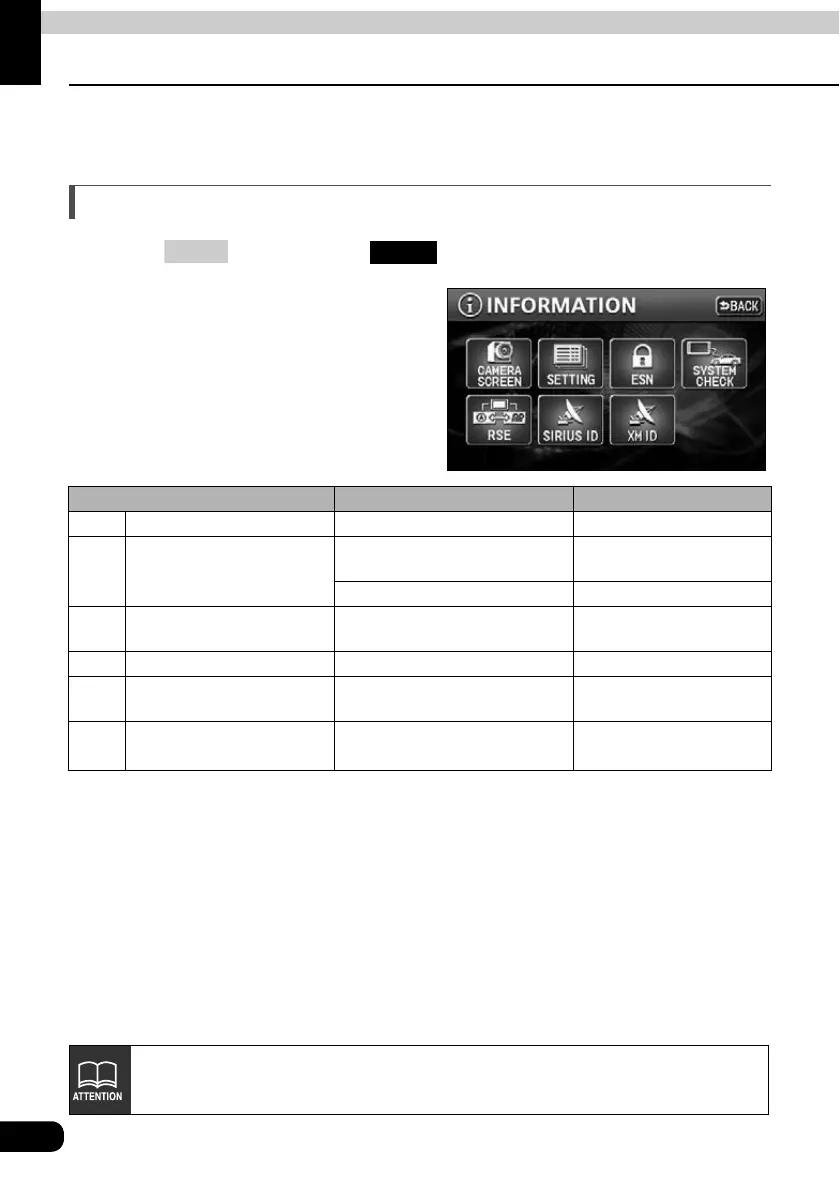
The information function contains "SETTING", "ESN" and "SYSTEM CHECK". The "CAMERA
SCREEN" and "SIRIUS ID" function can be operated by installing the optional items.
Information screen
Press and then touch to display the INFORMATION screen.
Touch the touch switch.
• Select an item.
• The following functions are possible
from the information screen.
Display order/item (touch switch) Function Page
1 CAMERA SCREEN Display of Rear View Camera 136
2 SETTING
Settings for the background,
beep, etc.
OPERATION GUIDE/
Audio
Setting for Rear View Camera 140
3ESN
Settings for the ESN
(ECLIPSE Security Network)
OWNER'S MANUAL
4 SYSTEM CHECK Display of system status 135
5 RSE Setting the DUAL PLAY
OPERATION GUIDE/
Audio
6 SIRIUS ID Display of the SIRIUS ID
OPERATION GUIDE/
Audio
MENU
INFO
CAMERA SCREEN button is available when backeye camera (BEC106) is conneted.



 To Next Page