EFKA FP220A5911
14
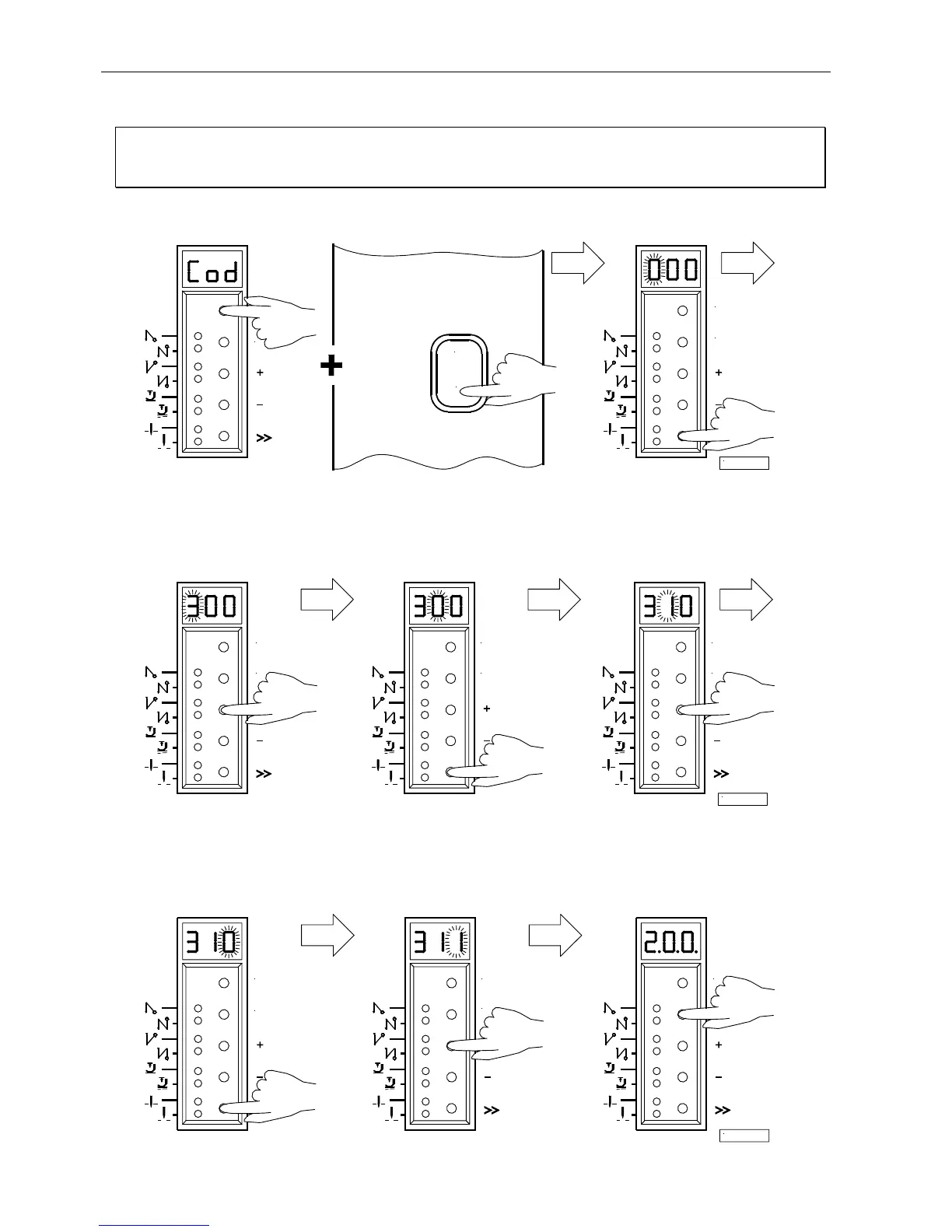
6.2 Programming the Code Number
Note
The parameter numbers in the illustrations below serve as examples and may not be available in all program versions.
In this case, the display shows the next higher parameter number. See List of Parameters.
1.
Press the P key and turn power on
2.
Press the >> key (1st digit blinks)
3.
Press the + or – key to select
4.
Press the >> key
5.
Press the + or – key to select
the 1st digit (2nd digit blinks) the 2nd digit
Technician level " Code no. 190
Supplier level " Code no. 311
6.
Press the >> key
7.
Press the + or – key to
8.
Press the E key; the parameter
(3rd digit blinks) select the 3rd digit number is displayed, which is
indicated by points between the
digits.
E
0
I
1/KL2316
P
E
E
P
E
P
2/KL2317
E
P
P
E
P
E
3/KL2318
P


 To Next Page