EFKA FP220A5911
86
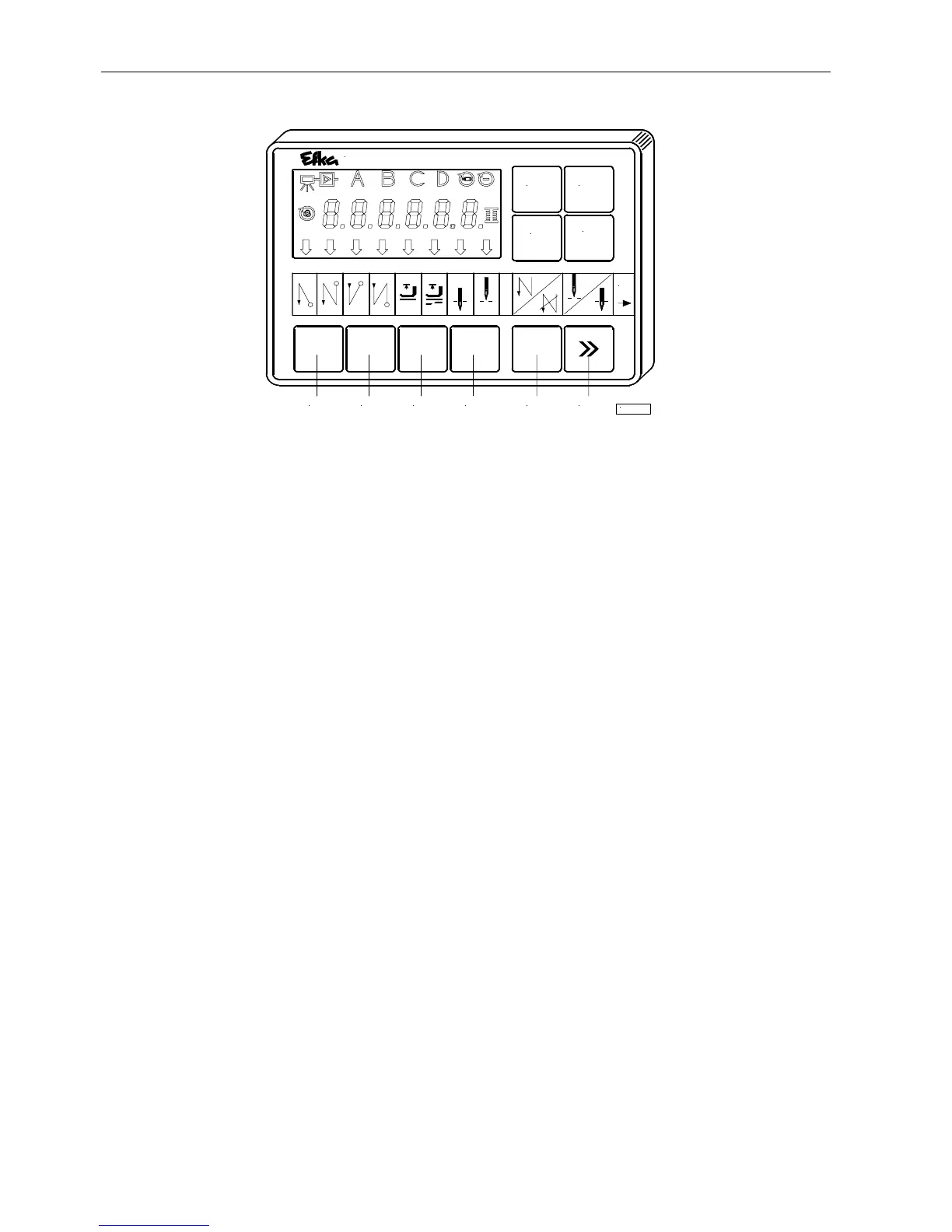
14 Operating Elements of the V810 Control Panel
The V810 control panel is supplied with the no. 1 slide-in strip above the keys. For different functions the strip can be
replaced with another one supplied with the control panel. Set parameter 291 in this case. See also V810 / V820 instruction
manual!
Function Assignment to the Keys
P key = Call or exit of programming mode
E key = Enter key for modifications in the programming mode
+ key = Increase of the value indicated in the programming mode
- key = Decrease of the value indicated in the programming mode
1 key = Start backtack SINGLE / DOUBLE / OFF
2 key = End backtack SINGLE / DOUBLE / OFF
3 key = Automatic sewing foot lift after thread trimming ON / OFF
Automatic sewing foot lift at stop in the seam ON / OFF
4 key = Basic position needle down (POSITION 1) / needle up (POSITION 2)
A key = Key for intermediate backtack
(Different input functions can be assigned to the A key using parameter 293)
B key = Key for needle up/down or shift key in the programming mode
(Different input functions can be assigned to the B key using parameter 294)
P
+
A1 2 3 4
variocontrol 810
KL2185
B
-
1
E


 To Next Page