EFKA FP220A5911
19
6.7 Program Identification on the Control
Function without control panel Parameter
Program number, modification index and identification number display 179
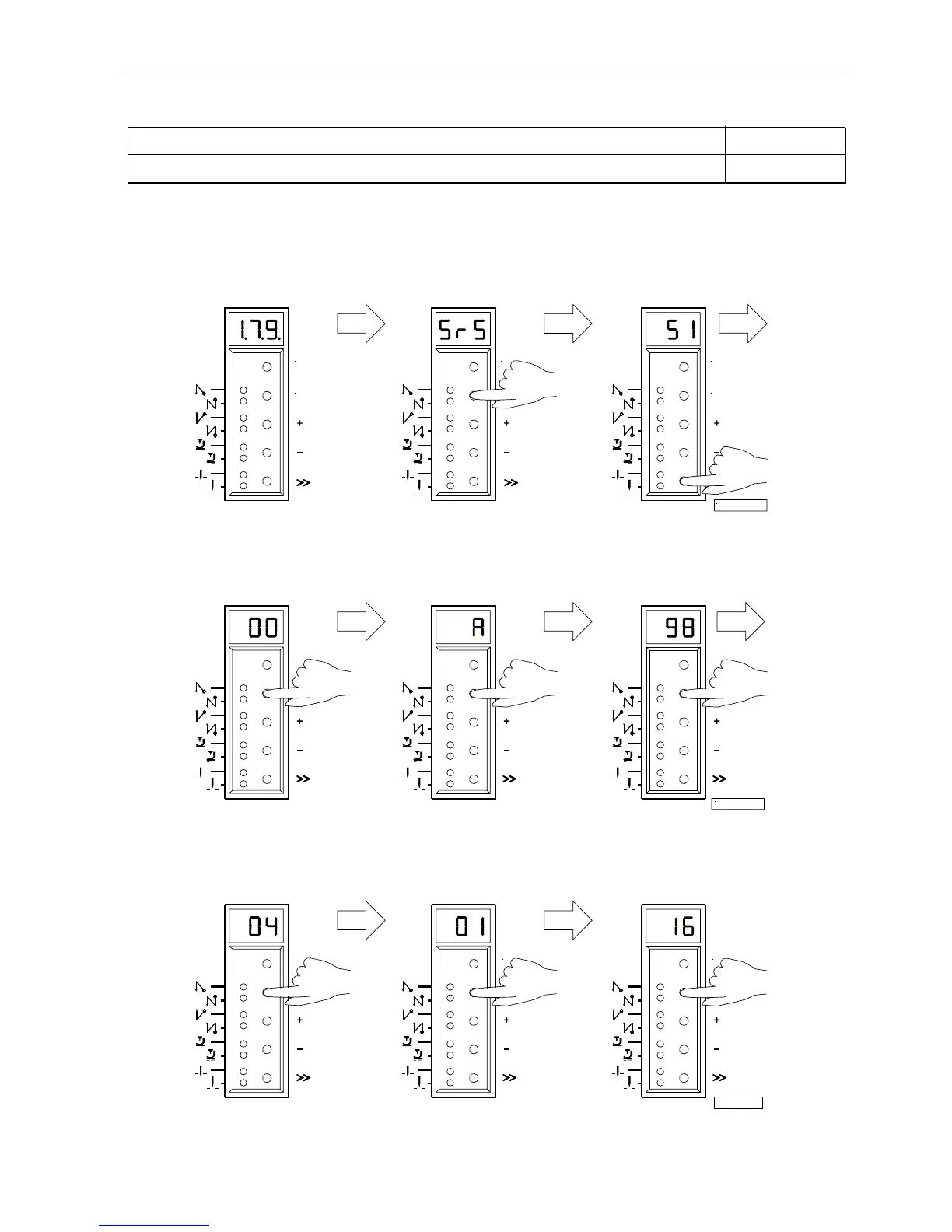
After having selected parameter 179, the following information is displayed in succession:
1.
Select parameter 179.
2.
Press the E key.
3.
Press the >> key.
Abbreviation Sr5 is displayed. The first 2 digits of the
program number are displayed.
4.
Press the E key.
5.
Press the E key.
6.
Press the E key.
The second 2 digits of the The program modification The identification number
program number are displayed. index is displayed. digits 1 and 2 are displayed.
7.
Press the E key.
8.
Press the E key.
9.
Press the E key.
The identification number The identification number The identification number
digits 3 and 4 are displayed. digits 5 and 6 are displayed. digits 7 and 8 are displayed.
The routine is repeated after pressing the E key. Exit the routine after pressing the P key once. The next parameter number
is displayed. Exit programming after pressing the P key. The drive is again ready for sewing.
P
E
P
14/KL2329a
P
E
P P P
15/KL2330a
P P
17/KL2361
P


 To Next Page