30
WWW.EILERSEN.COM
– Error code display (in NORMAL screen)
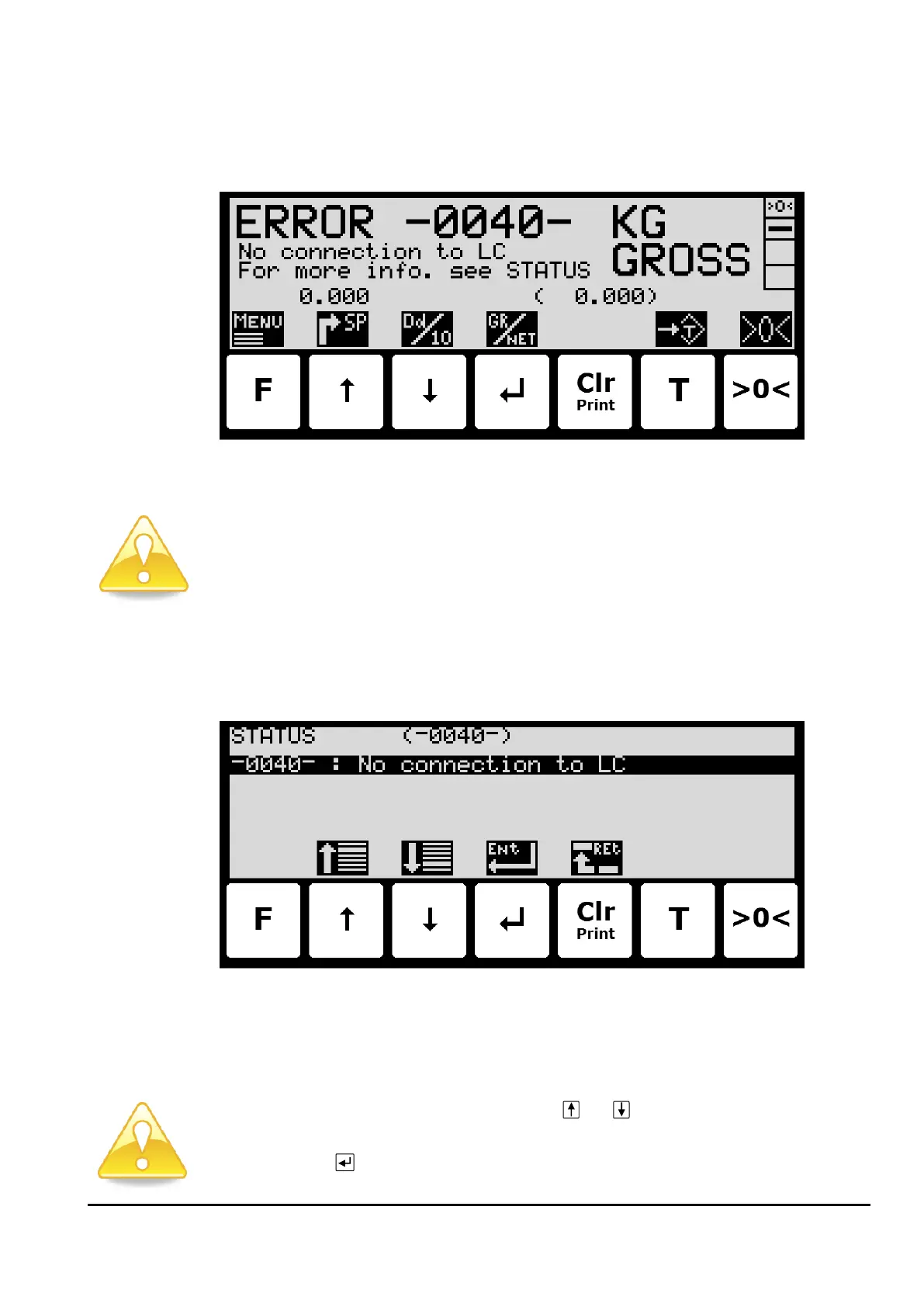
When the system detects a load cell error (-XXXX-) this will be shown in the NORMAL screen
as follows:
The weight indication normally shown in large types is replaced by an error code with a cor-
responding description and reference to the STATUS screen, where the error code is elabo-
rated and possible tips to how the individual error codes can be solved are given.
Please notice: If an error is indicated the STATUS screen can be accessed from the NORMAL
menu.
– Error solving (in STATUS screen)
In the STATUS screen, a list of error codes currently present on the system is shown as fol-
lows:
Please notice: Depending on the load cell protocol, a given error may result in multiple error
codes at the same time. These error codes will be logical OR’ed together, and the resulting
error code shown in the NORMAL screen is also shown in the top line of this screen.
Please notice: If more error codes are present at once, a given error code can be selected by
moving the cursor up or down in the list with the
and
keys. More error codes than can
be shown, can be present. In such case these can also be shown using the arrow keys.
Please notice: If is pressed, a list of possible tips to solve the currently selected (using the
cursor) error code will appear.



 To Next Page