6
WWW.EILERSEN.COM
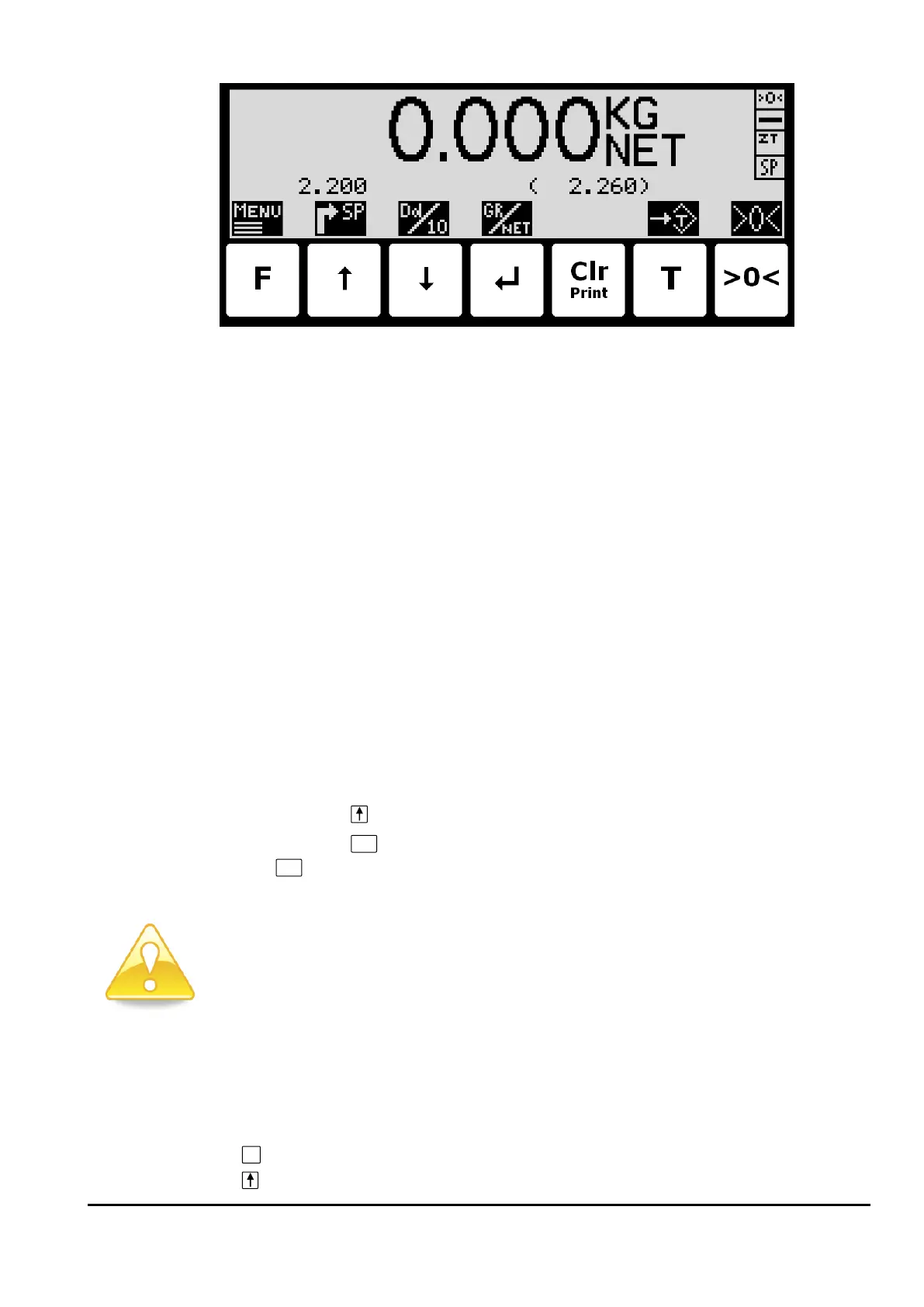
Weight reading:
• The actual weight reading is displayed in large types.
• To the right of the weight reading, the unit is indicated, like KG, LB etc.
• Below the unit gross/net selection is indicated with GROSS or NET.
• If an error condition is present the weight reading will indicate the error, like UL, OL,
- 0080 – etc. Please see below in section Trouble shooting, page 29 for details on er-
ror codes and how to recover from various error situations.
Status indications:
• ‘>0<’ in the upper right corner status field indicates that the actual gross weight is ze-
ro (within ± ¼ division).
• ‘--’ in the second status field indicates that the weight reading is steady/stable. If the
reading is unstable ‘~’ will be indicated.
• ‘ZT’ in the third status field indicates that a zero tracking device is active, holding the
actual gross weight at zero.
• ‘SP’ in the fourth status field if automatic dosing is running.
‘R’ in the fourth status field if registration is in progress.
• Above the key the actual setpoint (fine limit) is shown.
• Above the
key an “OK” icon is shown for a short period following every successful registra-
tion.
Please notice: The net weight is used to determine the state of the digital outputs during
dosing even when the gross weight is displayed.
Please see below how automatic dosing and digital outputs are used.
Please notice: If none of the icons directly above the keys are visible as shown in the
screen shot above, the keyboard is locked, since the Keyboard unlock length parameter
in the SETUP SYSTEM screen has been activated. As long as the keyboard is locked, no
keyboard actions will be available. Please see below in section - Unlock the keyboard,
page 11 on how to unlock the keyboard.
Keys/actions:



 To Next Page