32
6 STATISTICS
The Elcometer 456
2
Basic has a Simple Statistics feature
(STATS) which calculates and displays a statistical
analysis of readings as they are taken.
When EXTENDED MENU is active (MENU/EXTENDED
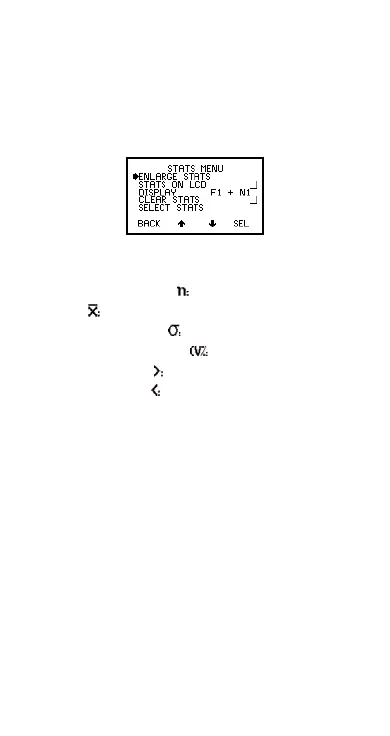
MENU/SEL), press STATS softkey to access STATS
MENU (Figure 30).
Figure 30. Stats menu
The statistical values available are:
• Number of Readings
• Mean
• Standard Deviation
• Coefficient of Variation
• Highest Reading
• Lowest Reading
See “Select stats” on page 34 and “Statistics
terminology” on page 40.
If you require statistics in batches, or memory for
readings, Elcometer 456
2
models Standard and Top
provide this facility. Contact Elcometer or your local
Elcometer supplier for more details.
6.1 ENLARGE STATS
Displays the chosen statistical values as double-height
characters. The example screens (Figure 31) appear
when all the statistical values are selected. The
Op_456_2_English.book Page 32 Friday, February 17, 2006 3:35 PM



 To Next Page