- 17 -
599 51 13-50 EN
DGS-TDS-N 11.2004 C.D. © Electrolux
4.3.2 Deactivate rinse+ cycle
An extra rinse cycle increases water consumption and program run time!
4.3.1 Activate rinse+ cycle
4.3 Rinse+ cycle
Programming before program start:
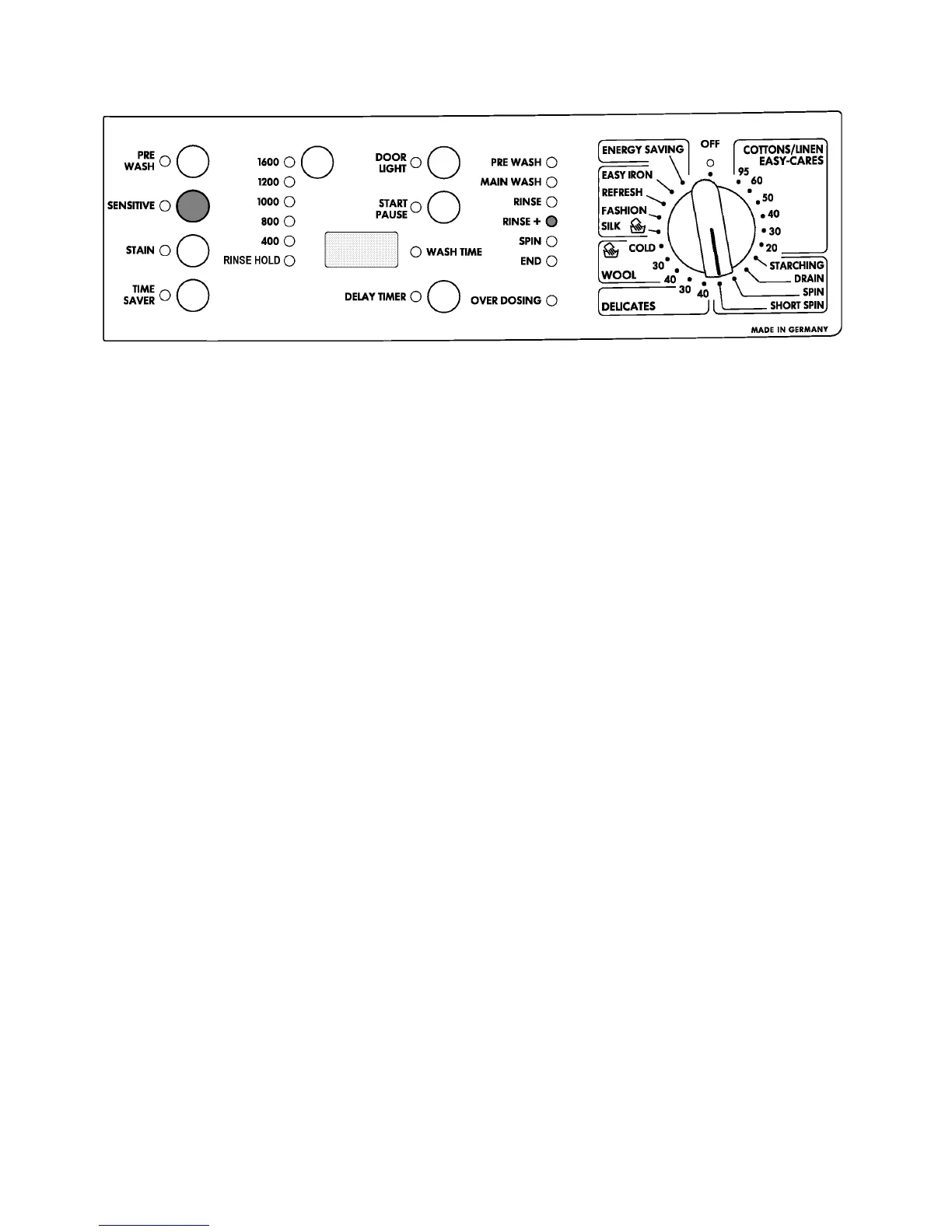
- Set selection switch to position short spin.
- Keep sensitive button pressed at least 5 sec.
- Immediately when pressing the button, the rinse+ LED is flashing.
- After 5 sec the flashing stopps and the LED is lit continuously for 5 sec.
- While the rinse+ LED is lit continuously, release the sensitive button.
- After the rinse+ LED has stopped lighting, the rinse+ cycle is cancelled.
Programming before program start:
- Set selection switch to position short spin.
- Keep sensitive button pressed at least 5 sec.
- To confirm the rinse+ LED is flashing for 5 sec.
- While the rinse+ LED is flashing, release the sensitive button.
- When the flashing has stopped, the rinse+ cycle is active.
In order to check whether the rinse+ cycle is activated, set the program selection switch to
short spin and press the sensitive button shortly. When the rinse+ LED is flashing,
the rinse+ cycle is activated.




 To Next Page