- 19 -
599 51 13-50 EN
DGS-TDS-N 11.2004 C.D. © Electrolux
Behaviour if a button is pressed:
Behaviour if the prorgam selection switch is turned:
4.5.2 Switch off the savety device
4.5 Safety device
4.5.1 Activate the safety device
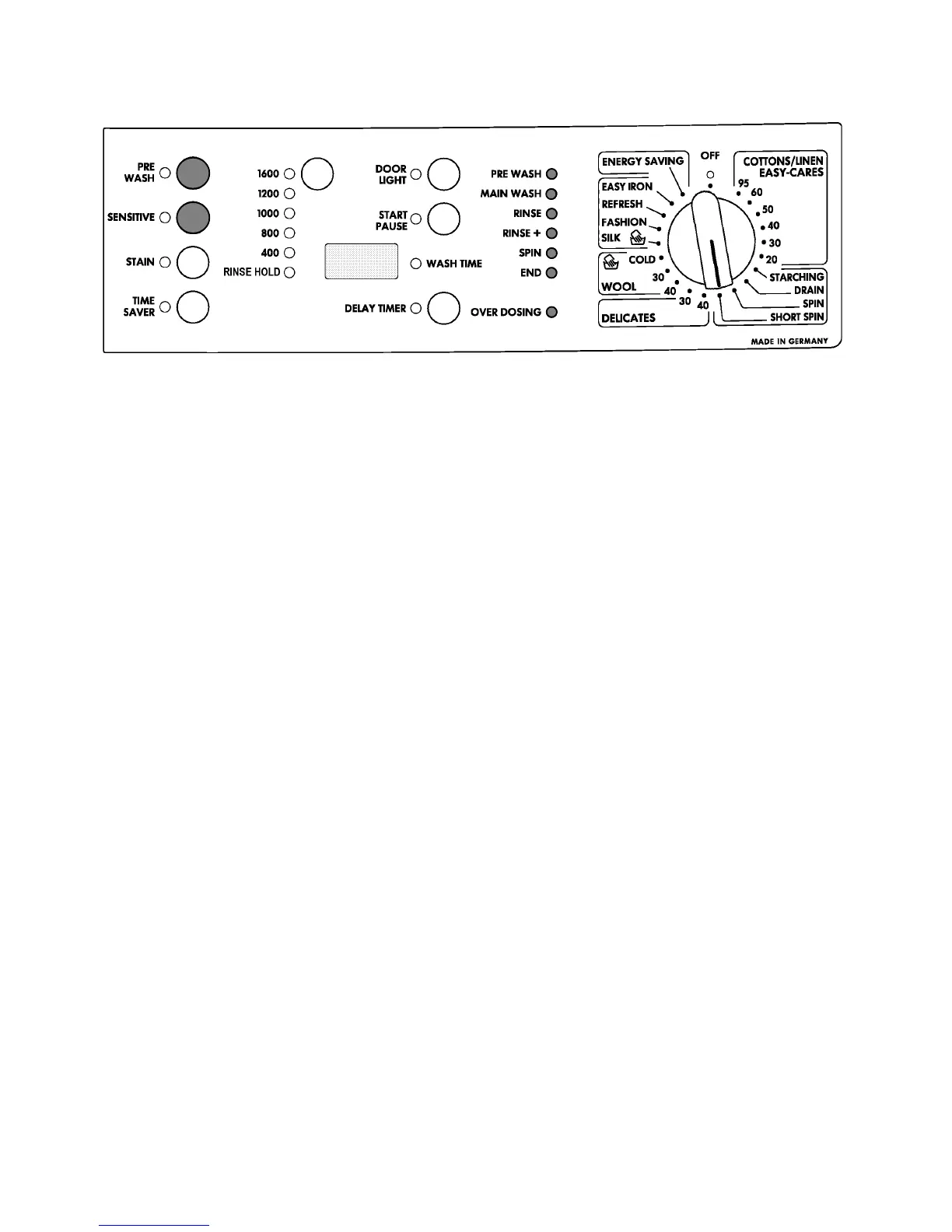
- You can activate it, if the program is started with the start button.
- Press the buttons prewash and sensitive at the same time for about 5 sec.
- You can see that the safety device is started if all LED's of the program duration display
are flashing for about 5 sec.
- After that the duration of the program is displayed in the usual way.
- The safety device is started and stays active also at the end of program.
- All LED's of the program duration display are flashing for about 5 sec.
After that the duration of the program is displayed in the usual way.
- All LED's of the program duration display are flashing, until the original position of
the program knob is selected.
- The program which was chosen before continues.
- It doesn't influence the savety device in it's activity, if the program knob is turned to the
position "OFF".
- Press the buttons prewash and sensitive at the same time for about 5 sec.
- You can see that the savety device is stopped if all LED's of the program duration display
are flashing for about 5 sec. and then the program duration display must illuminate
complete.
- After that the duration of the program is displayed in the usual way.




 To Next Page