7. Advanced System Operation
iConnect User Manual
37
2. Usingthearrowbuttons,scrollthroughthetransmitterlist.
3. Whenyouhavefinishedviewing,presstoexitthelist.
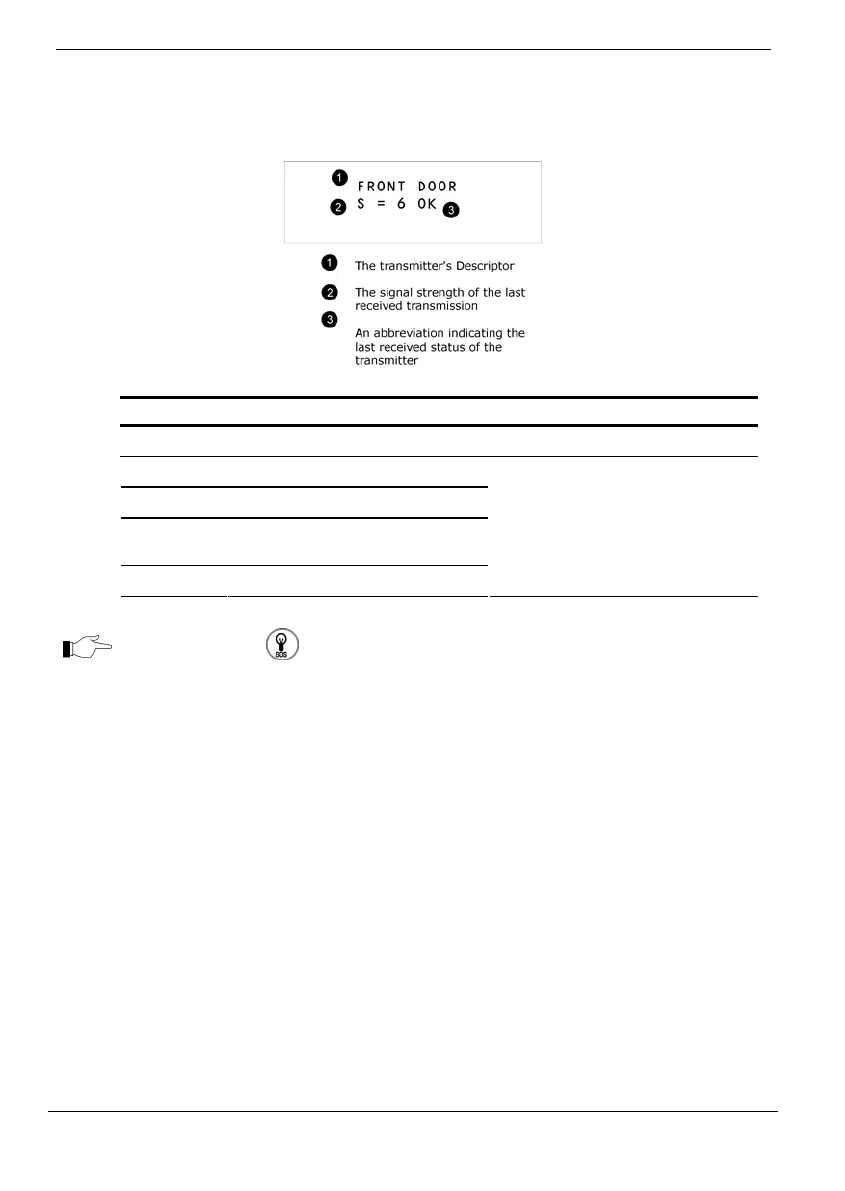
TheTXlistandTXtestdisplaythefollowinginformationoneachtransmitter:
Status Meaning
OK The transmitter is functioning correctly
TA Tamper condition
BT Battery low
OS The transmitter is out of
synchronization
NA The transmitter is inactive
Notify
your
installer
PressTheHAon keytodisplaythetransmitter’sdefaultdescriptor.
Thesecondutility,TXTestenablesyoutoidentifytransmitters.
In TX Test mode, each time a transmission is received, a chime is sounded and the
activatedtransmitterʹsdetailsaredisplayed.
ToinitiateTXTestmode:
1. FromtheServicemenu,select
Transmitters,TXTest[7072].
2. Activateatransmitter;thetransmitter’sdetailsaredisplayed.
3. Whenyouhavefinished,presstoexitTXTestmode.
Audio Volume
Toadjustthesensitivityofthemicrophoneandthevolumeofthespeaker:
1. Establishatwo‐wayaudioconnection.
2. Duringthetwo‐wayaudiosession,fromtheServicemenu,selectAudio
Volume[708].
3. Adjustthesettingaccordingtothefollowingtable.



 To Next Page