Lowz off
V
- - -
LPE
NPE
L - N
6. How to use.
6.1.
Screen Layout.
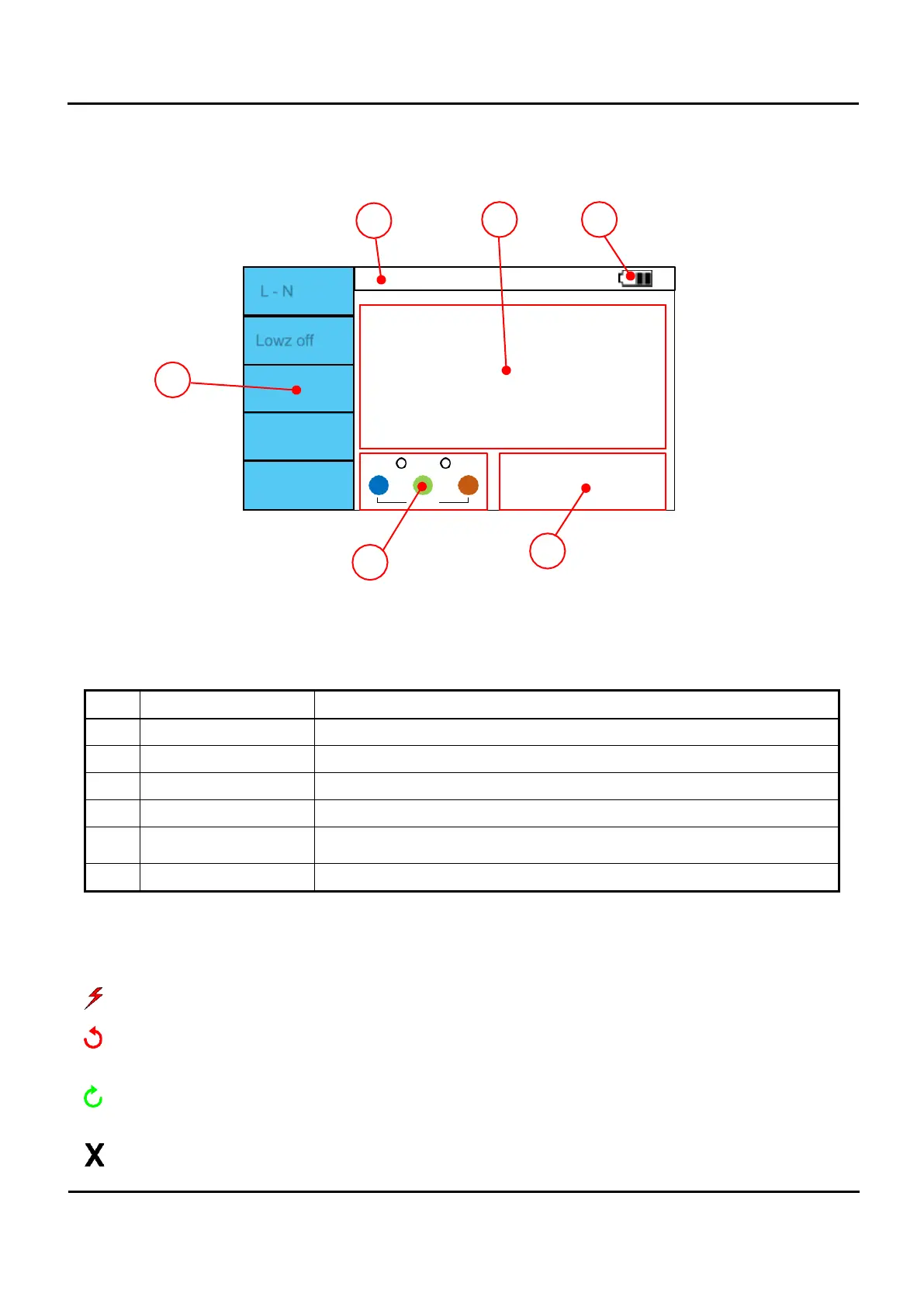
Figure 6.1 Display area.
No. Description Explanation.
1
F1-F5 menu Displays the menu for each function.
2
Function name Display the current function.
3
Battery level indicator Displays the current battery status.
4
Measurement Press the Test button to display the measured value.
5
Terminal indicator
Indicates which terminal should be used for the current function.
It also displays the status of the terminal.
6
Status indicator Error or high voltage during test and Pass, Fail… . Mark with symbol.
6.2.
Symbol.
: A symbol indicating that high voltage is being output via the terminal.
: Symbol displayed when L1, L2, and L3 are connected in the reverse direction to 3.2.1 when measured
with Phase rotation.
: Symbol displayed when L1, L2, and L3 are connected in the positive direction in 1.2.3 when measured
with Phase rotation
: Symbol displayed when phase rotation cannot be measured.


 To Next Page