TelevisGo Page 15/68
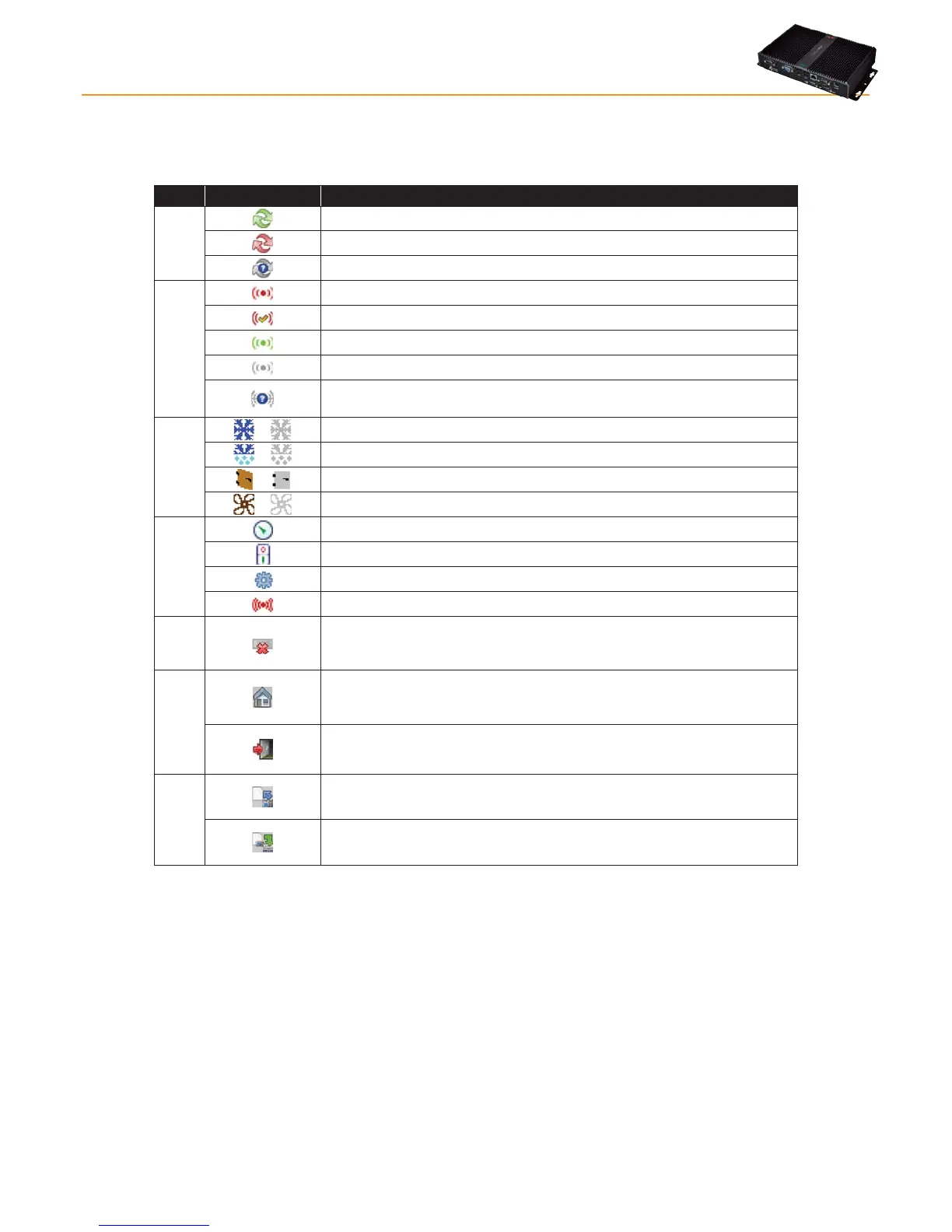
4.7 STATUS ICONS
The user interface has a series of indicator icons giving instant feedback on the status of the resource the icon represents. The icons
appearing in the different pages of the application are listed below, with an explanatory description:
Icon Description
Logging
status
TelevisGo data logging running.
TelevisGo data logging not running.
No controller network configured.
Alarm status
Indicates that the alarm is active.
Indicates that the alarm is active and has been noted by the user.
Indicates that the alarm in question has already ended.
Indicates that the alarm has never been active.
No alarm status information available.
(check status of plant connection and data logging).
Resource status
/
Compressor: On / Off.
/
Defrost: On / Off.
/
Port: Open / Closed.
/
Fans: On / Off.
Inputs and
regulators
Analogue input.
Digital input.
Associated device.
Alarm-type resource.
NO LINK
Nolink: indicates that the device in question cannot be reached.
Access
to the application
Home: return to start page (plant data - welcome page or page specified by
the user).
Exit: disconnects the user from the application and goes back to the login
page display.
Saving
configuration
Save naming: used to save the network naming and alarm delay settings
directly on the TelevisGo device.
Apply naming: used to apply previously saved naming and alarm delay
settings to the current network.



 To Next Page