TelevisGo Page 54/68
7.2.7 DOWNLOAD DATA
To download the data archive or alarm log, go to:
Data Historical Table (Extract data from historical table)
Data Historical Graph (Extract from historical graph)
Data Energy Report (Extract data from Energy Report)
Data Energy Graph (Extract data from Energy Graph)
Alarms Alarm Log (Extract data from Alarm Log)
In all 3 cases, click the icon
or Export. On clicking, the device saves data for the selected period to PC as a Csv file (which can be
opened in Microsoft Office Excel).
7.3 NETWORK COMMANDS FOR DEVICES
To send commands to devices, go to:
Functions Commands
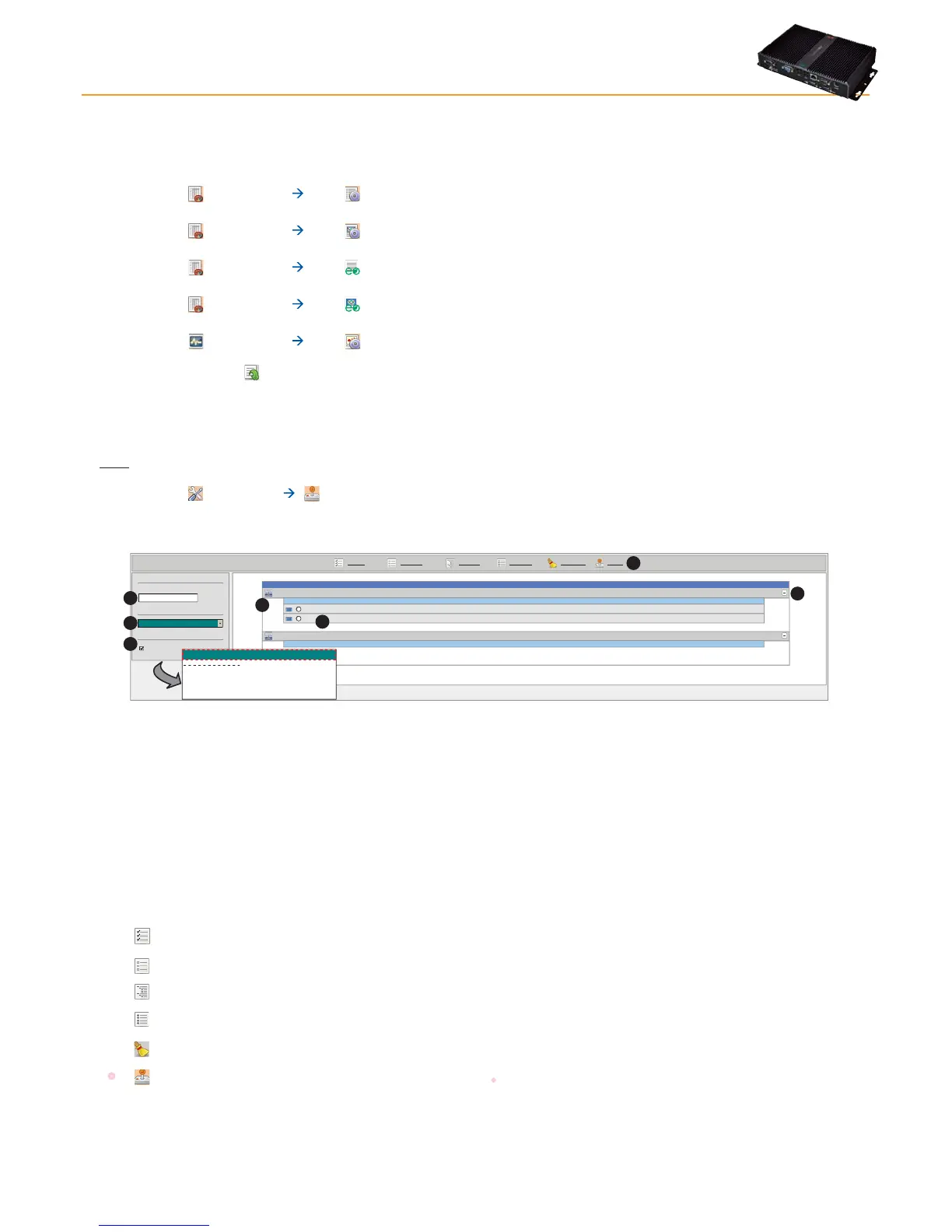
The following screen opens:
Page last update on: 7.39.34
Expand all Collapse all Cancel filters
LAN Adapter
Interface
ID Protocol
0
Micronet
Address
192.168.0.1
Fieldbus
LanAdapter
Address DescriptionName (short)
02:00 0.02:00 ID 974LXID 974LX
Compact
999
BusAdapterN/A
Address DescriptionName (short)
02:01 0.02:01 ID 974LXIC 974LX
Select all Deselect all
Filter devices
Commands
Show helpers
Description
Show table header
Execute
FNC00011 Keyboard Locked
FNC00012 Keyboard Unlocked
FNC00015 Manual defrost activation
Select a command
Select a command
A
B
C
D
E
F
G
The following controls will be visible:
• (A) Device filters, to filter by device description.
• (B) Commands, to select the command to be sent to the device
(the list groups together all commands available for all network devices).
• (C) View headings, to view/hide headings.
• (D) View list of network devices grouped by interface.
• (G) Expand/hide devices in an interface.
Devices can be selected using the relative check box to the left of the address (E).
The following buttons are presented at the top (F):
•
Select All: Select all devices in the list.
•
Deselect All: Deselect all devices in the list.
•
Expand All: to view the devices of all interfaces in the list.
•
Collapse All: to hide the devices of all interfaces in the list.
•
Cancel Filters: to restore the display of all devices and cancel device filters.
• Run: to send the selected command to selected devices.



 To Next Page