24
・
In places where the subject is exposed to bright sunlight (e.g. near a window), or
extremely bright lights, the brightness of the screen may not dim sufficiently, even when
the iris is closed from the touchscreen or the [ ] button on the remote control is
pressed.
In such cases, to adjust the amount of light, close the curtains or move the subject
away from the light.
・The brightness adjustment is not possible when the external input is selected in the input
selection menu.
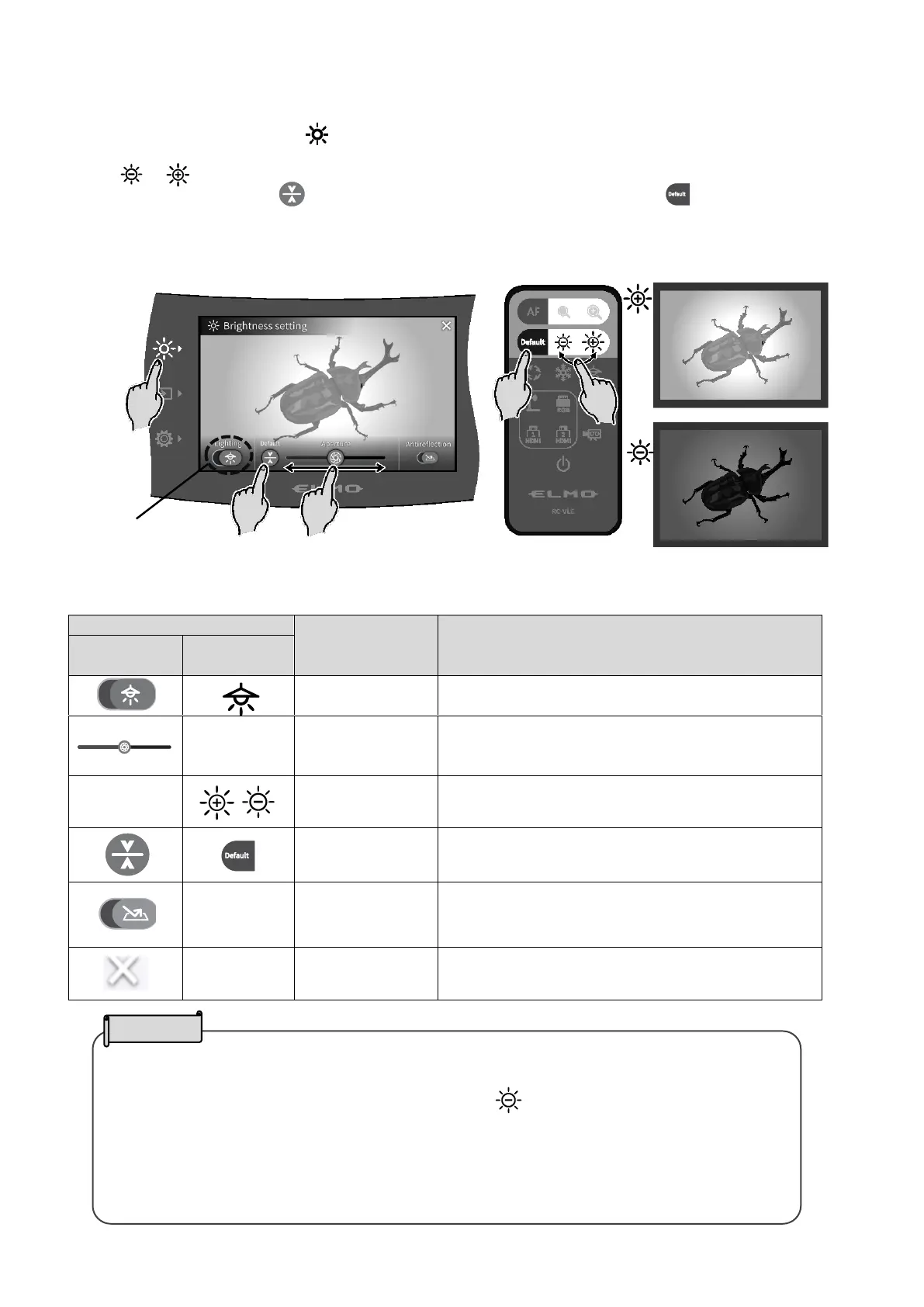
◆ADJUSTING THE BRIGHTNESS
Press the Brightness button [ ] on the operating panel to display the menu for brightness
adjustment. The image brightness can be adjusted by sliding the bar to the right or left, or by using
the [ / ] buttons on the remote control.
Press the Default button [ ] on the operating panel or the Default button [ ] on the remote
control to initialize the brightness settings.
<Operating panel> <Remote control>
To ON/OFF the LED lighting.
OFF ← → ON
To adjust the iris with a slide bar to change the
brightness.
Iris close (dark) ← → Iris open (bright)
To change the brightness of the camera image.
To initialize the brightness settings.
To ON/OFF the anti-reflection function.
(Reduce light reflection)
OFF:Disable ← → ON:Enable
To return to the camera image.



 To Next Page