n
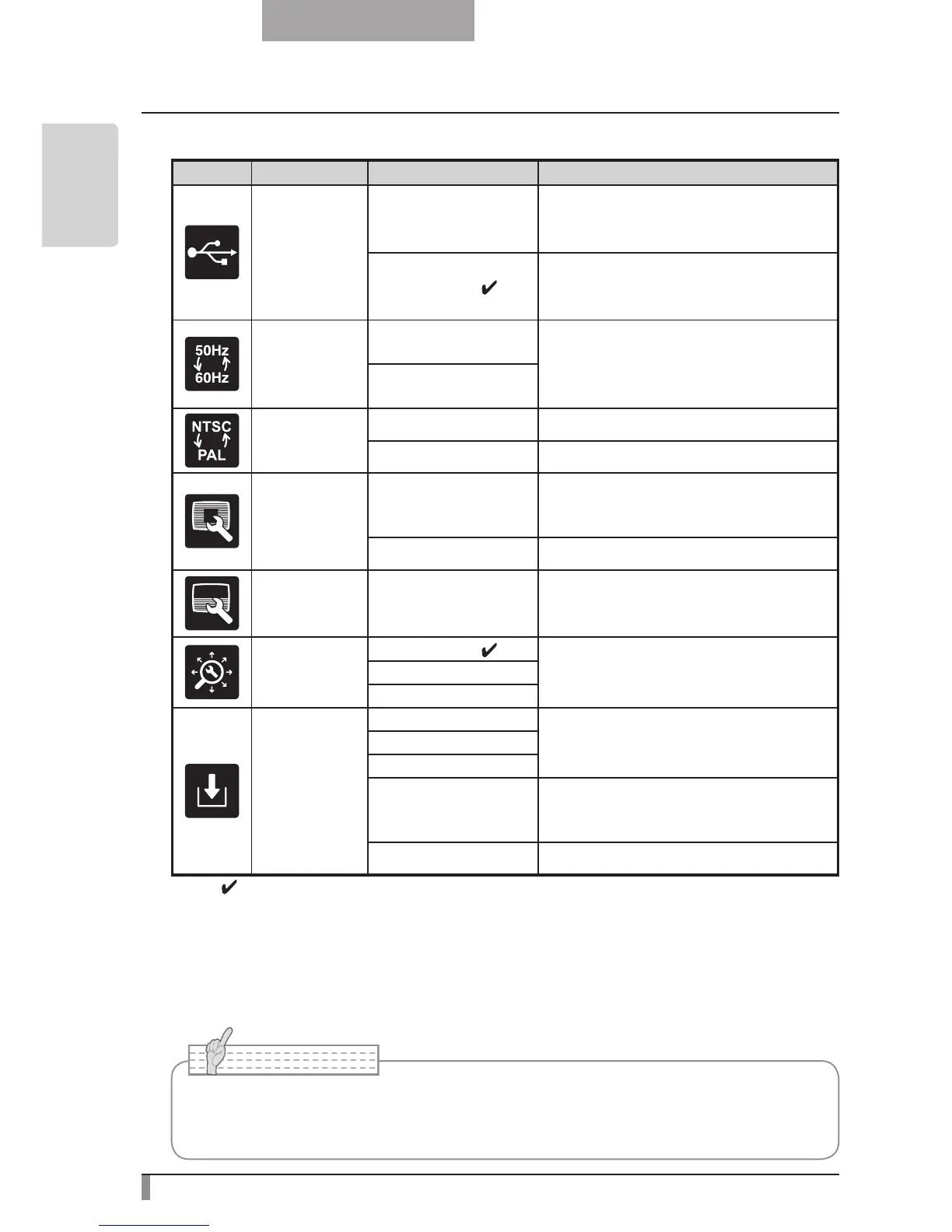
Function Setting Menu
Icon
Name Selection Item Function
USB Mode
Mass Storage
After connecting to a PC via a USB, data
on the SD card loaded in device can be
sent to the PC.
Application
(
∗
)
After connecting to a PC via a USB, it is
possible to take control of device and
import images from PC.
Flickerless
60Hz
To reduce fluorescent lamp flickering
due to the power supply frequency.
Select the same value as used for the
power supply frequency.
50Hz
Video Format
NTSC Video output NTSC.
PAL Video output PAL.
Highlight
Darkness -
To set the darkness of the masked sec-
tion using the level bar, except when us-
ing the Highlight display.
Size - To set the size of the Highlight display.
Mask Darkness -
To set the darkness of the masked sec-
tion using the level bar.
Scroll
x2
(
∗
)
To set the digital zoom magnification for
scroll display to 2x, 3x, or 4x.
x3
x4
Preset
1
To store preset settings in the memory of
the selected number.
2
3
Power On
The preset settings stored here are auto-
matically called the next time the power
is turned on.
Exit
Exits without saving settings.
* The " " symbol indicates the factory settings.
• Selecting [Power On] or [Default] from [Call] provides the factory settings when the
power is turned on. However, for items with (
∗
) in the [Factory Settings] column, the
last status set is maintained.
The default settings for Flicker Correction and Video Format differ depending on the region.
[North America Specifications]
Flicker Correction – 60Hz, Video Format - NTSC
[European Specifications]
Flicker Correction – 50Hz, Video Format – Pal



 To Next Page