25
PART
NAMES AND
FUNCTIONS
English
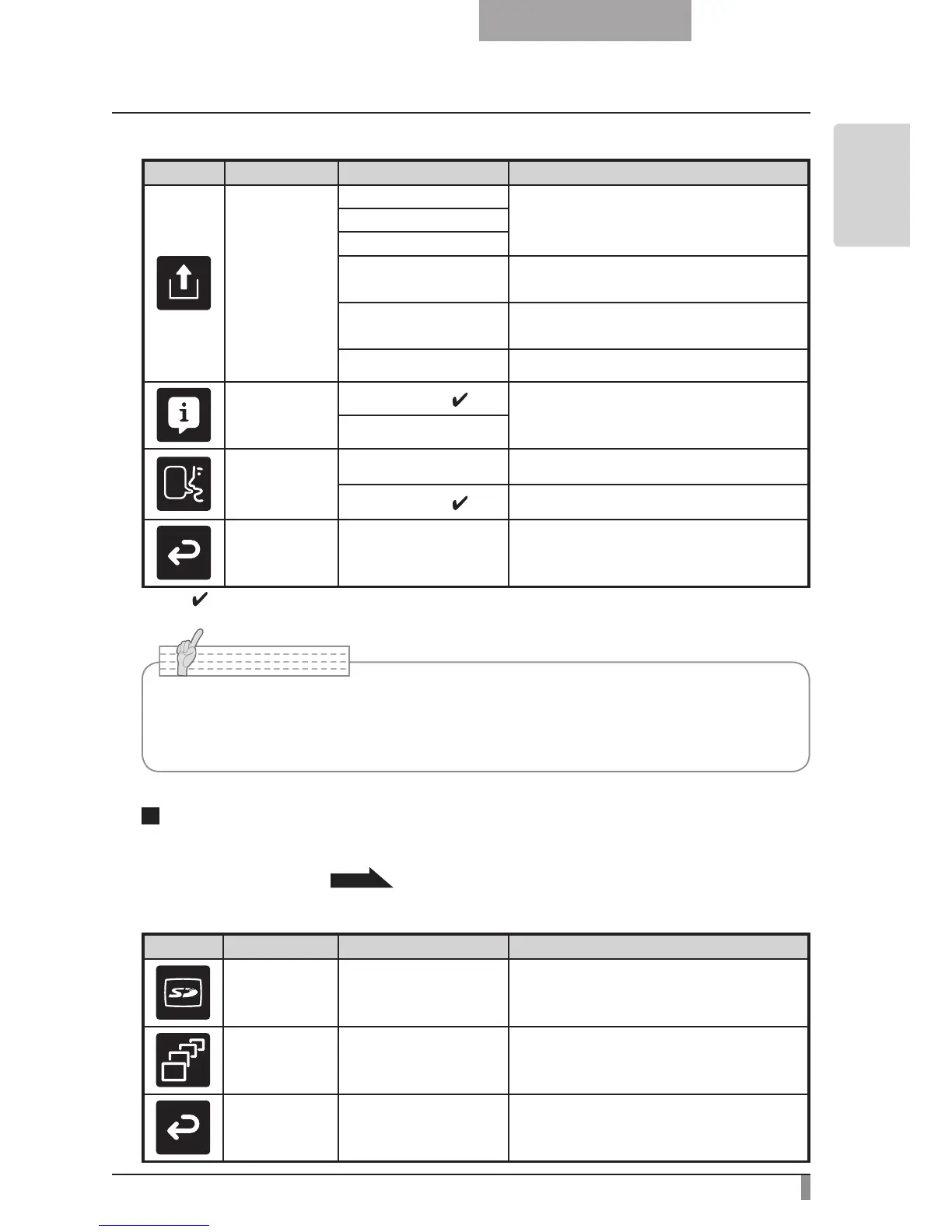
Icon
Name Selection Item Function
Call
1
To call the setting saved in the memory
of the selected number.
2
3
Power On
Current settings are returned to the
Power On status. (
∗
)
Default
Current settings are returned to the De-
fault status. (
∗
)
Exit Exits without calling settings.
Guide
On
(
∗
)
When turned on, the device's operating
status and an explanation of the icons is
displayed on the screen.
Off
Language
Japanese To display the OSD menu in Japanese.
English
(
∗
) To display the OSD menu in English.
Back
To return to the OSD menu display top
menu.
* The "
" symbol indicates the factory settings.
After using Image select to change the output image to SD Mode, press the "MENU" button
to display the OSD menu.
P.54
SD Mode OSD Menu
Icon
Name Selection Item Function
SD SD Menu
To display the setting menu for SD im-
ages.
Slide Show Slide Show Menu
To display the setting menu for Slide
Show.
Back - Hides the OSD menu display.
n
OSD Top menu
• Selecting [Power On] or [Default] from [Call] provides the factory settings when the
power is turned on. However, for items with (
∗
) in the [Factory Settings] column, the
last status set is maintained.



 To Next Page