37
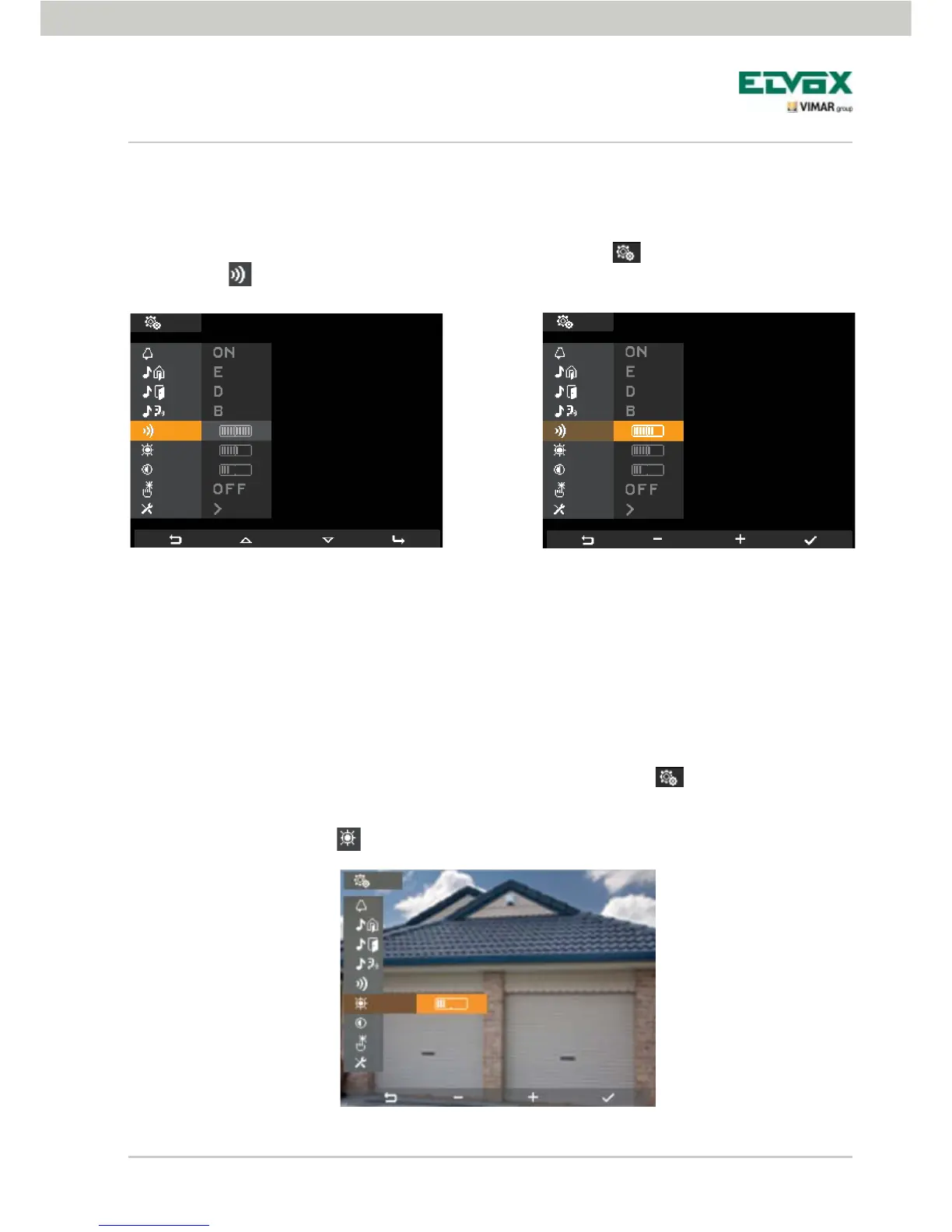
Ringtone volume adjustment.
The volumes of the ringtones described above are adjusted in one and therefore all three will be given the
same volume level.
To set the volume, starting from the main screen, tap the softkey D (icon
) and using B and C
select the icon ; then tap D to confirm.
Using the softkeys B and C set the volume whose level will be highlighted by the horizontal bar:
- short pressure = single increase or decrease;
- long pressure = gradually faster increase or decrease.
Lastly tap D to confirm.
Setting the video parameters.
This menu is used to set the brightness and contrast for optimal viewing of the image on the display.
To set these parameters, starting from the main screen, tap the softkey D (icon ).
• Setting the brightness.
Using B and C, select the icon
and confirm by tapping D.
Confi guration of the video door entry unit
Fig. 49 - Selecting the volume of ringtones Fig. 50 - Adjusting the volume of ringtones
Fig. 51 - Adjusting the brightness


 To Next Page