EasyManua.ls Logo

Emerson Micro-Motion 2400S - Page 34

Emerson Micro-Motion 2400S
198 pages
Print Icon
To Next Page IconTo Next Page
To Previous Page IconTo Previous Page
Loading...
26 Micro Motion
®
Model 2400S Transmitters with Analog Outputs
Flowmeter Startup
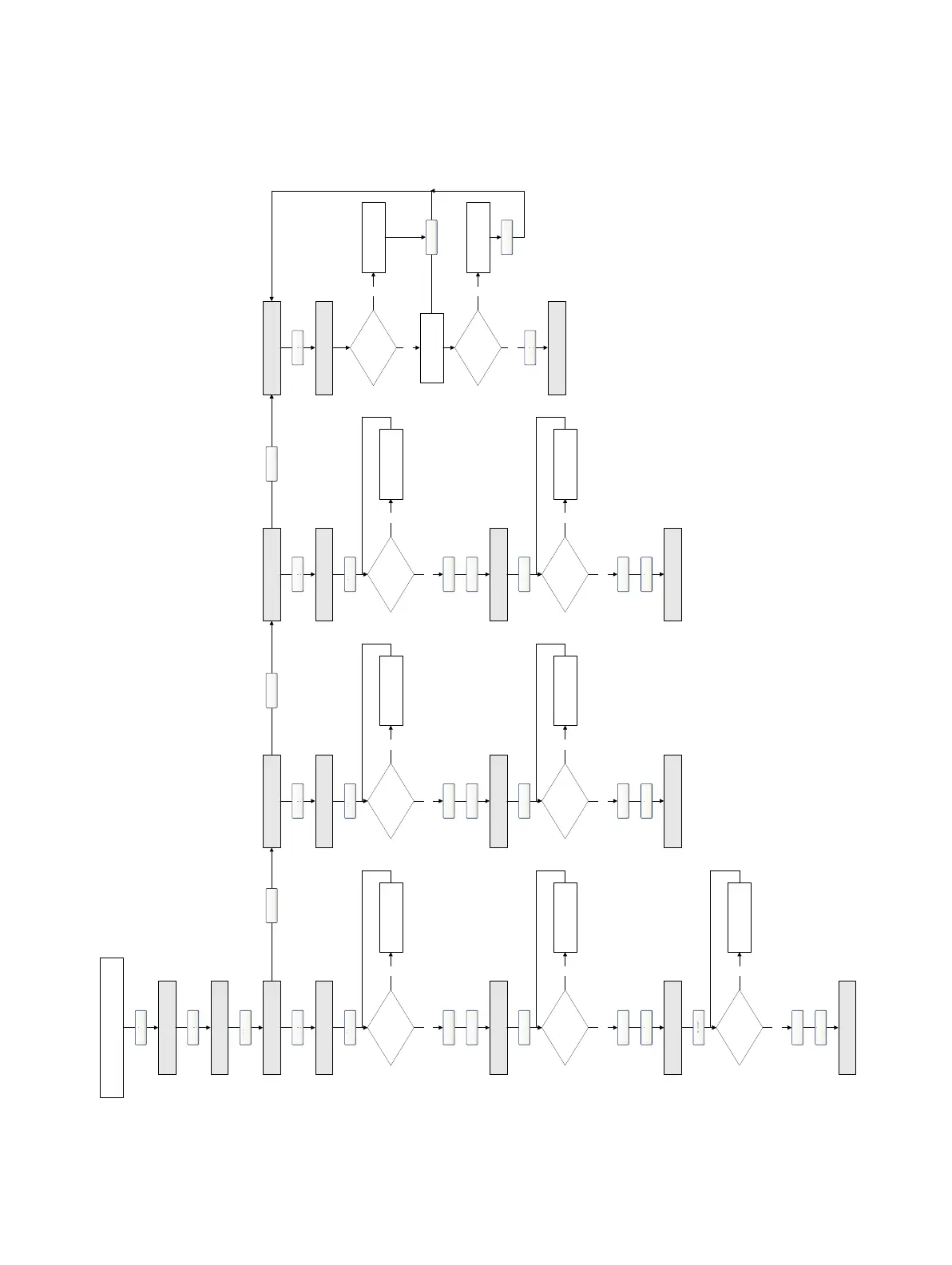
Figure 5-2 Display – Loop test procedure
Scroll and Select simultaneously
for 4 seconds
OFFLINE SIM
Yes
Select
SET MAO1/2 SET FO
(1)
Scroll
SET DO
(1)
READ DI
(1)
Scroll
Select
SET 12 MA
Yes
SET 20 MA
Select
Select
Scroll
No Troubleshoot
Correct at
receiving device?
Yes
Yes
Select
Select
Scroll
No Troubleshoot
Correct at
receiving device?
Yes
SET 4 MA
Yes
Select
No Troubleshoot
Correct at
receiving device?
Yes
Select
Scroll
SET 10 KHZ
Yes
Select
Select
No Troubleshoot
Correct at
receiving device?
Yes
SET 1 KHZ
Yes
Select
No Troubleshoot
Correct at
receiving device?
Yes
Select
Select
Scroll
Scroll
Scroll
SET OFF
Yes
Select
Select
No Troubleshoot
Correct at
receiving device?
Yes
SET ON
Yes
Select
No Troubleshoot
Correct at
receiving device?
Yes
Select
Select
Scroll
EXIT
EXIT EXIT
Scroll
DI ON/OFF
EXIT
Correct?
Yes
Troubleshoot
Toggle remote
input device
No
Select
Select
Correct?
Yes
TroubleshootNo
Select
Scroll
OFFLINE MAINT
Scroll
Scroll
(1) Displayed only when Channel B is
configured for this I/O type.

Table of Contents