28 Micro Motion
®
Model 2400S Transmitters with Analog Outputs
Flowmeter Startup
5.4 Trimming the milliamp output
Trimming the mA output creates a common measurement range between the transmitter and the device
that receives the mA output. For example, a transmitter might send a 4 mA signal that the receiving
device reports incorrectly as 3.8 mA. If the transmitter output is trimmed correctly, it will send a
signal appropriately compensated to ensure that the receiving device actually indicates a 4 mA signal.
You must trim the mA output at both the 4 mA and 20 mA points to ensure appropriate compensation
across the entire output range.
To trim the output:
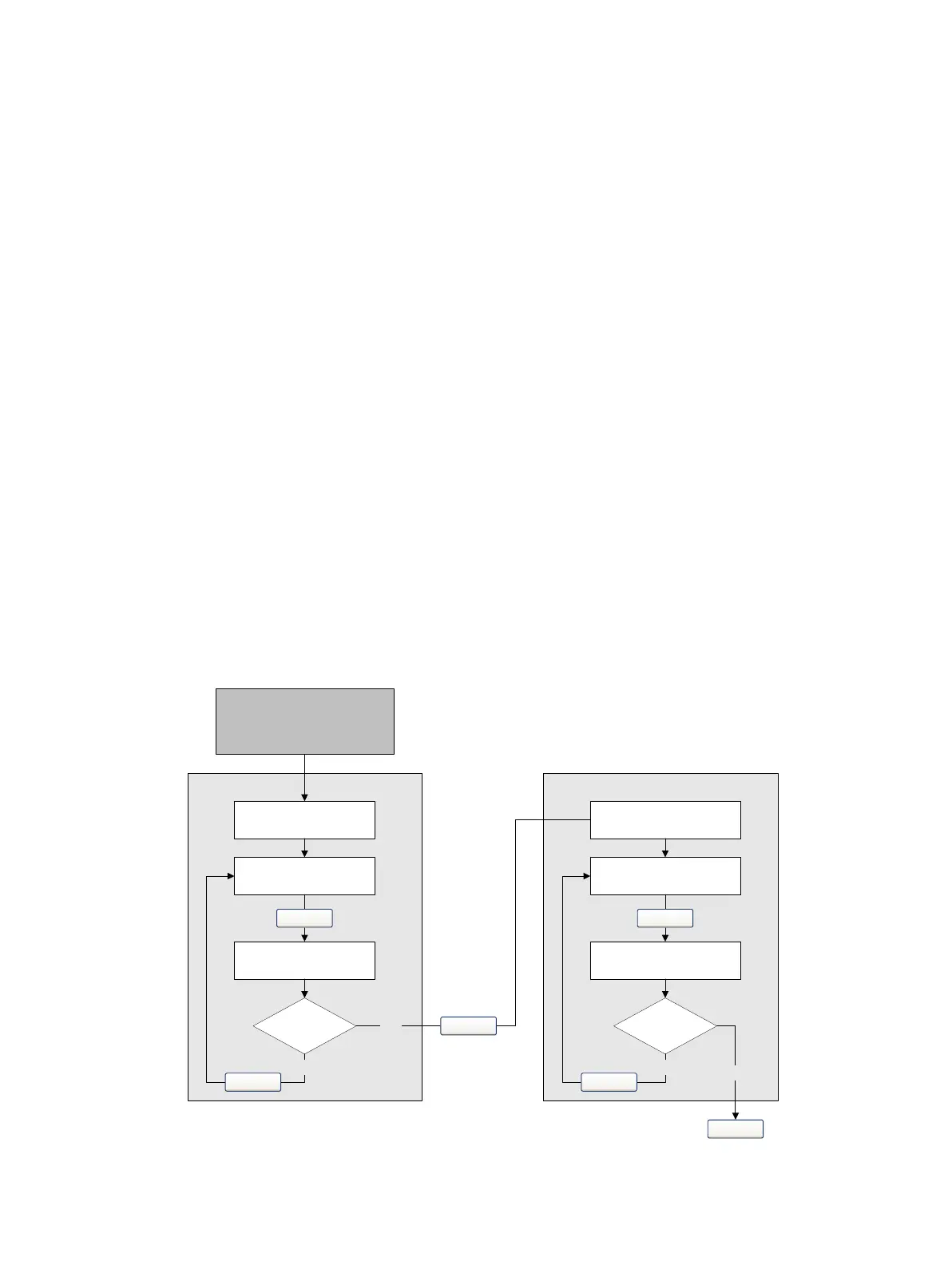
• Using ProLink II, see Figure 5-5.
• Using the Communicator, see Figure 5-6.
Additionally, if you are using a Communicator, you can perform a scaled AO trim. The scaled AO
trim is used when the reference meter’s low and high values are not 4 and 20 mA. To perform a scaled
AO trim, see Figure 5-7.
Note the following:
• If you are connected to the transmitter via HART/Bell 202, the HART/Bell 202 signal will
affect the reading. Disconnect from the transmitter before reading the output, then reconnect
and resume the trim after taking the reading. If you are using any other protocol, this is not
required.
• Any trimming performed on the output should not exceed ± 200 microamps. If more trimming
is required, contact Micro Motion customer support.
• If you are using the Communicator, the receiving device value can contain up to two decimal
places.
Figure 5-5 ProLink II – mA output trim procedure
Read mA output at
receiving device
Read mA output at
receiving device
Equal?
Enter receiving device
value in Enter Meas
Read mA output at
receiving device
Read mA output at
receiving device
Equal?
Enter receiving device
value in Enter Meas
4 mA trim
20 mA trim
Yes
No
Yes
Next
Next
Next
ProLink >
Calibration >
Milliamp 1/2 Trim
Back
No
Back
Finish



 To Next Page