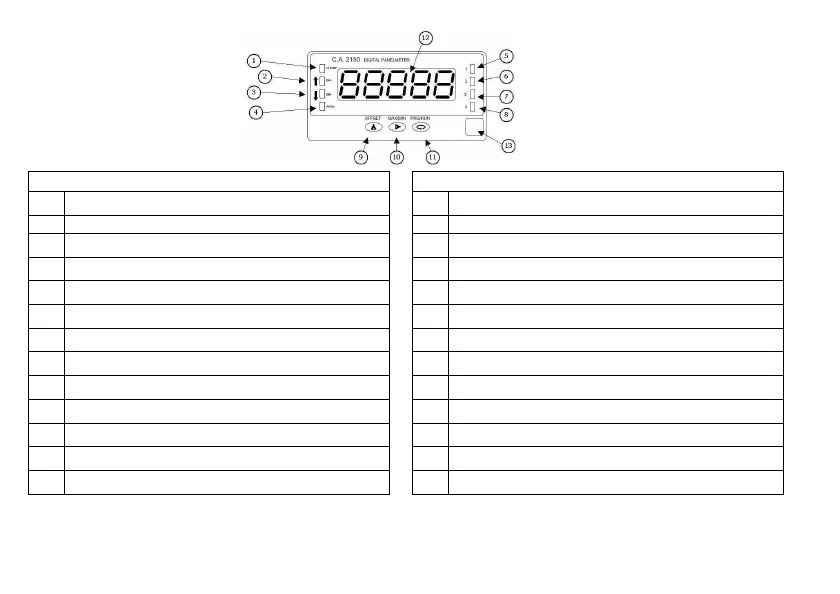
2.3 Instrument front view
-Pro- Run
1 Not active in Programming mode
1 AC measurement indication (TRMS)
2 Not active in Programming mode
2 Displayed value corresponds to max. value
3 Not active in Programming mode
3 Displayed value corresponds to min. value
4 Indicates that you are in Programming mode
4 Not active in Run mode
5 Indicates SET 1 is being programmed
5 Indicates that SET 1 is activated
6 Indicates SET 2 is being programmed
6 Indicates that SET 2 is activated
7 Indicates SET 3 is being programmed
7 Indicates that SET 3 is activated
8 Indicates SET 4 is being programmed
8 Indicates that SET 4 is activated
9 Key that allows modifying numerical value
9 Allows direct access to SETPOINTS value prog.
10 Key that allows moving the blinking digit
10 Allows visualization of of MAX and MIN value
11 Key that allows stepping forward in prog. Menu
11 Allows access to Programming mode
12 Display tricolor
12 Display tricolor
13 Label with engineering unit
13 Label with engineering unit


 To Next Page