5.2.3 Programming the functions
Once the user h
as acceded the menu of logic functions configuration, he can select, by
pressing the key, a function among those of the table.
If the user selects the logic functions 7, the instrument will display any of these 2 messages.
The second, when activated the
corresponding function, will add to the corresponding value
sent to the printer the order to print date and time.
à
Example: CA2150-E with value of 1234.5
Message in Hexadecimal sent from the CA2150-E output when logia function 7 is activated.
With
τ−οφφ
τ−οφφτ−οφφ
τ−οφφ
the chain of characters is: 0x18, 0x23, ”01”, 0x0D, “NET: +1234.5”, 0x0D
With
τ−ον−
τ−ον−τ−ον−
τ−ον−
the chain will be: 0x18, 0x23, ”01”, 0x0D, “NET: +1234.5”, 0x0D, 0x18, 0x4A, 0x06, 0x18, 0x48
CA2150-E has to be programmed to work under protocol ASCII (Prt1) y (dLY 1). See Page 44
Example ticket without date
#01
NET: +1234.5
Example ticket with date
#01
NET: +1234.5
Time 15:07 Date 11/04/05
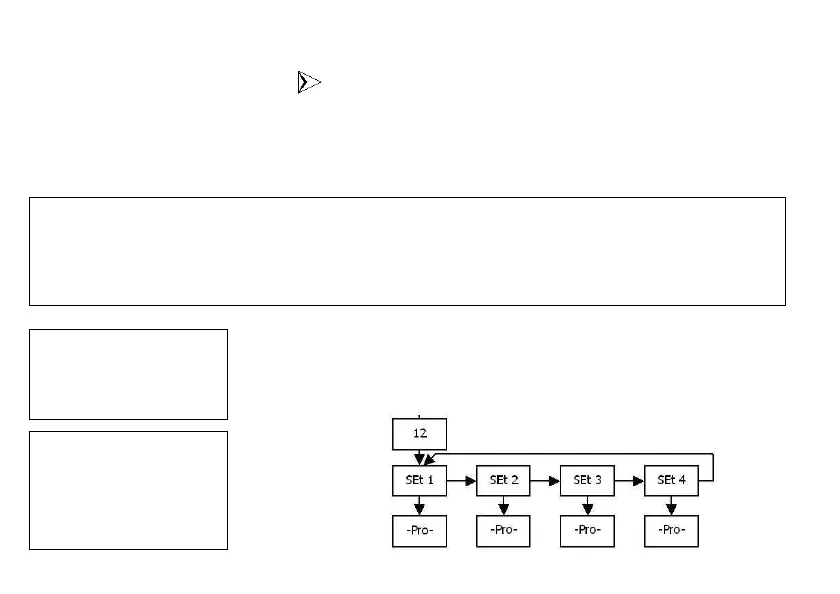
If the selected function is number 12 and any of the 2 Relays SPDT, 4 Relays SPST, 4
Output NPN, 4 Output PNP opti
ons is installed, it will allows us to choose one of the two
or four setpoints available depending on the option, which will be the value displayed by
the instrument when this function is activated.


 To Next Page