16
Usingtheprovidedhardware,theEAP900Hcanbeattached
to a ceiling or wall.
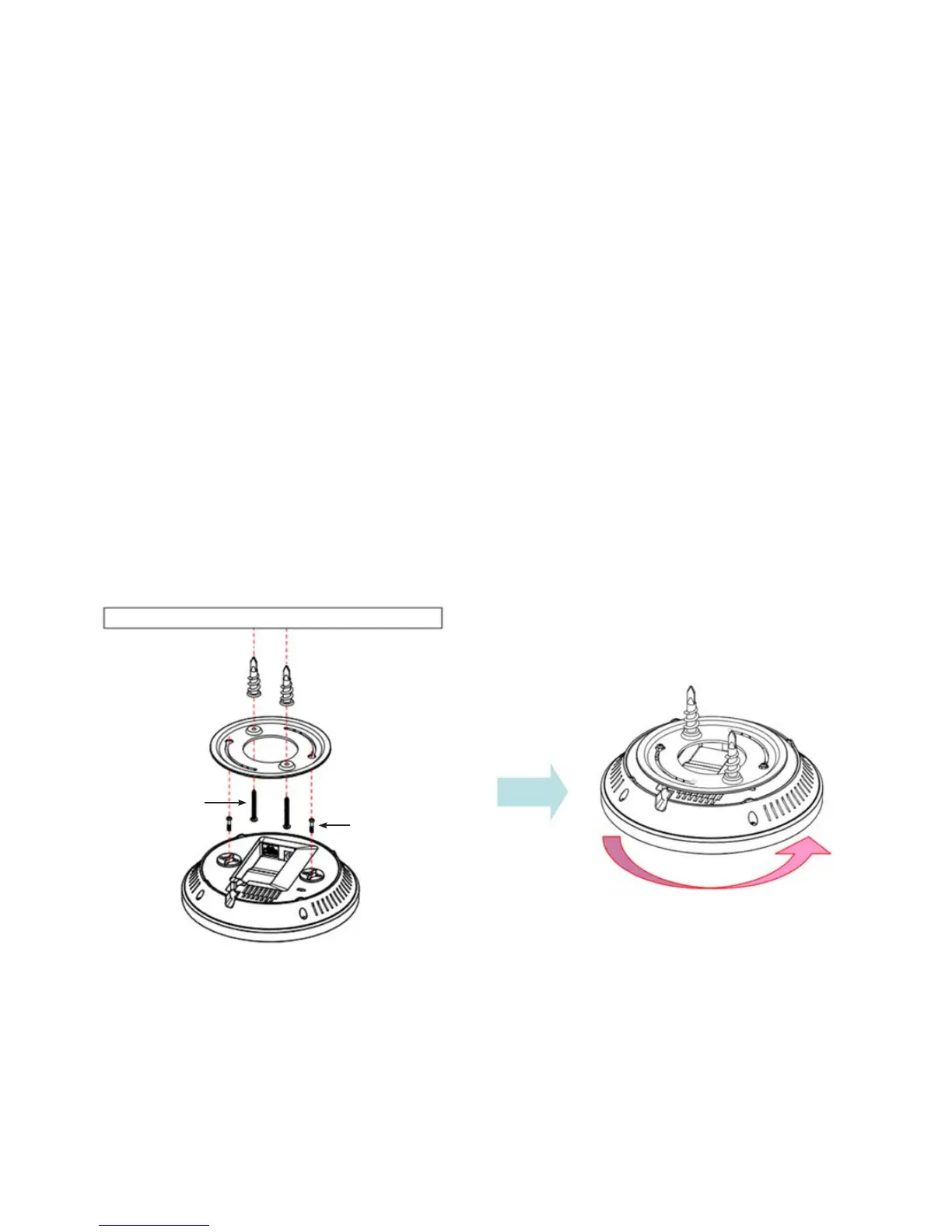
To attach the EAP900H to a ceiling or wall using
the mounting bracket:
1. Attach the mounting bracket to the wall or ceiling using
the provided wall/ceiling mounting hardware kit.
2. Insert the provided short screws into the bottom cover
of the EAP900H.
Leave enough of the screws exposed to ensure that the
unit can be attached to the mounting bracket.
Ifextraspaceisrequired,usetheprovidedspacersandlong
screws from the T-Rail mounting hardware kit to increase
the space between the unit and the mounting bracket.
3. Mount the EAP900H on the mounting bracket by rotating
the unit clockwise about 90 degrees to secure it in place.
Mounting the EAP900H
Wall
Mounting Screw
Lock the EAP900H by revolving
Mounting Bracket
P2.6*12 Screw
P3.5*32 Screw



 To Next Page