eno one 2/r - user manual
REV.05
32
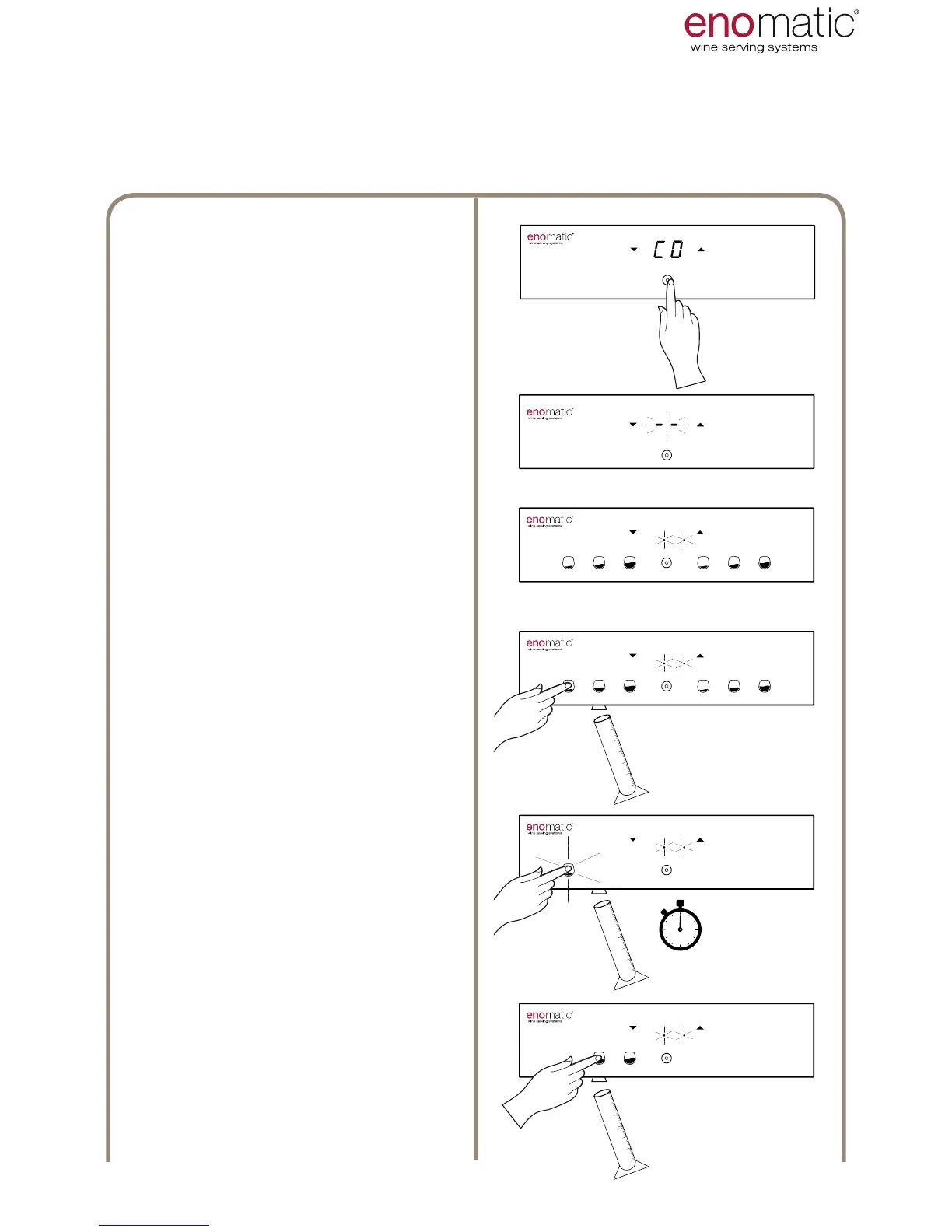
Having entered the "F.4 function"
and having chosen "CO" (para. 27)
press the multifunction button (Z).
Flashing of the display lines con-
rms successful programming of the
setting.
The Dispenser is now in program-
ming mode, indicated by ashing of
the two points on the display.
Place a glass or a graduated cylin-
der under any dispensing nozzle (S)
and press one of the dose dispens-
ing buttons (V) until the desired vol-
ume of liquid is obtained.
If the rst pressing lasts less than
half a second, the dose will not
be perceived and an error will be
reported with rapid ashing of all
the light buttons.
In the next 5 seconds, if the dis-
pensed volume is insufcient, it
is possible to increase it either by
pressing once more or with short
sequential pressings.
After 5 seconds from the last
dosing, the Dispenser will recognise
the dose and will prepare for the
next one. The button relating to the
dose just stored is now switched off.
Repeat the same operation for the 2
remaining buttons.



 To Next Page