eno one 2/r - user manual
REV.05
28
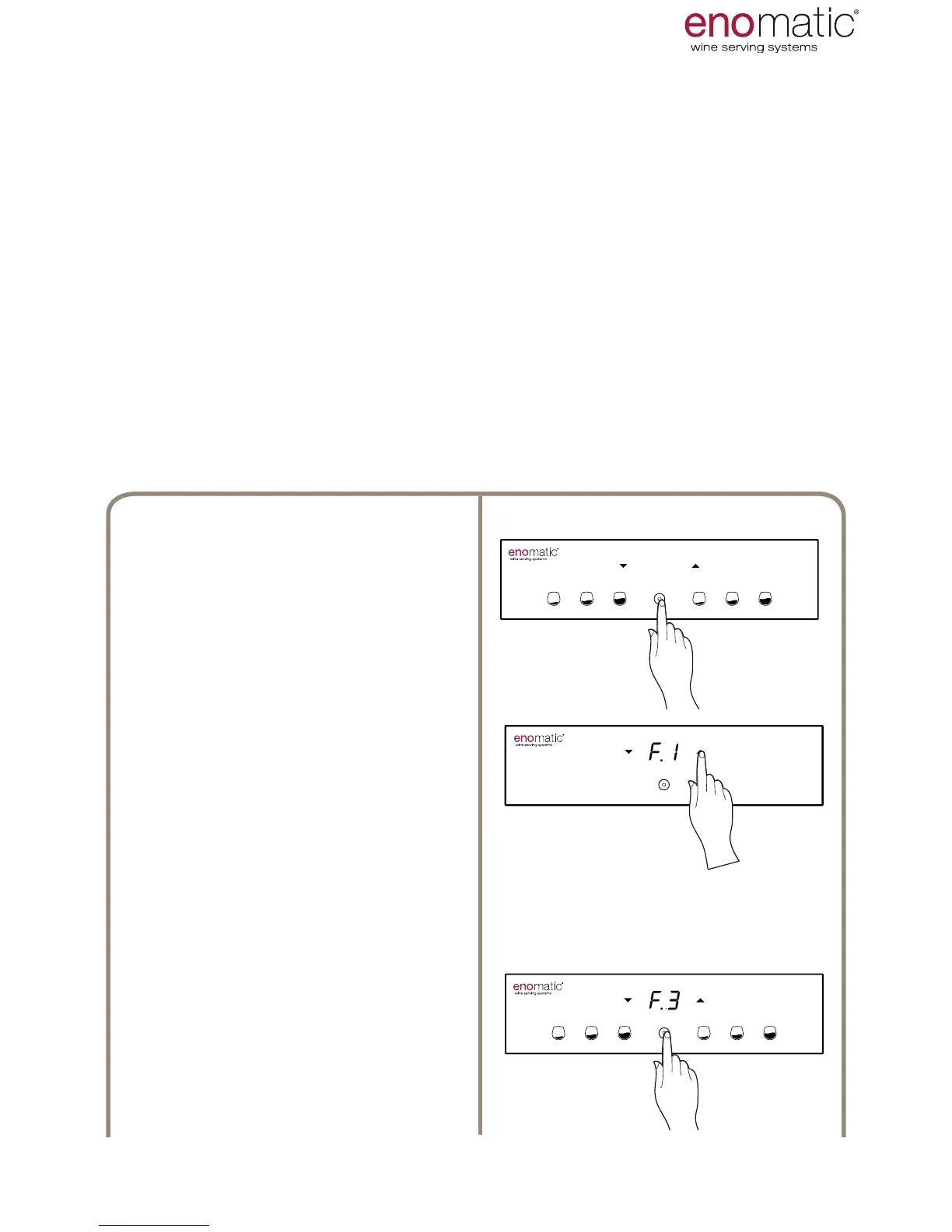
25. F.3 FREE OR PROGRAMMED DOSE SETTING
[PO default setting]
From the operating state press the
multifunction button(Z) for 3 seconds
and release it as soon as the letters
"F1" are displayed.
Scroll with the arrow buttons (X, Y)
to select the function "F.3"
Press the multifunction button (Z)
to access the function chosen.
3’’
The dispenser can provide wine in two different modes.
• FREE DOSE "FE": Dispensing starts with pushing only of the medium dose
button (V2) of the two dispensing units and ends with its release. Hold the
button until the desired quantity is provided.
• SCHEDULED DOSE "PO"
: When the dose button (V), is pressed, the Dis-
penser provides the pre-set quantity with the default values, pressing again
during dispensing instantly interrupts the dosing in progress. The following are
the default programmed doses:
USE AND OPERATION
Small dose.........30ml [1.06 .oz] ± 3%
Medium dose.......60ml [2.11.oz] ± 3%
Large dose..........90ml [3.17 .oz] ± 3%
(values found at start of bottle)



 To Next Page