eno one 2/r - user manual
REV.05
35
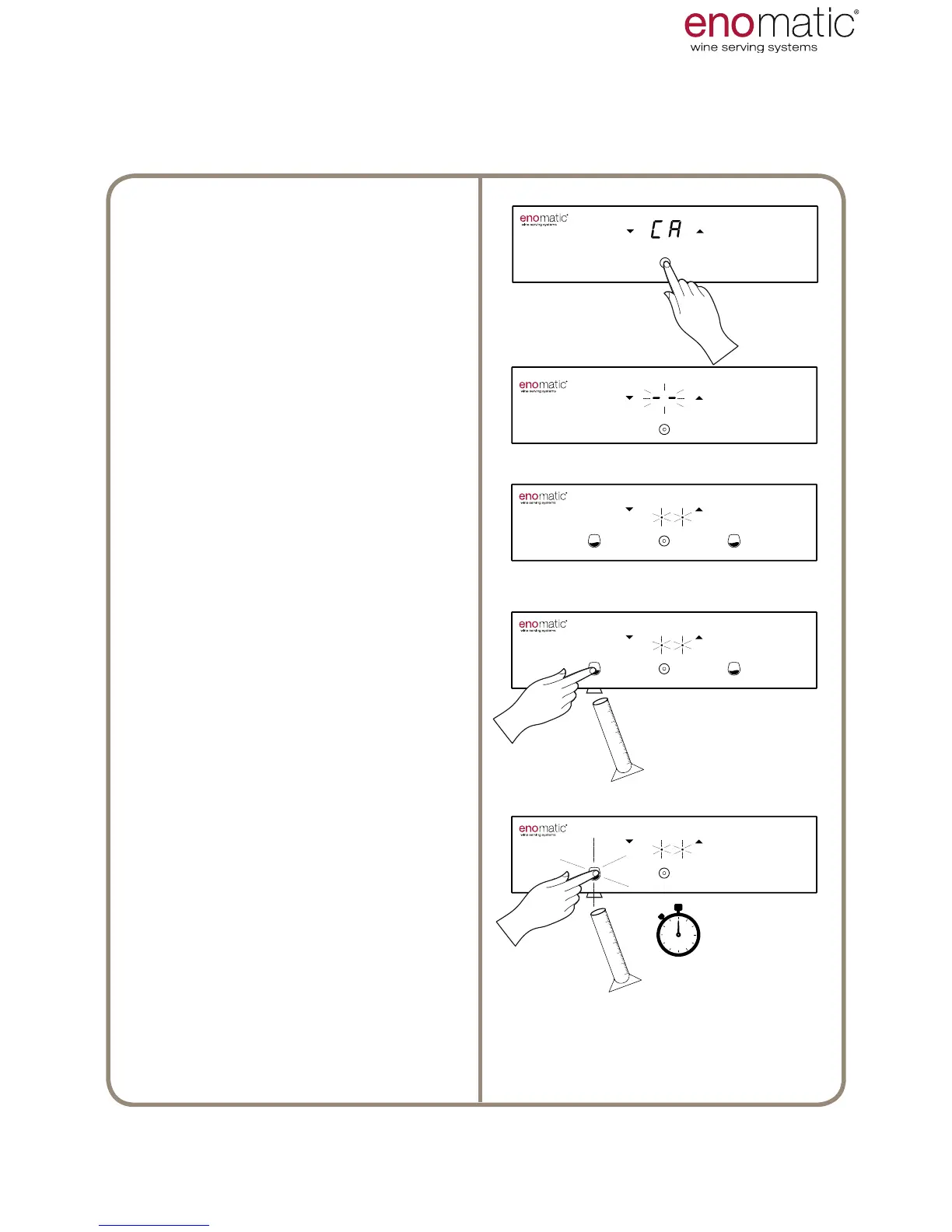
30. CA (copy all) DOSE PROGRAMMING
Having entered function "F.4 " and
having chosen "CA" (para. 27) press
the multifunction button (Z).
Flashing of the display lines conrms
successful programming of the set-
ting.
The Dispenser is awaiting
programming, dened by ashing of
the two points on the display.
Place a glass or a graduated cylin-
der under the dispensing nozzle and
press one of the medium dose dis-
pensing buttons (V2) until the de-
sired volume of liquid is obtained.
If the rst pressing lasts less than
half a second, the dose will not be
perceived and an error will be re-
ported with rapid ashing
of all the light buttons.
In the next 5 seconds, if the dis-
pensed volume is insufcient, it
is possible to increase it either by
pressing once more or with short se-
quential pressings.
Having programmed the one dose,
the Dispenser automatically copies it
into the adjacent tap and then places
itself in the operating mode.



 To Next Page