eno one 2/r - user manual
REV.05
36
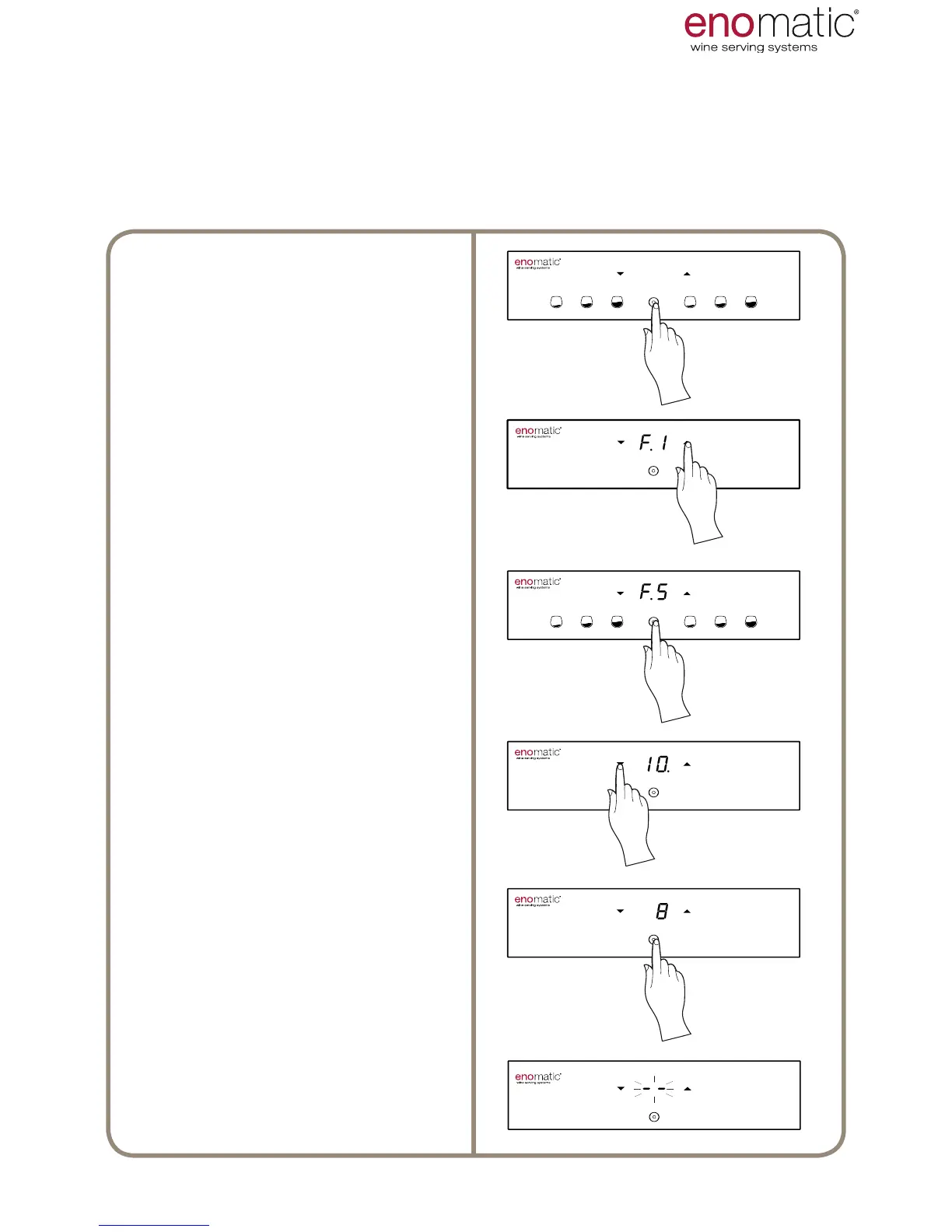
31. F.5 LED INTENSITY SETTING [default value 10]
The Dispenser has an LED strip (R) which illuminates the bottles. The LED light
comes on together with the Dispenser. The intensity of light can be set from a value
of "1" to a "maximum" of “10” or can be set in mode “OF” = OFF
to "10" = Maximum brightness.
From the operating state press the
multifunction button(Z) for 3 seconds
and release it as soon as the letters
"F1" are displayed.
Scroll with the arrow buttons (X, Y)
to select the function “F.5”
Press the multifunction button (Z) to
access the function chosen.
The Dispenser will display the cur-
rent setting highlighting it with a point
“ .”
Scroll with the arrow buttons to
select the desired setting between
“1÷10/OF”.
Press the conrmation button (Z) to
save the setting.
Flashing of the display lines conrms
successful programming of the set-
ting.



 To Next Page