18
Using the Touch Pad
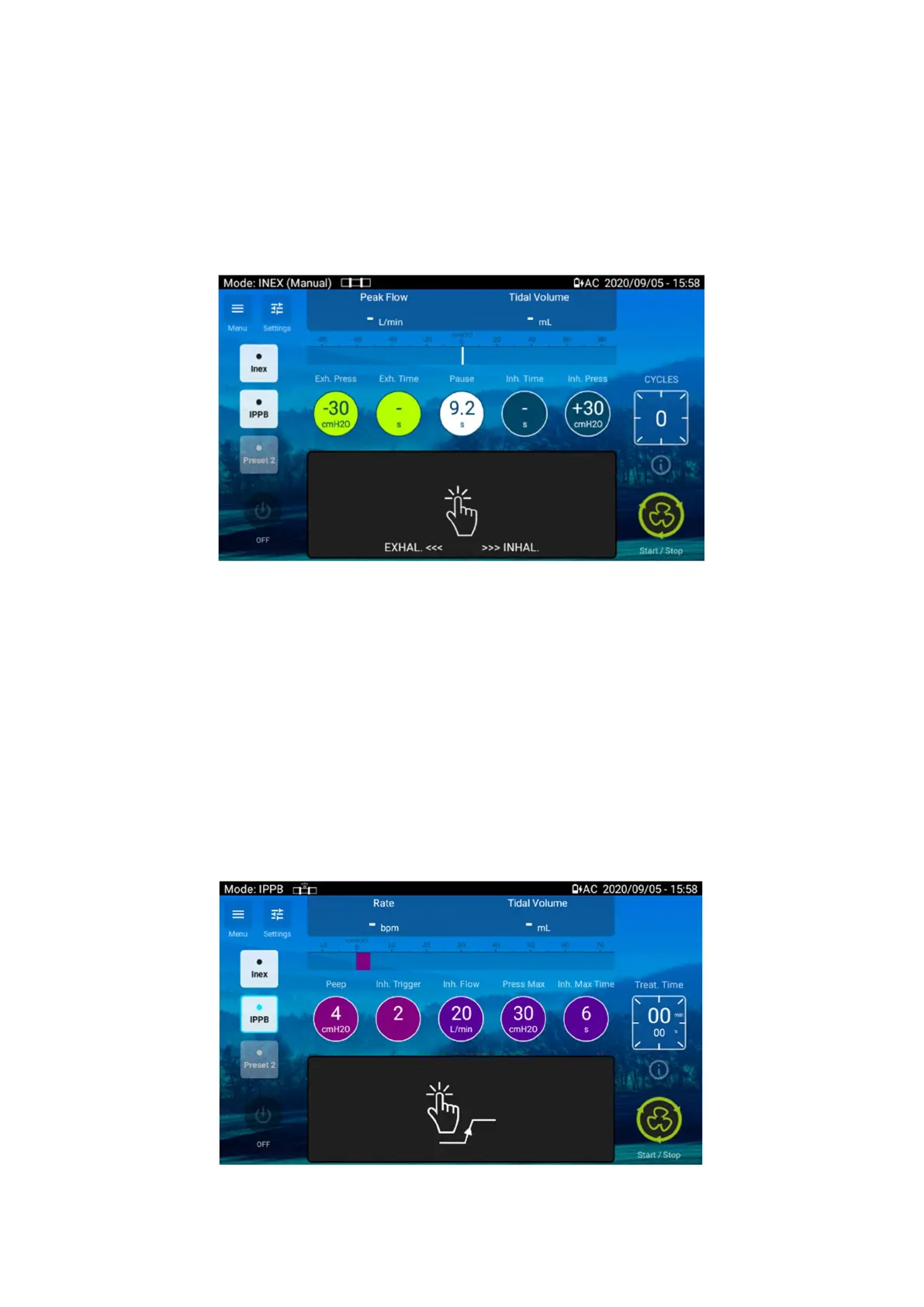
The Touch Pad is activated in INEX mode when set to MANUAL or in IPPB mode.
INEX mode Manual operation
In INEX mode, the operation must start in the Touch Pad black area but then the full screen surface
can be used if the finger keeps the contact with the screen.
1. Start the treatment. While the Touch Pad is not used, the device is in pause state
controlling PEEP pressure.
2. Press the Touch Pad and slide to the right. The device is starting an inspiration
phase.
3. Keep a finger on the pad to hold the inspiration
4. Without removing the finger from the Pad, slide to the left. The device is starting an
exhalation.
5. Keep a finger on the pad to hold the exhalation
6. Release the Touch Pad. The device comes back to a pause phase.
IPPB mode operation
In IPPB mode, a simple touch on the Touch Pad will trigger an inspiration.


 To Next Page