POWERED BY
124
SERIESSERIES
Managing User Accounts
Purpose:
There is a default account in the device: Administrator. The Administrator user name is admin and the password is 12345. The Ad-
ministrator has the permission to add and delete user and confi gure user parameters.
Adding a User
Steps:
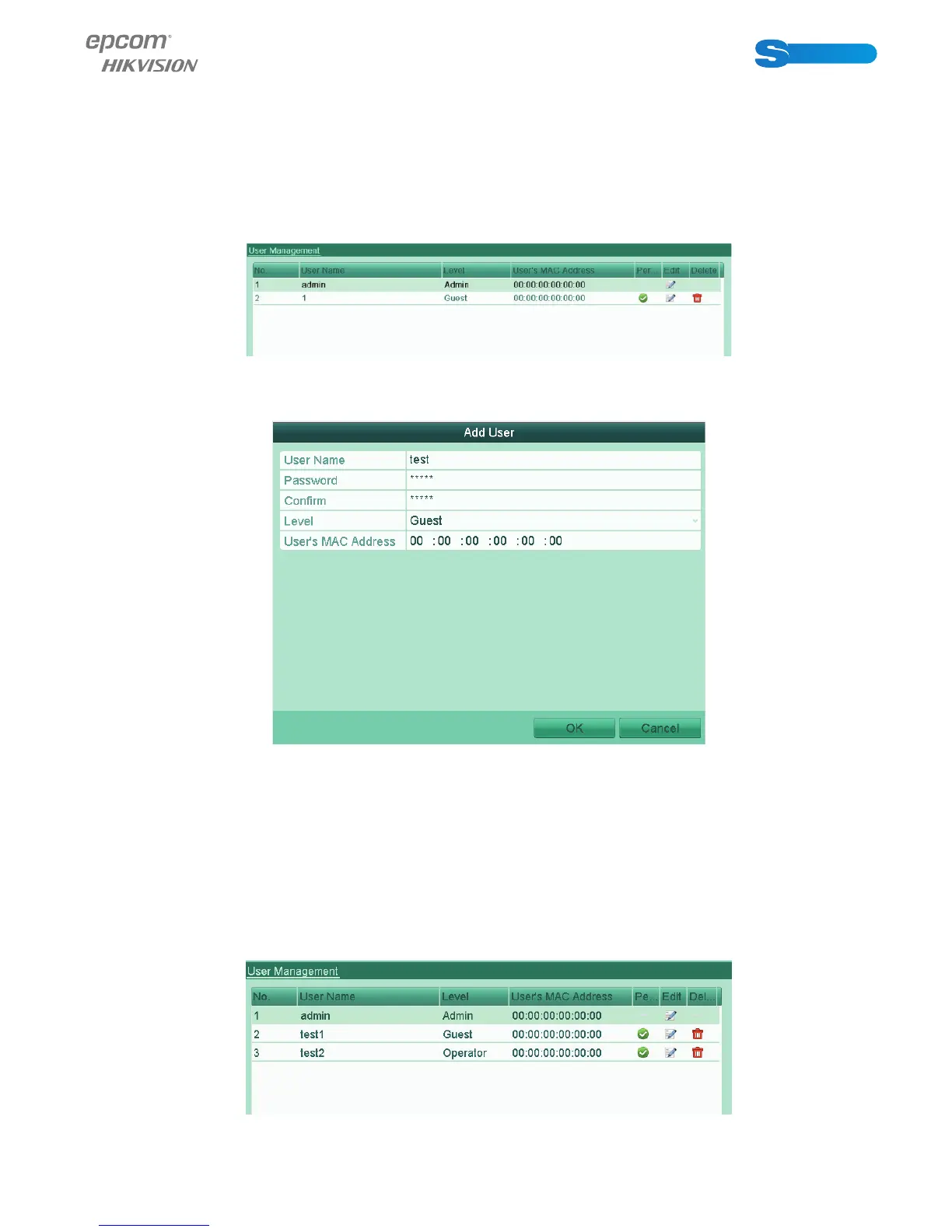
1. Enter the User Management interface.
Menu > Confi guration > User
Figure 13.4 User Management Interface
2. Click the Add button to enter the Add User interface.
Figure 13.5 Add User Menu
3. Enter the information for new user, including User Name, Password, Level and User’s MAC Address.
Level: Set the user level to Operator or Guest. Different user levels have different operating permission.
•Operator: The Operator user level has permission of Local Log Search in Local Confi guration, Remote Log Search and
Two-way Audio in Remote Confi guration and all operating permission in Camera Confi guration.
•Guest: The Guest user has permission of Local Log Search in Local Confi guration, Remote Log Search in Remote Confi -
guration and only has the local/remote playback in the Camera Confi guration.
User’s MAC Address: The MAC address of the remote PC which logs onto the device. If it is confi gured and enabled, it only
allows the remote user with this MAC address to access the device.
4. Click the OK button to save the settings and go back to the User Management interface. The added new user will be displa-
yed on the list.
Figure 13.6 Added User Listed in User Management Interface



 To Next Page