POWERED BY
96
SERIESSERIES
9.4 Network Detection
Purpose:
You can obtain network connecting status of device through the network detection function, including network delay, packet loss,
etc.
9.4.1 Testing Network Delay and Packet Loss
Steps:
1. Enter the Network Traffi c interface.
Menu > Maintenance > Net Detect
2. Click the Network Detection tab to enter the Network Detection menu.
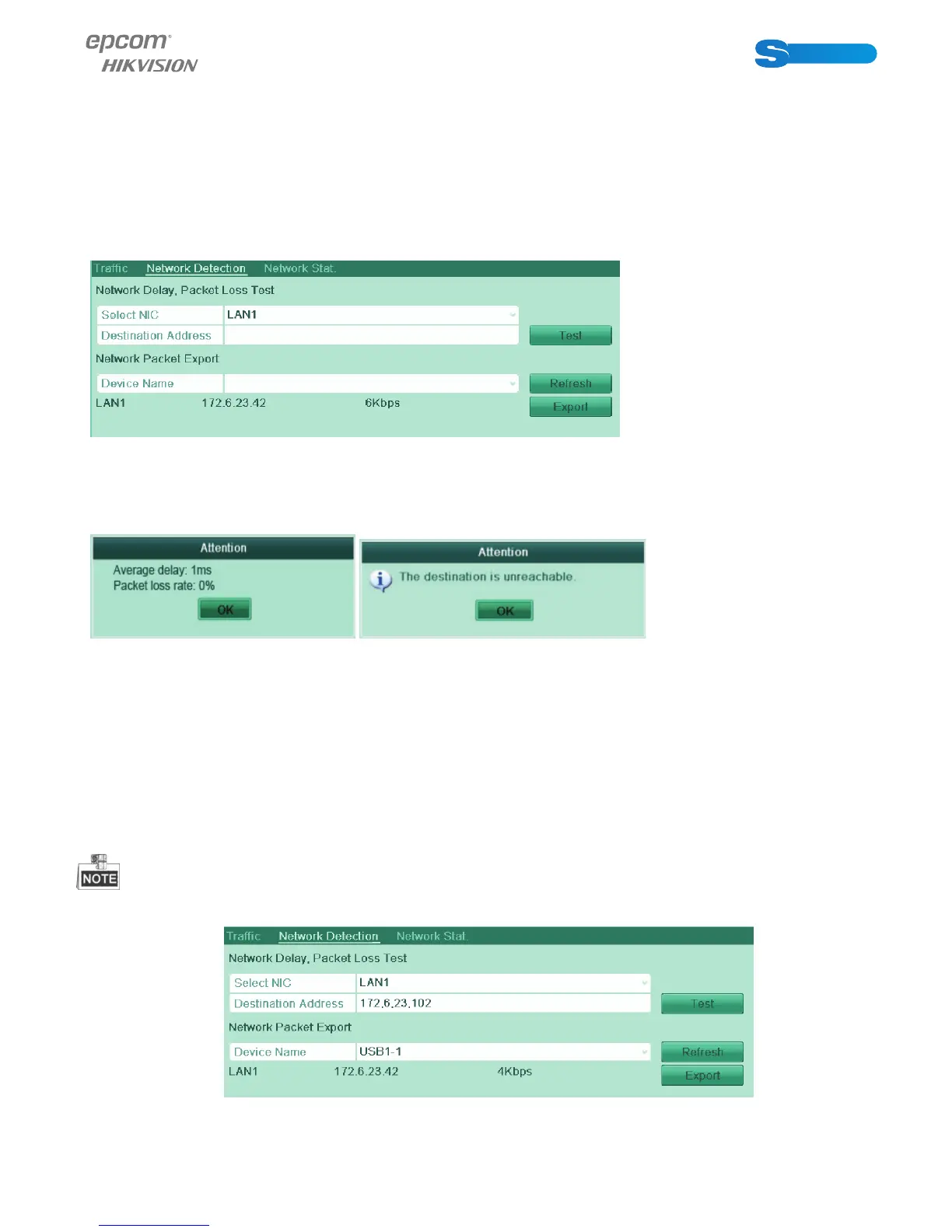
Figure 9.26 Network Detection Interface
3. Enter the destination address in the text fi eld of Destination Address.
4. Click the Test button to start testing network delay and packet loss. The testing result pops up on the window. If the testing
is failed, the error message box will pop up as well. .
Figure 9.27 Testing Result of Network Delay and Packet Loss
9.4.2 Exporting Network Packet
Purpose:
By connecting the device to network, the captured network data packet can be exported to USB-fl ash disk and other local backup
devices.
Steps:
1. Enter the Network Traffi c interface.
Menu > Maintenance > Net Detect
2. Click the Network Detection tab to enter the Network Detection interface.
3. Select the backup device from the dropdown list of Device Name, as shown in Figure 9.28.
Click the Refresh button if the connected local backup device cannot be displayed. When it fails to detect the backup device,
please check whether it is compatible with the device. You can format the backup device if the format is incorrect.
Figure 9.28 Export Network Packet



 To Next Page